
We all know that Adobe Photoshop is a graphics designing and editing software. But it is not completely true, in it, we can create some realistic 3D objects and render them. All the process will be completed in Photoshop. We will learn how to create realistic 3D chrome text in Adobe Photoshop and composite it. Reflection, shadow, shining all is calculated as in the real world and then we render for the final result.
So, let us now begin the creation process steps in brief. After the steps, I will also give the whole YouTube Tutorial link so you can learn all the techniques I used in it and create this artwork.
First, let me share the original stock images used in this effect.
Stock Image
Source Link
 http://bit.ly/2v47g7r
Step 1. Open the stock image in Photoshop and add the text you want to put on it.

Step 2. We will turn this text layer into the 3D layer and extrude it with the extrusion slider and place it on the ground matching with the perspective of our image by the 3D camera movements.

Step 3. Then we will select the inflate shape preset and add reflection, shining to it

Step 4. Add the texture for the surrounding's reflection in the image-based lighting (IBL) properties and adjust with the spherical ball's movement.

Step 5. Enable the shadow and reflection on the ground plane and change these values.
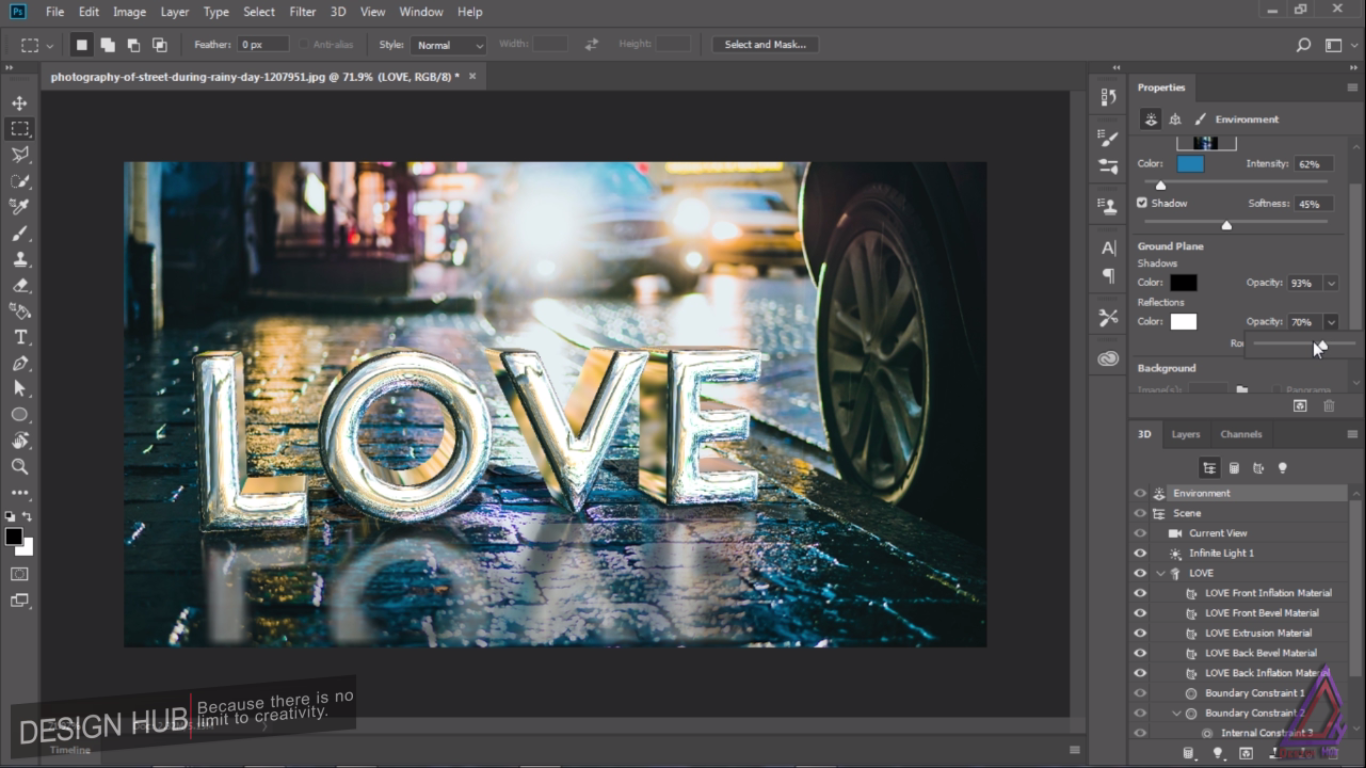
Step 6. Adjust the direction of the light source with the infinite lights handles and adjust the intensity of light, shadow softness.

Step 7. With the tilt-shift blur filter, we will create the depth of field in our background layer to make the scene more attractive.

Step 8. We will merge all the layers into one layer and apply the camera raw filter to make some color adjustments and add some vignetting to our final image.

And we are done with this cool Photo-Manipulation Artwork.
Watch The Detailed YouTube Tutorial Here
I am a professional digital artist, photo-editor and motion designer having experience of 5 years. If you also want these cool effects and creative logo animations for your text, logo or graphics, I will design them for you at very reasonable prices. You may contact me on telegram, discord or Fiverr. Here are my contact ids for these social handles.
TELEGRAM : @gauravrocksg DISCORD : @rocksg#4832
FIVERR : https://www.fiverr.com/grocksg/ (Fiverr is a marketplace for the freelancer, you can watch my portfolio there and past works I have done for clients and place your own orders, it is very secure and safe)