
FreThler Thompson, one of the top multinational companies located in over 10 countries of the world seeks to create a private asset in the coy's name to use internally across its branches. We have been contracted to create an asset custom to this purpose. Asset to be collateralized in equal amount with total supply in fiat with partner Bank. FreThler wishes to have the following instructions programmed with the asset:
- Asset with total supply 500000.
- Asset name is FreTh, unit name - Thomp.
- Company's website - https://none.com
- Ability to update authorized accounts with special role to the asset
- Ability to control fraudulent practice(s) by reversing target transactions.
- Freeze suspected accounts under investigation.
- Destroy assets at will.
An easy way is to create and deploy an Algorand Standard Asset - ASA on Algorand blockchain. If you can write a program using either of Java, Python, Javascript, Golang, you will be able to complete this task in no time, although there are only a few differentials you may need to familiarize yourself with which I will walk you through in this lesson. This tutorial is for intermediate persons. If you are a beginner in python programming, here is a great place for you to start.
A few steps will be to install Algorand Python SDKs. Follow the guide in this article to complete installation. There are ample resources available for your use in the Algorand ecosystem. Also, this blog and here gives you orientation into the Algorand ecosystem as a developer. On Algorand, there are a myriad of ideas and possibilities for individual businesses, enterprises, corporations, governments and most especially developers to turn into reality. With three faucets, you can tap into these possibilities.
Algorand 2.0 is a segment of the Algorand ecosystem that significantly expands the range of decentralized applications (Dapps) and processes that can be built on the Algorand platform. With this new suite of features all built directly into Layer-1, enterprise-scale distributed apps can be created without sacrificing performance or security.
The Algorand standard Asset layer allows issuance of Role-Based Control Assets with special and unique functionality. Personally, this layer interests me a lot because of the flexibility it gives in asset customization and its exciting use cases. Get more details.
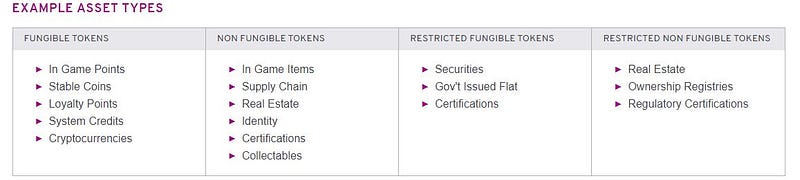
Some Asset Types You Can Create Using ASA
Creating An Asset
- Set up connection
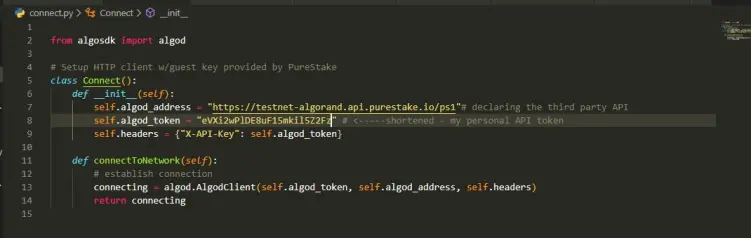
Without further Ado, let's get to work. By now, it is assumed you have Algorand Python SDK installed. Firstly, we need to establish a connection to Algrand testnet which is contained in the connect.py module. The algod_token attribute is a personal secret token for a third party REST API service to connect to Algorand testnet or mainnet. Get one from Purestake.
- Create asset
For the purpose of this lesson, we require an account already funded with ALGO Token pay for fee since every activity that causes a change in ledger state on Algorand or demand a response is termed a transaction and require a minimal amount in Algo as fee which is used for rewarding participating nodes. Transaction fee in Algorand is extremely low.
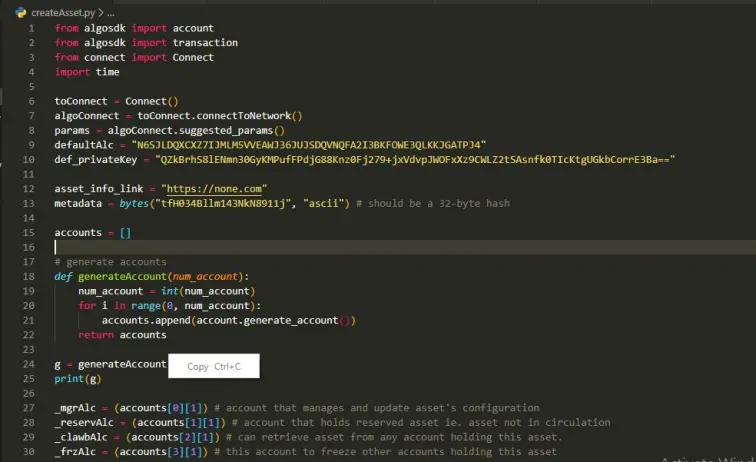
- defaultAlc is an already generated account and has some ALGO. We will need to fund another account from it.
- def_privatekey is a private key for the same account generated from 24-word mnemonic seeds.
- metadata is optional, to be used in the transaction field.
- We will need a couple of accounts to be generated using generateAccount( ).
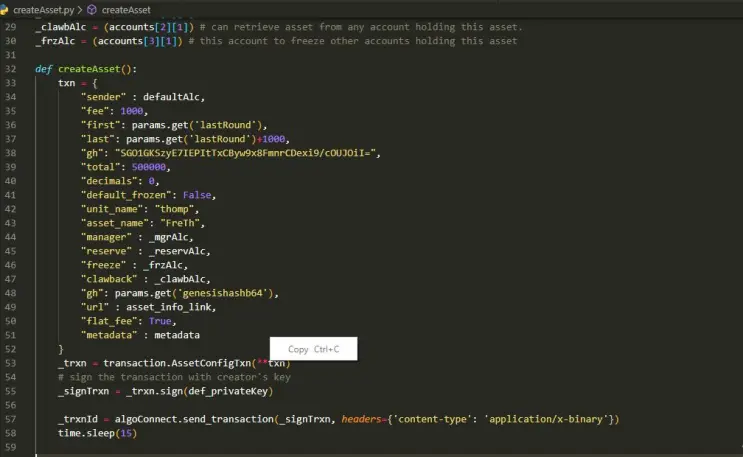
- To send transaction, some fields are required hence we allow the network to suggest few parameters for us thus first_valid_round : params.get('lastRound'), last_valid_round : params.get('lastRound') + 1000 and params.get('genesishashb64') (gh). Note that 'gh' appears twice? This does not affect transaction execution. They both give the same value hence the network will disregard one and work with the other since they're both genesishash for Algorand testnet.
- We set the fee at 1000 microAlgo. In case transaction fee varies, we set flat_fee to True. This ensures our transactions do not run out of gas.
- Note that the order in which items in dictionary object txn are written does not matter.
- Accounts - manager, reserve, freeze and clawback are special accounts with special roles different from the asset creator. They predominantly give FreThler the desired control over the assets as instructions rightly specified.
- In, Algorand, assets can be managed by sending three types of transaction:
- AssetConfigTxn
- AssetTransferTxn
- AssetFreezTxn
Creating an asset requires using AssetConfigTxn and the system assigns each address its role using the keyword argument.
- To update assets information, a manager account is given the role.
- 'Freeze' account can restrict holders of contained assets from initiating transfer of any type.
- 'Reserve' as the name implies holds balance of FreTh. Balance in the reserve account is total issued asset less circulating supply.
- 'Clawback' will revoke or call back assets from the target address either it is online or otherwise.
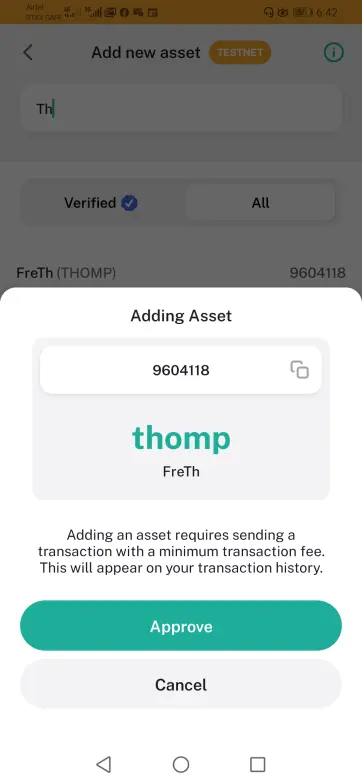
We have successfully created an asset for FreThler named FreTh and unitname Thomp. To view this asset on testnet, download algorand wallet (GooglePlay, iOS) on your mobile device. From node settings, switch to testnet. Search for FreTh. Another way to check is to check with Algoexplorer and search using asset ID - 9604118 or follow link.
-
Updating asset
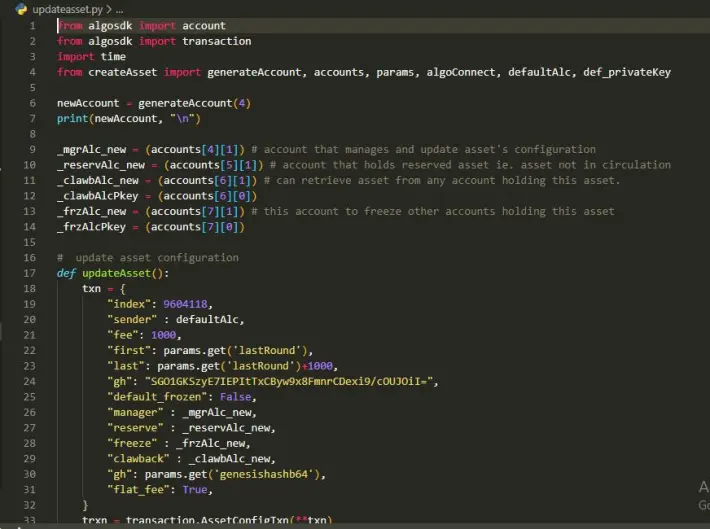
Things often change. Circumstances may warrant changing one or all the four accounts. All we need to do is resend a transaction along with four new accounts. I have generated four new accounts stored in accounts list and make a total of 8 accounts in the list. The transaction fields will change slightly. Compare it to the previous we had in createAsset.py .
- index is the asset's ID at creation. To get it, simply print the account information of the creator of the asset using algoConnect.
-
from createAsset import algoConnect getAccountInfo = algoConnect.account_info(<enter asset's creator address>) #there you find asset ID - Transaction must be sent from the manager's account. Note the default account shown below is an error.
- Input the newly generated accounts to replace existing four accounts.
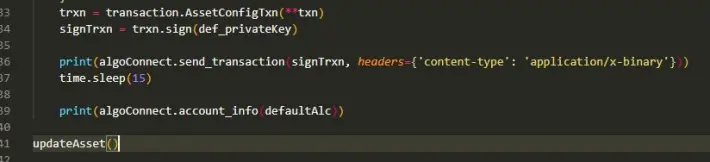
- Calling updateAsset() changes the addresses and the old ones are no longer recognized.
-
Sending Asset
- For fun, I have created additional 5 accounts to whom we will transfer some FreTh.
- With tranferasset() , we can fund the four accounts with Algo to have Algo for transaction fee, or rather use the dispenser. whichever is convenient for you. Follow previous articles to gain more insight into how transactions work and different types of transactions.
- I use the Time object to provide for confirmation time usually around 5 seconds in Algorand Blockchain.

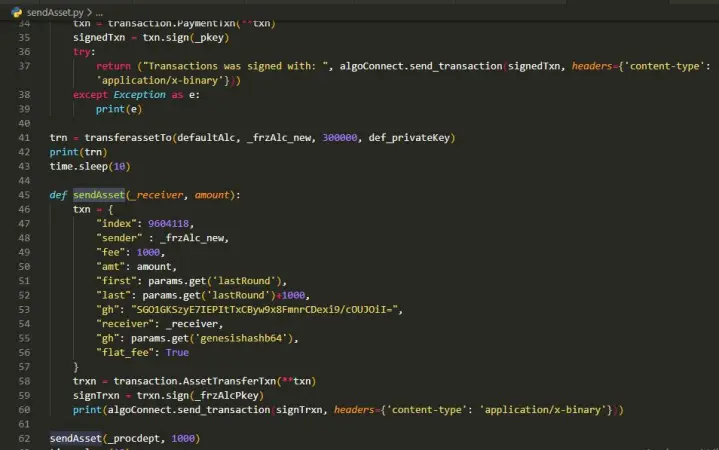
- acceptAsset() enables the target address to start accepting assets. Amount is set to zero and a transaction is initiated setting the receiver to freeze the address from the same account.
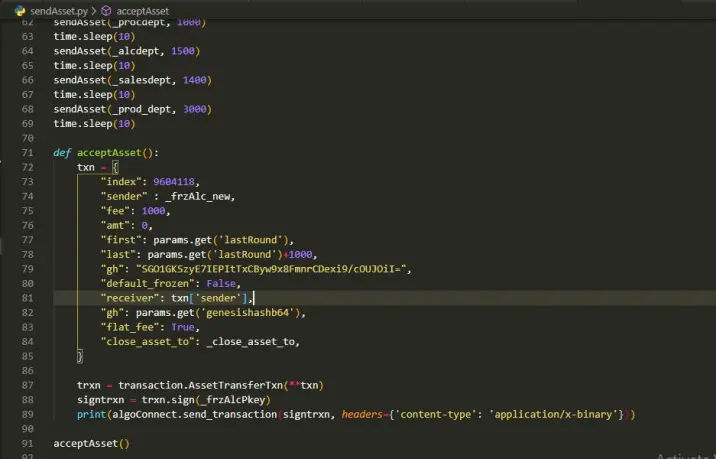
-
Freezing Asset
- To freeze an account, get asset ID, account to freeze, inclusive of other required parameters.
- Transaction is sent from Freeze account .
- Set new_freeze_state to True.
#freezeAsset.py............

from algosdk import transaction
from updateasset import _frzAlc_new, _frzAlcPkey
from sendAsset import _procdept, algoConnect
from createAsset import def_privateKey, defaultAlc, params
import time

def freezeAsset():
    txn = {
        "index": 9604118,
        "sender" : _frzAlc_new,
        "fee": 1000,
        "first": params.get('lastRound'),
        "last": params.get('lastRound') + 1000,
        "gh": "SGO1GKSzyE7IEPItTxCByw9x8FmnrCDexi9/cOUJOiI=",
        "flat_fee": True,
        "freeze_target": _procdept,
        "new_freeze_state" : True
    }
    trxn = transaction.AssetFreezeTxn(**txn)
    signedtrxn = trxn.sign(_frzAlcPkey)

    print(algoConnect.send_transaction(signedtrxn, headers={'content-type': 'application/x-binary'}))

freezeAsset()
-
Revoke Asset
- Revoking assets require initiating the transaction from an account with claw-back authority i.e clawback account .
- Specify the account from which asset should be revoked in the 'revocation_target'.
- Asset revoke is sent to a special or any address, in this case '_close_asset_to' .
#revokeAsset.py.................


from algosdk import transaction
from createAsset import algoConnect, params, def_privateKey, defaultAlc
from updateasset import _clawbAlc_new, _clawbAlcPkey
from sendAsset import _prod_dept, _close_asset_to
import time

def revokeAsset(_amount):
    txn = {
        "index": 9604118,
        "sender" : _clawbAlc_new,
        "fee": 1000,
        "amount": _amount,
        "first": params.get('lastRound'),
        "last": params.get('lastRound') + 1000,
        "gh": "SGO1GKSzyE7IEPItTxCByw9x8FmnrCDexi9/cOUJOiI=",
        "receiver": _close_asset_to,
        "flat_fee": True,
        "revocation_target": _prod_dept
    }
    trxn = transaction.AssetTransferTxn(**txn)
    signtrxn = trxn.sign(_clawbAlcPkey)
    print(algoConnect.send_transaction(signtrxn, headers={'content-type': 'application/x-binary'}))

revokeAsset(1000)
-
Destroy Asset
- Including this function allows FreThler to destroy the asset at will based on Instructions given. This removes asset's details from completely from the ledger and the action cannot be undone.
- Every units of the asset must be available in the original creator's account.
- Transaction is sent from the manager's account.
- Supply Asset ID as index
- Strict_empty_address_check is set to False. It triggers the system when this is set to false to ignore a check for an empty address. Usually, when sending a transaction, its default state is set to True which would throw an error if the recipient address is not found.
#destroyAsset.py.............


from createAsset import def_privateKey, defaultAlc, algoConnect, params
from algosdk import transaction

def destroyAsset():
    txn = {
        "index": 9604118,
        "sender" : "GHYDSIC7JLDWGP2577QWRKDSV7GDLA7R...manager's account",
        "fee": 1000,
        "first": params.get('lastRound'),
        "last": params.get('lastRound') + 1000,
        "gh": "SGO1GKSzyE7IEPItTxCByw9x8FmnrCDexi9/cOUJOiI=",
        "flat_fee": True,
        "strict_empty_address_check" : False,
    }
    print(algoConnect.account_info(txn['sender']))
    trxn = transaction.AssetConfigTxn(**txn)
    signedtrxn = trxn.sign("xrCz70dXjQvYBUVDraRuxZ11uKVqDW1ldvVDNdsi...manager's privatekey")
    print(algoConnect.send_transaction(signedtrxn, headers={'content-type': 'application/x-binary'}))

destroyAsset()
I hope this article is helpful. Please a leave comment or suggestion in the comment box below. I will bring you more tutorials on Algorand blockchain shortly.





