

The Art of False Positive Management in Vulnerability Assessments
Published on Cyb3r-S3c by Pragmat1c_0n3
Vulnerability management personnel are on the front lines of cybersecurity defense. One of the most critical skills will be distinguishing between real security threats and false positives, as those pesky alerts that look dangerous may not actually represent security risks in your environment.
This guide will provide practical techniques to identify, manage, and reduce false positives, making security teams more efficient. By mastering these skills, security teams can spend less time chasing ghosts and more time protecting the organization from real threats.
Why This Matters: Studies show that security analysts can spend up to 50% of their time investigating false alarms. Learning to quickly identify and properly handle these cases will dramatically improve productivity and job satisfaction.
\\Understanding False Positives in Vulnerability Management
What Are False Positives?
A false positive occurs when a vulnerability scanner identifies something as a security issue, but it's actually not a risk in your specific environment. Think of it like a smoke detector going off when you're cooking. The detector is working correctly, but there's no actual fire.
Common examples include:
- SSL certificate warnings for internal systems that don't need public certificates.
- Directory browsing alerts on servers that only contain public marketing files.
- Outdated software warnings for applications that have been patched through other methods.
- Information disclosure alerts on administrative interfaces that are properly access-controlled.
\The Real Cost of False Positives
False positives aren't just annoying, they have real business impact:

When a security team gets good at managing false positives, they help your entire organization respond faster to real threats and maintain better relationships between security and development teams.
\\The False Positive Investigation Toolkit
\Step 1: Context is Everything
Before diving into technical details, always gather context about the affected system:
1) Environment Classification
Is this production, staging, development, or internal? Different environments have different risk profiles and security requirements.
2) Asset Purpose
What does this system do? A vulnerability on a public-facing customer portal is very different from the same issue on an internal monitoring dashboard.
3) Network Location
Is the system accessible from the internet, or is it behind firewalls and access controls? Network segmentation can significantly reduce actual risk.
4) Business Criticality
Does this system handle sensitive data or critical business functions? Understanding business impact helps prioritize your investigation time.
\Step 2: Technical Validation Techniques
Manual Verification
Sometimes the best way to confirm a vulnerability is to carefully test it yourself:
Safe Testing Practices:
- Always get approval before testing production systems.
- Use read-only tests when possible.
- Document your testing methodology.
- Never attempt to exploit vulnerabilities, just verify they exist.
Cross-Reference with Other Tools
If possible, don't rely on just the vulnerability scanners. Check if other security tools in your environment support or contradict the finding:
- Does your Web Application Firewall show the same vulnerability?
- Are there SIEM alerts related to this finding?
- Do other vulnerability scanners report the same issue?
Version and Configuration Analysis
Many false positives can occur if the vulnerability scanners can't see the full picture:
- Check if patches have been applied through operating system updates.
- Verify if compensating controls are in place.
- Look for configuration settings that mitigate the reported risk.
\\Common False Positive Patterns
SSL/TLS Certificate Issues
Certificate-related false positives are extremely common. Learn to recognize these patterns:
Common SSL False Positives:
- Self-signed certificates on internal systems (often acceptable for internal use).
- Certificate expiration warnings with 30+ days remaining.
- Hostname mismatches on load balancers or internal services.
- Weak cipher alerts on systems with WAF protection.
Information Disclosure Findings
These findings often trigger on legitimate administrative interfaces:
- Server version disclosure on internal monitoring systems.
- Directory browsing on servers containing only public files.
- Error messages that reveal system information in development environments.
Outdated Software Alerts
Software version detection isn't always accurate:
- Backported patches that update security without changing version numbers.
- Custom software builds with security fixes.
- Virtualized environments with host-level protections.
\\Building Your Exception Management Skills
When to Suppress vs. When to Escalate
Security personnel need to know when to handle something themselves and when to escalate:
Safe to Suppress (with proper documentation):
- Known false positive patterns in the environment.
- Findings on systems where risk is clearly mitigated.
- Issues that violate established exception policies.
Should Escalate:
- Unclear whether compensating controls are sufficient.
- Findings on critical production systems.
- New vulnerability types never seen before.
\\Documentation Best Practices
Exception Documentation Template:
Vulnerability ID: [Scanner Reference]
Asset: [System/Application Name]
Environment: [Production/Staging/Dev/Internal]
Reason for Exception: [Brief technical explanation]
Risk Assessment: [Why this isn't a risk in this context]
Compensating Controls: [What protections are in place]
Review Date: [When to reassess this exception]
Approved By: [Your supervisor/team lead]
\\Improving security team Efficiency
Pattern Recognition
The more vulnerabilities security teams investigate, the faster they'll recognize common patterns. Keep notes on:
- Recurring false positive types in your environment.
- Systems that frequently generate specific alerts.
- Scanner quirks and known limitations.
Building Relationships
Security teams job becomes much easier when they have good relationships with other teams:
- System Administrators: Can quickly verify patching status and configurations.
- Developers: Understand application behavior and can explain unusual findings.
- Network Engineers: Know about compensating controls and network segmentation.
Time Management
Effective security teams develop efficient workflows:
Productivity Tips:
- Batch similar vulnerabilities for investigation.
- Start with quick wins - obvious false positives first.
- Set time limits for complex investigations.
- Use templates for common documentation tasks.
- Create checklists for your investigation process.
\\Professional Development Path
Skills to Develop
As a security professional grows in your role, focus on building these capabilities:
- Technical Knowledge: Understanding of common vulnerabilities, network protocols, and system administration.
- Risk Assessment: Ability to evaluate actual business risk in different contexts.
- Communication: Skills to explain technical findings to non-technical stakeholders.
- Process Improvement: Ideas for making vulnerability management more efficient.
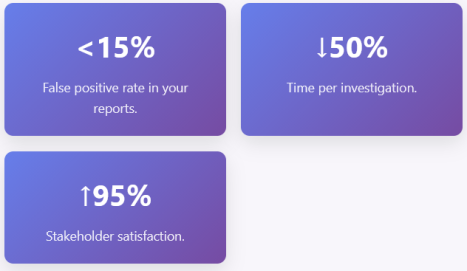
Success Metrics
Track your progress with these key indicators:
\\Key Takeaways
Your Success Formula:
- Context First: Always understand the environment and business purpose before diving into technical details.
- Verify Smartly: Use multiple methods to confirm findings, but always test safely.
- Document Everything: Good documentation protects you and helps the team learn.
- Build Relationships: Other teams are your best resource for understanding complex environments.
- Keep Learning: Each investigation teaches you something new about your environment.
Becoming skilled at false positive management isn't just about reducing noise, it's about becoming a trusted security professional who provides accurate, actionable intelligence that helps organizations stay secure. Every false positive correctly identified saves time and resources that can be focused on real threats.
Continuing the Learning Journey
This guide provides the foundation, but every environment is unique. Security teams should work closely, ask questions, and document what has been learned. Expertise in managing false positives will make any security team invaluable to the organization.





