
Many users misunderstand the private mode in their Chrome or Firefox browser. It does not make you invisible in the internet but takes care of the local traces on the computer.
The free Brave Browser finally offers a private mode that really deserves this name. Tor is used for this, with which you can also move in the Darknet.
But before I start to highlight this special feature I would like to thank all of you who read, liked and tipped my previous post "The Big Basic Attention Token (BAT) Price Forecast 2020 to 2025" and made it such a big success. The positive response to this post from the publishOx community has made me quite happy and it gave me a lot of motivation to publish new ones!

That`s The Alternative
Most people use Chrome to surf. But there are alternatives that can do so much more. A good example of this is the Brave Browser. Like many other browsers, it uses Chromium and is therefore brisk on the go. In addition, the Brave Browser offers good support for current web standards, so that you don't have to accept any restrictions when you are surfing daily. The main distinguishing feature of the well-known browser is the stronger focus on the protection of privacy. To do this, the browser retrofits Tor support. This is a really great feature that no other browser has.
Of course, the possibility to earn Basic Attention Token (BAT) with Brave is another great feature but this post is focusing on the great privacy features this browser has. So let me explain how to use the Tor feature and why it`s so great.
Private Mode In A Way It Should Be
The private mode in Firefox, Chrome and other well-known browsers can mislead a user because it makes nobody invisible while surfing, but only ensures that no surf tracks are left on the computer. Many users rightly think of it differently. The Brave Browser has therefore expanded the private mode.
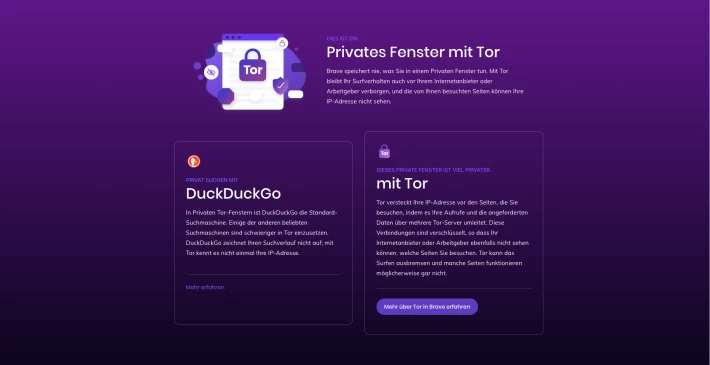
Users can now explicitly open a new window in private mode with the support of the well-known Tor network. Tor is an anonymization network that obscures the activities of users on the Internet. So far, you either needed a browser extension or installed the Tor Browser.
Safe search and tracking blocker
With the Brave Browser, you don't have to worry about a lot of things if you want to better protect privacy. DuckDuckGo is preset as a safe search, third-party cookies are blocked and a tracking and ad blocker is activated. You can disconnect the blockers for individual pages using the Brave icon in the address bar. For example, this is necessary if a certain page in Brave does not work properly.
How and When To Use
Thanks to the Tor feature, the Brave Browser is greatly upgraded. You can surf normally with it and, if necessary, you can easily open a private window with Tor support.
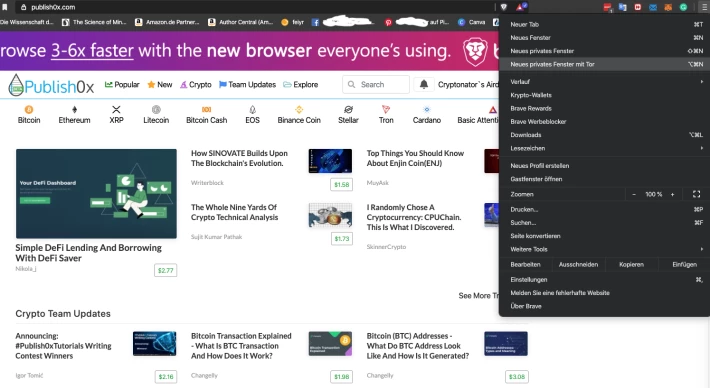
Simply click on the menu icon on the right edge of the search bar and select "New private window with Tor". Then a new window opens that contrasts in color from normal mode.
WLAN hotspots on your vacation or other public places, for example, are a possible application for the Brave Browser. Log in to the hotspot in a normal tab and then simply open a window with Tor support for private surfing. This obscures the IP address and encrypts the data traffic. The configuration is kept absolutely simple, there are no options for adapting the Tor configuration. If you open a new window with Tor, you will directly see a brief description, including possible side effects such as slow connection or problems with websites.
I hope I could provide you with some useful information. Thank you for reading, liking and tipping! I appreciate your support!






