
Today, let’s take a look at the User Interface (UI) of Extended, what you need to know, and how it will help you trade and earn points for the upcoming airdrop !
The User Interface (UI)
The UI is simple to understand and easy to use. Let’s break it down step by step.
- Visit the Extended platform with this link (includes a 10% fee reduction) :
https://app.extended.exchange/join/ASTROBOY13
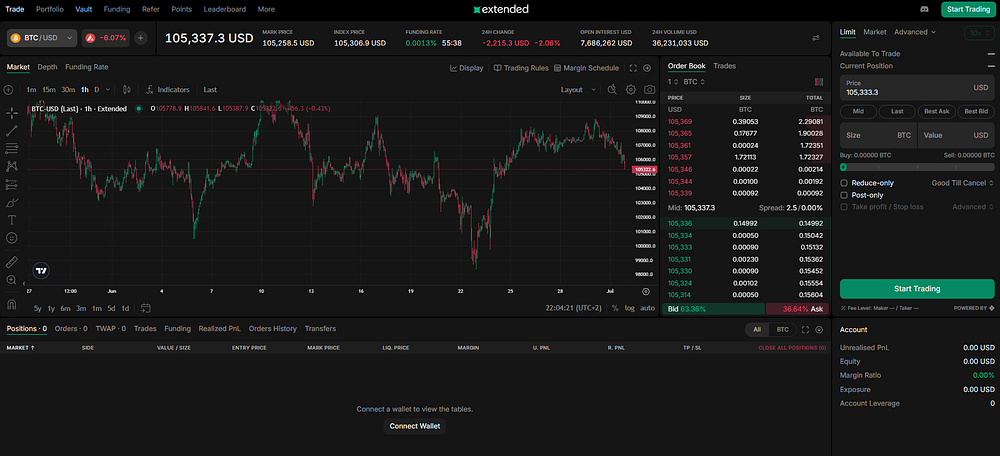
2. Click on “Start Trading” and select your preferred wallet (Rabby, Metamask, Phantom, etc.).
3. Confirm the pop-up to connect your wallet.
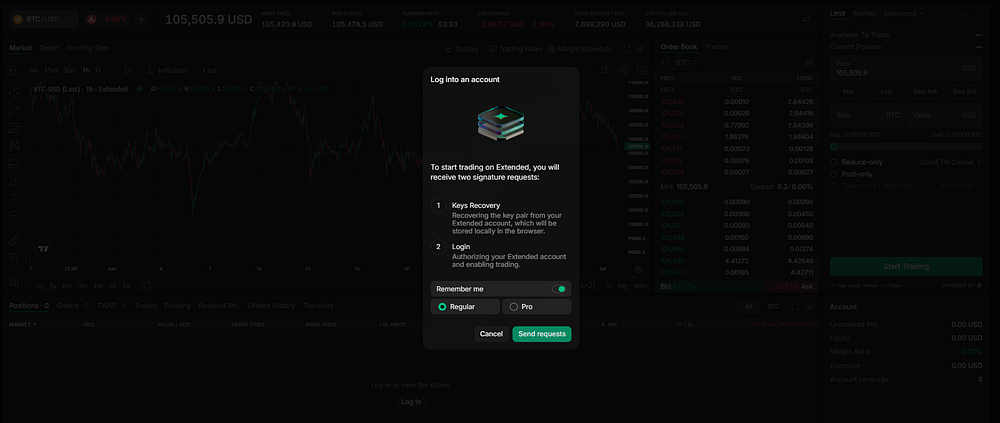
4. Click “Send Requests” to allow Extended to interact with your wallet. This enables deposits and trading without KYC requirements.
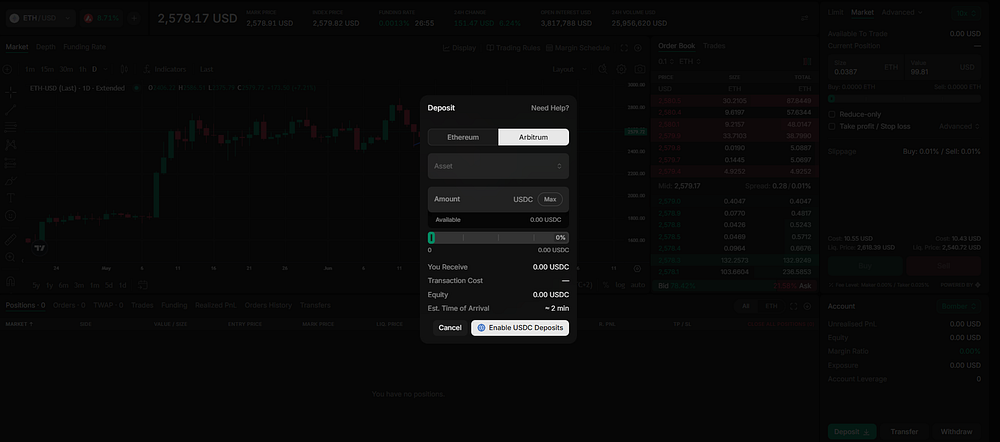
5. Click “Deposit” to transfer USDC to the platform, using either Arbitrum (for lower fees) or Ethereum.
These USDC funds will be used to trade on Extended and earn points for the upcoming airdrop !
Trade Interface Overview
 (1)
(1)
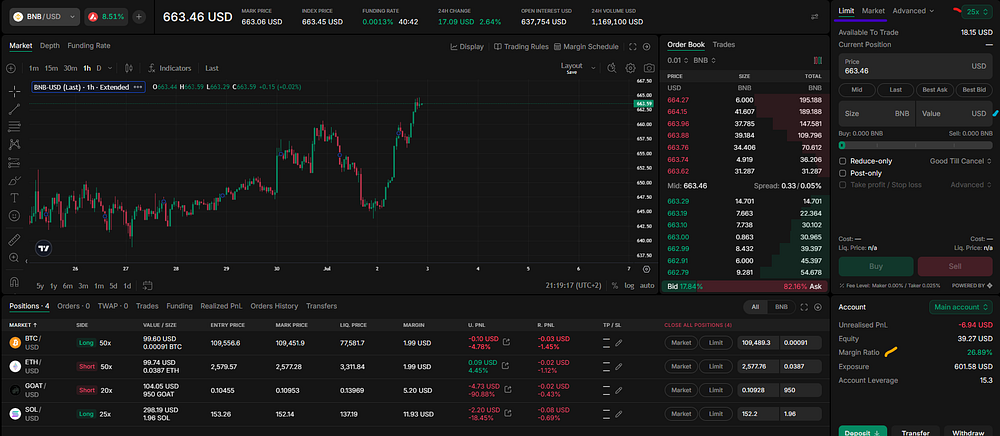
I‘ve opened a sample trade for reference and marked the screenshot with colors to explain the key elements :
- Red Mark — Leverage : Leverage means borrowing funds to increase your position size. It amplifies both potential gains and risks.
Example : If you have $100 and use 10x leverage, you can open a $1,000 position. A 1% move in price equals a 10% gain or loss on your capital.
Leverage ranges from 5x to 100x depending on the token.
- Cyan Mark — Trade Size : This is where you choose your position size (in USD or tokens). The value includes leverage. For example, selecting $1,000 with 10x leverage means you’re using $100 of your own capital.
- Blue Mark — Order Type :
Market Order: Executes immediately at the best available price. Fast but can slip in volatile markets.
Limit Order: Executes only at a specified price or better. Slower but offers price control.
- Yellow Mark — Margin Ratio : Extended uses cross margin for all trades meaning your entire balance supports all open positions.
Formula: Margin Ratio = (Equity / Maintenance Margin) × 100
Equity = Total account balance including unrealized PnL
Maintenance Margin = Minimum required to keep the trade open
Important: If your margin ratio hits 100%, your position will be liquidated.
What is margin ? It’s the amount you need to open a leveraged trade.
Example : To open a $1,000 trade at 10x leverage, you only need $100 (your margin).
Open Trade Information
 (2)
(2)
Once a trade is open, you’ll see key details such as :
- Size
- Entry Price
- Mark Price (current market price)
- Liquidation Price
Color Highlights in the Screenshot (2) :
- Yellow Mark — Unrealized PnL : Current profit/loss of the position, excluding fees and funding.
- Red Mark — Realized PnL : Reflects fees from trade execution and changes over time with funding fees.
What are Funding Fees ? These are small payments exchanged between traders depending on who’s holding longs or shorts.
Example : If most traders are long, they pay funding to short traders.
On Extended, funding fees are settled every hour.
 (3)
(3)  (4)
(4)
As shown above, I can track funding fees in real time. I have to pay them for three of my trades, and I’m receiving them on my short position on Solana.
Back on the trade sreenshot (2) :
- Green Mark — Close Position : You can close a trade instantly (Market) or set a specific closing price (Limit).
Setting Stop Loss (SL) and Take Profit (TP)
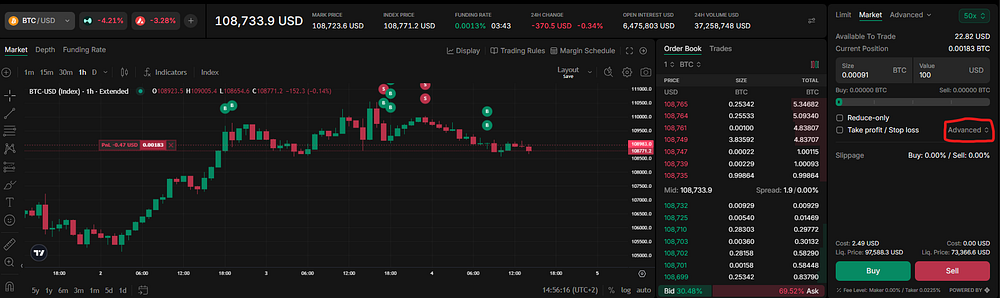
To set SL/TP :
- Click on “Advanced”
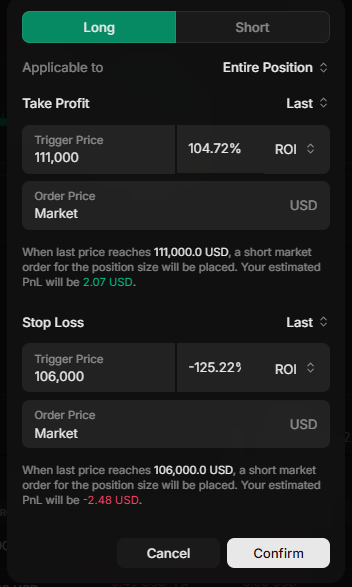
2. A pop-up will appear where you can enter your SL and TP prices.
3. It will also show estimated PnL if those prices are hit.
This makes risk management simple and effective.
Final Thoughts
That wraps up this guide on how to use Extended !
In this article, we covered :
- How to connect your wallet
- How to deposit USDC
- The interface breakdown
- Leverage, trade size, order types
- Margin ratio, PnL, funding fees
- How to close a trade and set SL/TP
Be careful : Trading can be risky if you don’t understand what you’re doing. In my next article, I’ll walk you through my strategy to maximize airdrop points !
As always, thank you for reading !
Extended (10 fees discount) : https://app.extended.exchange/join/ASTROBOY13
Hyperliquid (4% fees discount) : https://app.hyperliquid.xyz/join/ASTROBOY13
My favorite Crypto Faucet: Cointiply (referral)
Read exclusive articles on publish0x, and if you want to support me for free, you can sign in with this link
Disclaimer: This is not financial advice, you need to do your own research !






