
If you caught my article earlier this week on WAX's space game, Far From Home, then you'll also know the remaining ship packs to get the initial game assets were running out. Well, they sold out today. The original drop packs are gone. However, plenty of ships in different classes are available on the WAX NFT secondary market which you can access through any of the big three purchase platforms (Atomic Hub, NeftyBlocks, or NFTHIVE). That said, once you have a ship, it can be a big confusing how to get started.
Get Staked
First, to even be able to play the game, your ship NFTs have to be staked. To do that, you start with the Hanger. In here, once logged in through WAX, you will be able to see your ships listed if you have the NFTs in the same account.
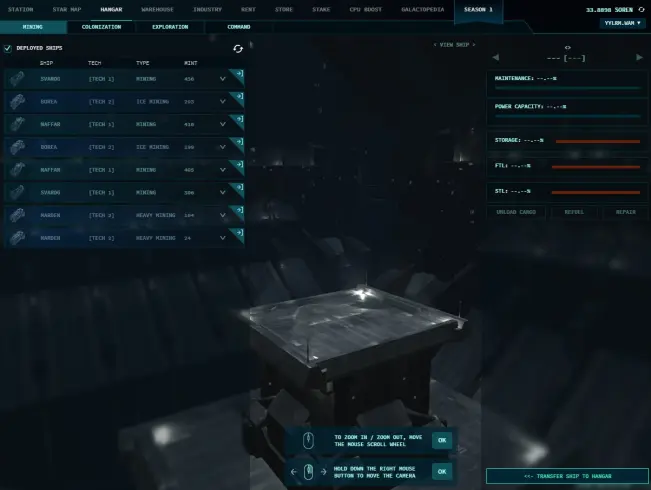
If the ship is not already staked, then you will see it listed with an aqua green color versus blue, and a plus sign on the right side of the ship label bar. Once staked, the color changes to a darker blue tone, and you see the essential arrow pointing right symbol confirm the ship is ready. It will also appear on the screen. For those who've played Eve Online, the Hanger view will be very familiar, with the usual zoom-in/out effect etc.
Now to Get Moving
Once done with the entry via the Hanger, it's time to get moving in the game. That means you need to switch to the star map. If you notice, at the top of the screen showing the Hanger above, there's a horizontal game menu. The second choice in from the left if the Star Map. Click it.
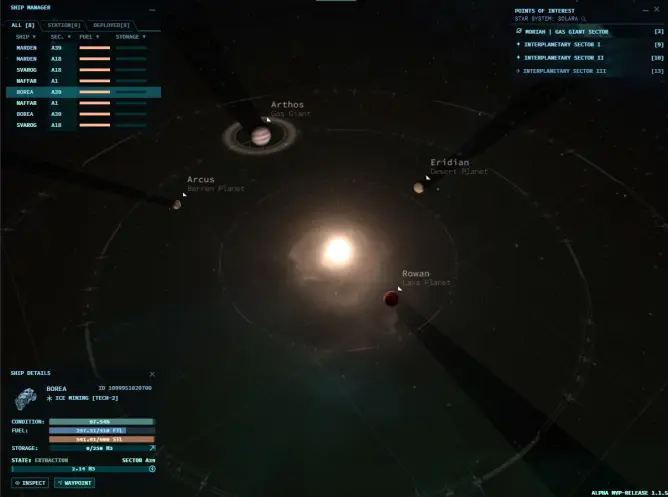
You will get the overall solar system view with a number of options. On the top left corner, you will see the list of all your ships and their conditions. If you click on an individual ship, the screen details in the bottom left corner change. This is your basic status read out for your ship. It gives you the info metrics on your ship's condition, fuel levels, and operational status (in dock, traveling, mining etc.). You also see which class it is, but the name is a giveway on that too. On the top right side is your Waypoint menu. If this doesn't appear, just click the Waypoint button on the bottom left, and it shows up. To get moving, you now have to choose one of the four sections to warp to for finding mining asteroids.
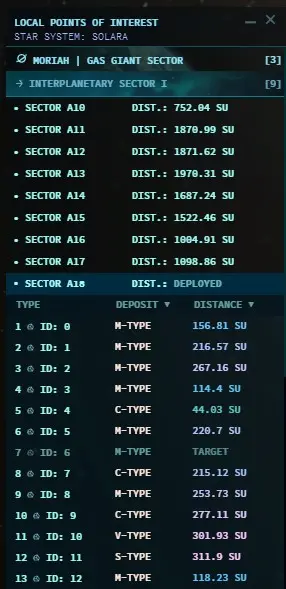
Each section menu includes a short or long list or sectors. In each of those is a short or long list of asteroids. You warp to the same spot in each section, and then the asteroids will be varying distances from your arrival point. This matters if you're managing your fuel. Warps eat up different levels of FTL fuel, and the same for asteroid distances eats up your STL fuel. Ergo, you then need to mine the right stuff to bring back raw resources for refining and ultimately creating your own fuel cells for future ships. Note, not all minerals provide what you need for every fuel type. So, the challenge of the game is to move around and mine different types of asteroids to find the missing elements. Hint: FTL elements are a pain to find.
Don't Stress, Build Up Experience
With a few trips and asteroid hunting experiences, movement around in the game is pretty easy to figure out. Again, for those who've played Eve Online, this should be almost second-hand knowledge. It's a very similar setup and mechanism. And, best of all, nobody is sitting at the warp gate waiting to gank your ship for your harvest, at least not yet.
Other Articles on WAX's New Intersteller Game, Far From Home, and How to Play
See here for valuable quick start guides and how to get into space smart instead of being confused:
- Getting Started (Far from what?)
- Space Fuel Management (don't run out of gas on the far side of an asteroid!)
- Market Linking Active (get your mined resources to market!)
Where to find ships on the Wax Network:
- How to get started with Wax
- Wax markets: AtomicHub, NeftyBlocks, NFTHive (buying ships and resources)






