

Bit, is a blend of words of “Binary Digit”. In Base 10(Decimal) number system, the digits, numerals are 0, 1, 2, 3, ...8 and 9. In binary, the numerals, digits are “Bits”. A bit can have one of two possible values. The most common of these are 0 or 1.
A bit is also the smallest unit of measurement of data storage in computers. It takes up exactly 1 bit of disk space.
Nibble
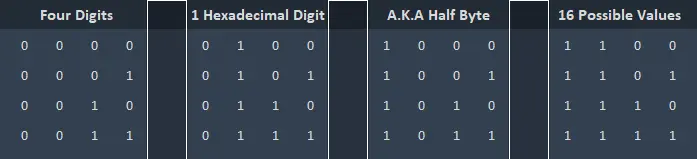
A nibble is four binary digits aka 4 bits. As a nibble is four bits (also has four digits) and a bit can have two possible values, a nibble can have sixteen possible values.
It has four binary digits. A nibble is also represented by a single hexadecimal digit.
It is also known as a half byte, nabble, nybble, nyble.
Byte
A byte is a unit of measurement of data, digital information. One byte consists of eight bits. The term byte was first used / invented in 1956 to avoid confusion with bit and it also rhymes with eight as there are eight bits in a byte.
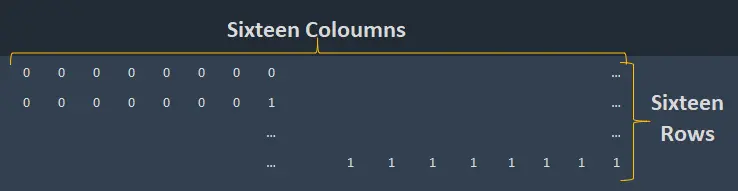
Like a nibble can have sixteen possible values ( 2^4 ) as each digit can have one of two possible values, a byte can have one of 256 possible values. This is well enough for representing letters, numbers, special characters, punctuation marks, etc. A table can be drawn as we did with nibble above.
Whenever we exceed 1000, we put a name before “byte” and divide it by 1000. Like going from gram to kilograms. Like saying “1.5 kilograms” instead of 1500 grams. In the decimal number system (Base 10) it is every 1000 units, in the binary number system, it is every 2^10 units.
A byte is eight bits. There is no confusion here. 1000 Bytes is equal to 1 Kilobyte (kb) and 1000 kilobytes equal to 1 Megabyte and so on. Let’s see it on a table to comprehend further.
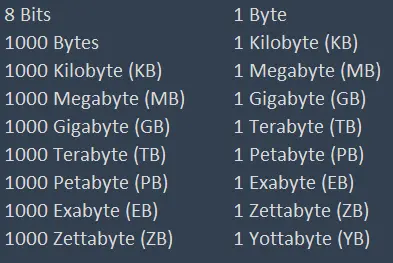
The table above is for decimals. Then there is binary, what computers use. The calculation is a bit different. In binary we can’t reach the exact 1000, instead, we use 2^10 which equals to 1024. 8 bits equal to 1 byte it’s the same thus far. But 1 Kilobyte equals to 1024 bytes. Furthermore, to avoid confusion it is called a Kibibyte with a symbol of KiB.
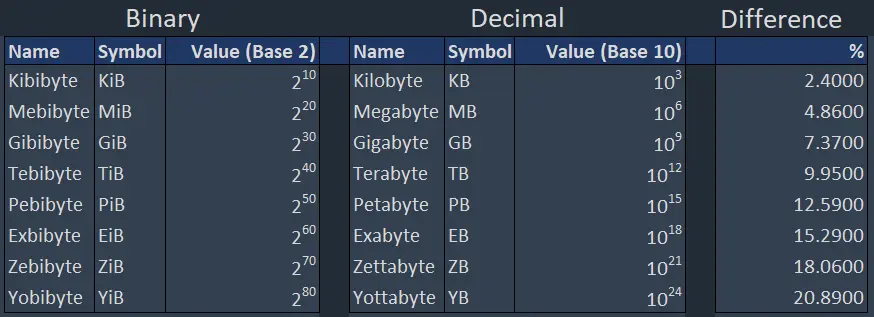
Binary or Decimal, 1024 or 1000, we keep using KB, MB, GB…etc. for either of them. Whether it is decimal or not we always use decimal notation. Have you ever asked yourself “Why my hard disk or SSD has less storage space than written on its label”? Well, that is why.
It is common when you go and buy a 3TB disk and after you plugged in it says that you have less than 2.8TB available space. It is because computers use 1024 and multiples although we do our calculations 1000 and multiples. Thus, binary equivalents will always be bigger than decimal ones. For example, 1GiB = 0.93GB. And as shown above, the difference between them will grow as the size grows.
Moore’s Law
On April 19, 1965, Intel co-founder, engineer Gordon Earle Moore made a prediction that computers’ processor speeds or overall processing power will double about every 18 months in Electronics Magazine.
From careful observation of an emerging trend, Moore extrapolated that computing would dramatically increase in power, and decrease in relative cost, at an exponential pace.
Now we have RAMs that have gigabytes of capacity and 5nm processors. Moore also stated that it can’t continue forever and at some point, the miniaturisation will reach atomic levels.


Whatever has been done, can be outdone.
-Gordon Earle Moore
And Satoshi Nakamoto mentions Moore’s Law in Bitcoin Whitepaper in section 7, Reclaiming Disk Space by explaining how keeping the block headers in memory will not be a problem ever where blocks are generated every 10 minutes.
A block header with no transactions would be about 80 bytes. If we suppose blocks are generated every 10 minutes, 80 bytes * 6 * 24 * 365 = 4.2MB per year. With computer systems typically selling with 2GB of RAM as of 2008, and Moore's Law predicting current growth of 1.2GB per year, storage should not be a problem even if the block headers must be kept in memory.
-Satoshi Nakamoto ,Bitcoin Whitepaper
Thank you for reading. I hope, you enjoyed it and/or it helped you somehow.
Have a nice day :)






