
What is PoW Banano?
Banano transactions require a "proof of work" in order to be broadcasted and confirmed on the network. Basically you need to compute a series of random hashes until you find one that is "valid" (satisifies the difficulty equation). This serves as a replacement for a transaction fee.
What is Banano and why do I want BoomPow?
BANANO is an instant, feeless, rich in potassium cryptocurrency. It has had an ongoing free and fair distribution since April 1st, 2018.
BANANO is distributed through folding@home "mining", faucet games, giveaways, rain parties on telegram and discord, and more. We are always looking for new ways to distribute BANANO fairly.
BoomPow is going to reward contributors with BANANO. Similar to mining, if you provide valid PoW solutions for the BoomPow system you will get regular payments based on how much you contribute.

Running BoomPow client on RaspberryPi4
Requirements
- Raspberry Pi4
- Ubuntu 20.4
- Banano Address (Most common are https://kalium.banano.cc/ or https://vault.banano.cc/)
Download and Build Nano Work Server
Before diving into BoomPow, you'll need a Nano Work Server. You can ready all about it here.
Create a folder in your home: ~/BoomPow/mkdir ~/BoomPow/
cd ~/BoomPow/
Clone the repogit clone https://github.com/nanocurrency/nano-work-server.git
Enter the foldercd nano-work-server
Install Cargo and Rustcurl https://sh.rustup.rs -sSf | sh
Build the servercargo build --release

Start the server./target/release/nano-work-server -c 1 -l 127.0.0.1:7000 &
Get Help./target/release/nano-work-server --help
Create shortcut executable on ~/BoomPow/
touch start_nano.shchmod +x start_nano.sh
Add this to ~/BoomPow/start_nano.sh
#! /bin/bash./nano-work-server/target/release/nano-work-server -c 1 -l 127.0.0.1:7000 &

Download BoomPow and Python dependencies
Now that Nano Work Server is running, we can finally download BoomPow.
Go to ~/BoomPow/cd ~/BoomPow/
Clone the repogit clone https://github.com/BananoCoin/boompow.git
Go to ~/BoomPow/boompow/clientcd ~/BoomPow/boompow/client
Install Python and librariessudo apt install python3sudo apt install python3-pip
sudo apt install ocl-icd-libopencl1
Install Python dependenciespip3 install --user -r requirements.txt
Go to ~/BoomPow/
cd ~/BoomPow/
Create logs foldermkdir ~/BoomPow/logs
Run the Client, use your ban address for paymentspython3 ./boompow/client/bpow_client.py --payout ban_3b3bqj9m89a5qoxkmjbmom3rhp171irr39tcbd1opwn7rm5g5jk3e5n9sd44 --work any &
Get Helppython3 ./boompow/client/bpow_client.py --help
Create shortcut executable on ~/BoomPow/
touch start_bpow.shchmod +x start_bpow.sh
Add this to ~/BoomPow/start_bpow.sh
#! /bin/bashpython3 ./boompow/client/bpow_client.py --payout ban_3b3bqj9m89a5qoxkmjbmom3rhp171irr39tcbd1opwn7rm5g5jk3e5n9sd44 --work any &
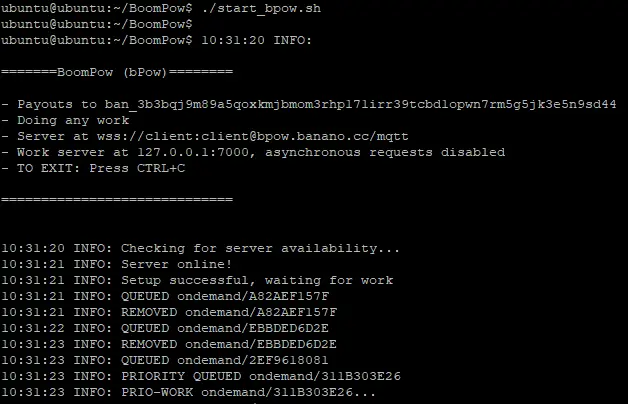
That's it!
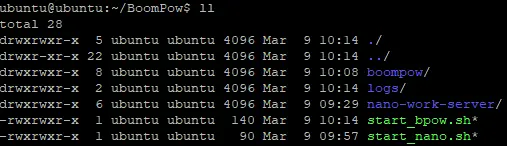
Your final folder should look like this:
You can see how it all works in https://bpow.banano.cc/ .
My Banano Address: ban_3b3bqj9m89a5qoxkmjbmom3rhp171irr39tcbd1opwn7rm5g5jk3e5n9sd44 , feel free to add me to your contact list :)






