![[TUTORIAL] How to prepare your wallet on the Polygon Network - MetaMask](https://www.publish0x.com/img/925882.webp?action=resize&ar=1&enc=webp&inv=0&ori=1&st=1&up=1&w=1140&signature=39b4c5153621a214fe680e981045aa53bc92160ac98536aab98c4d08cbd1ca8c)
As you know, Floyx is preparing to launch a pre-sale round. Therefore, we decided to create a short tutorial on how the MetaMask wallet should be properly configured for the Polygon network to avoid additional problems or potential access delays.
Desktop wallet - browser
Once you have downloaded the wallet from the official website https://metamask.io/ and configured it correctly, let’s move on to adding a new network.
(If you already have a configured Polygon network that you added via https://polygonscan.com/ - delete it and let’s add it again).
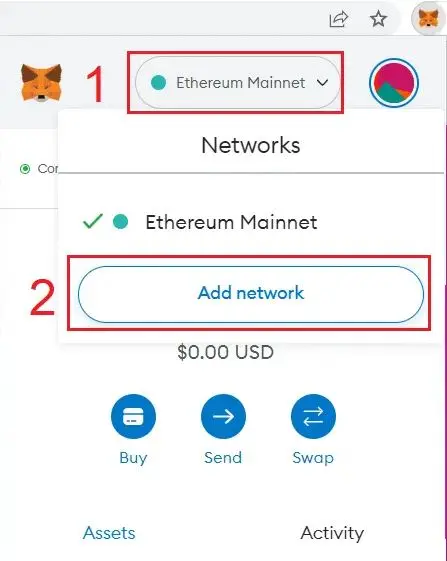
This will open a new tab in our browser:
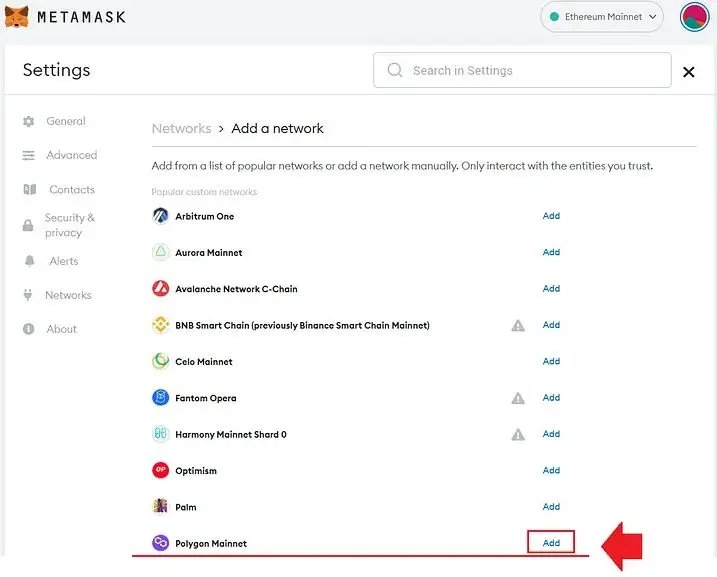
We are interested in the last position in the list ‘Polygon Mainnet’.
Click ‘Add’ to add Polygon network.
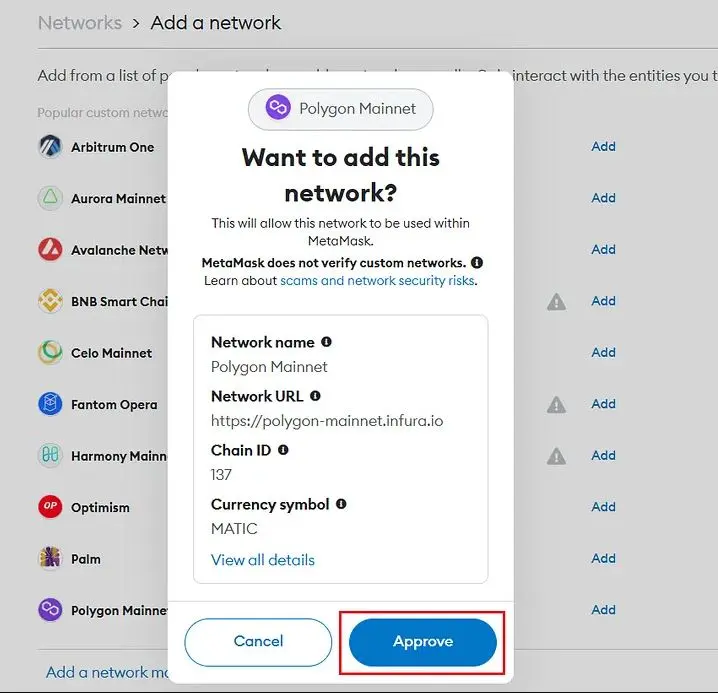
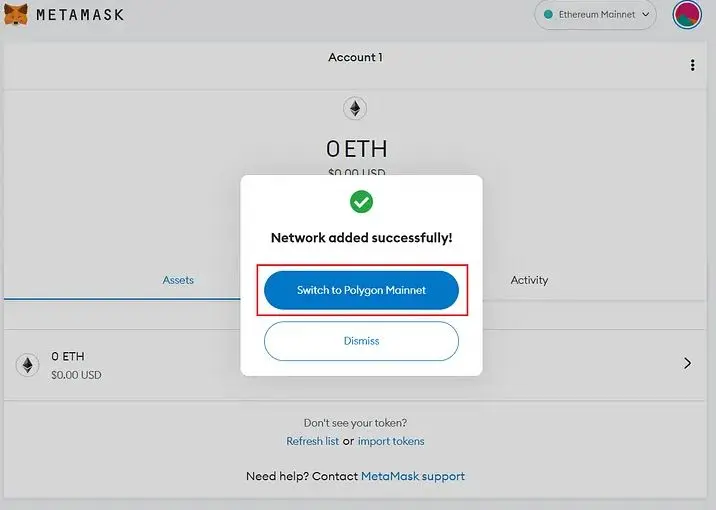
We receive confirmation of the addition of the Polygon network, and we can immediately switch the network to the one we are interested in.
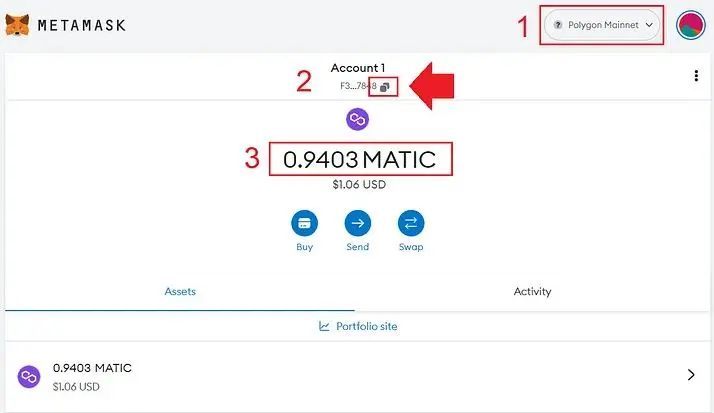
- Information on which network we are currently on.
- Here we see the address of our wallet and the option to copy the address. Remember, in order to purchase tokens or perform any transaction through Polygon chain, you need to have Matic on your wallet (which are needed for gas fee). When making a deposit to your MetaMask address, you must choose Polygon chain when sending Matic, or any other currency (USDT, USDC).
- Sent Matic will be immediately visible on your wallet. Then you are guaranteed to be able to cover the gas fee and perform transactions using Matic and other cryptocurrencies using the Polygon network.
We have our wallet ready!
Mobile wallet
After downloading the wallet from the GooglePlay / AppStore and configuring it correctly, let’s move on to adding a new network.
(If you already have a network already configured - delete it and let’s add it again).
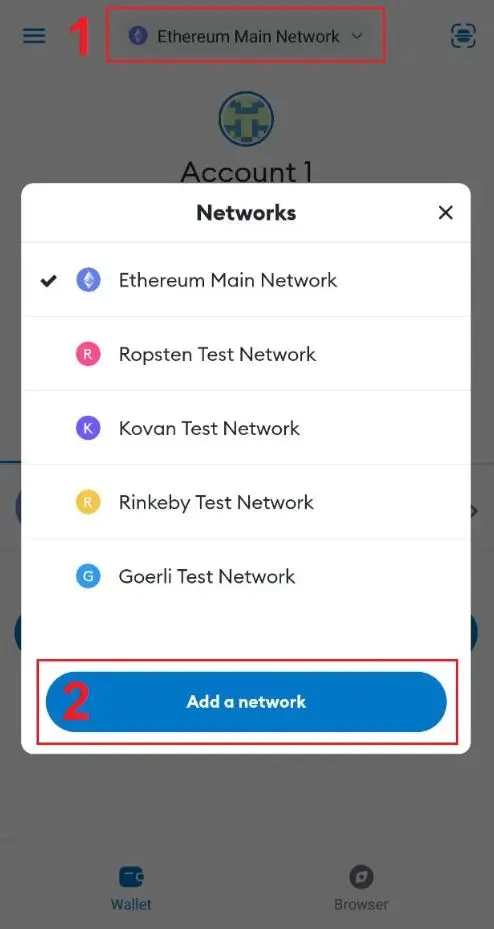
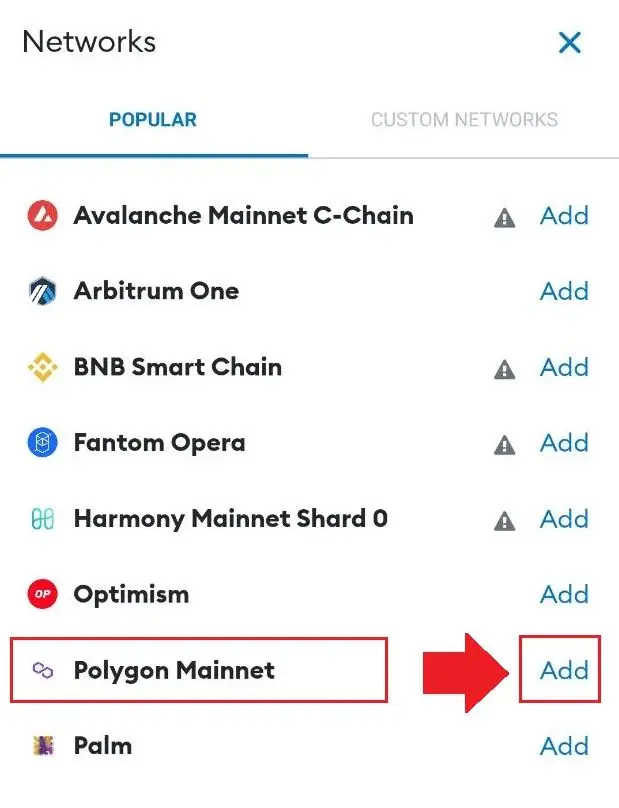
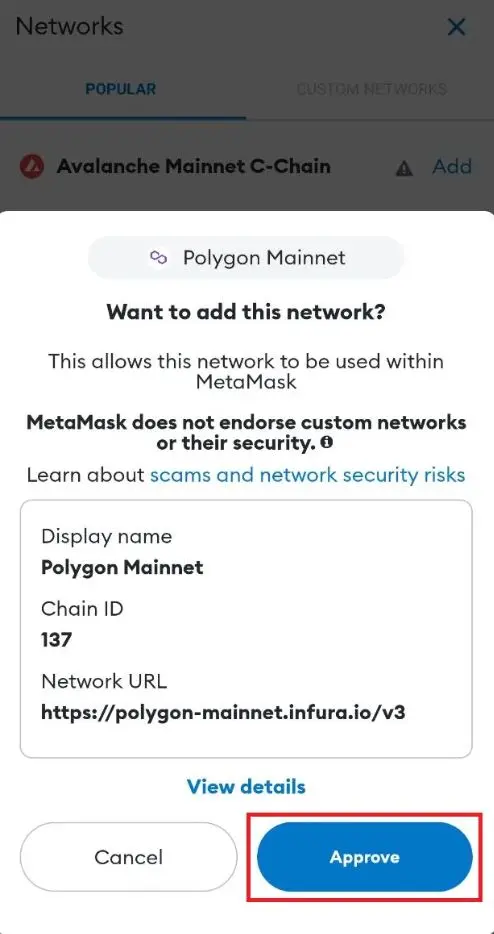
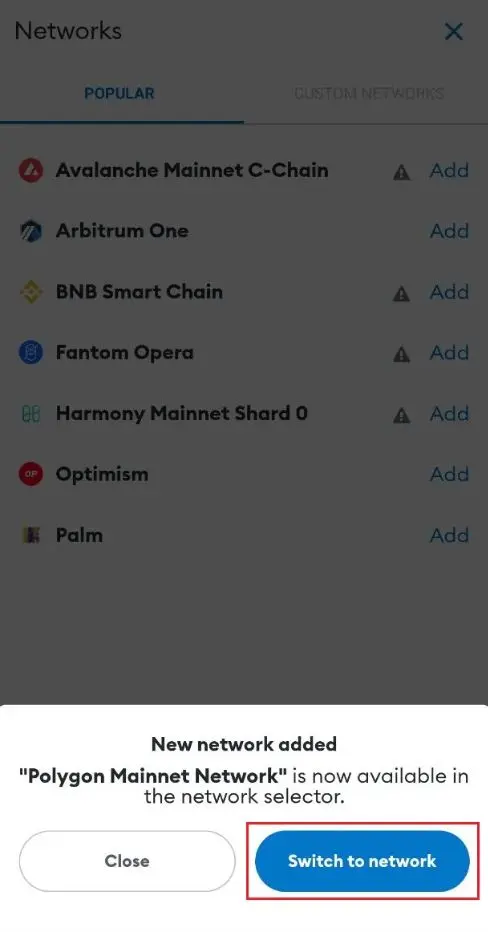
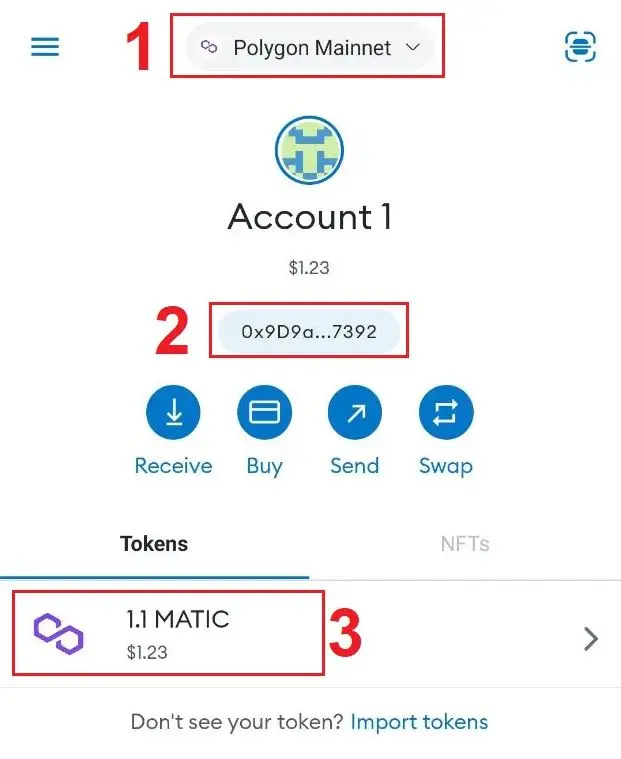
- Information on which network we are currently on. If we see ‘Polygon Mainnet’ it means that we have configured our network correctly.
- Here we see the address of our wallet and the option to copy the address. Remember, in order to purchase tokens or perform any transaction through Polygon chain, you need to have Matic on your wallet (which are needed for gas fee). When making a deposit to your MetaMask address, you must choose Polygon chain when sending Matic, or any other currency (USDT, USDC).
- Sent Matic will be immediately visible on your wallet. Then you are guaranteed to be able to cover the gas fee and perform transactions using Matic and other cryptocurrencies using the Polygon network.
We have our wallet ready!
Why are we reconfiguring our Polygon network?
Adding a Polygon network through the polygonscan, has a different RPC than that offered by the MetaMask wallet.
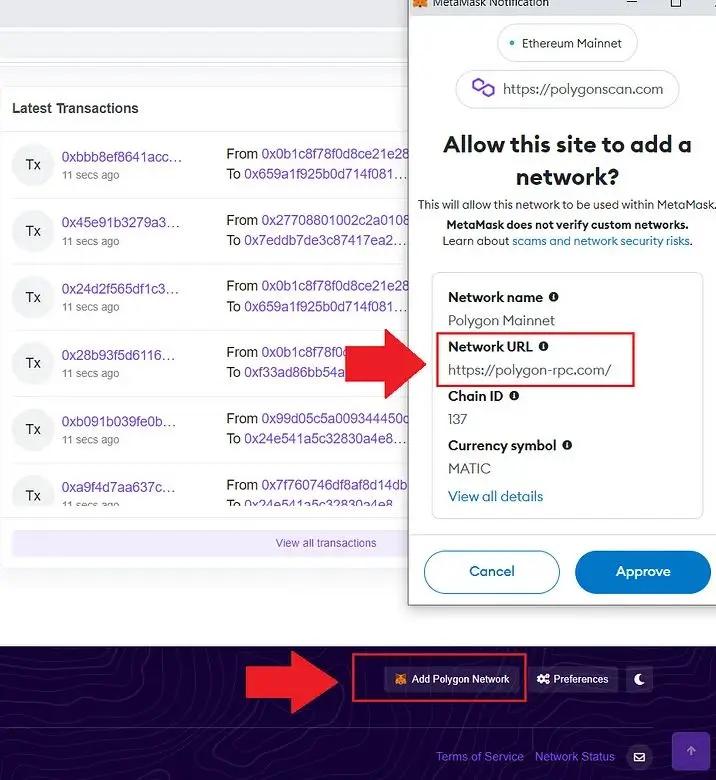
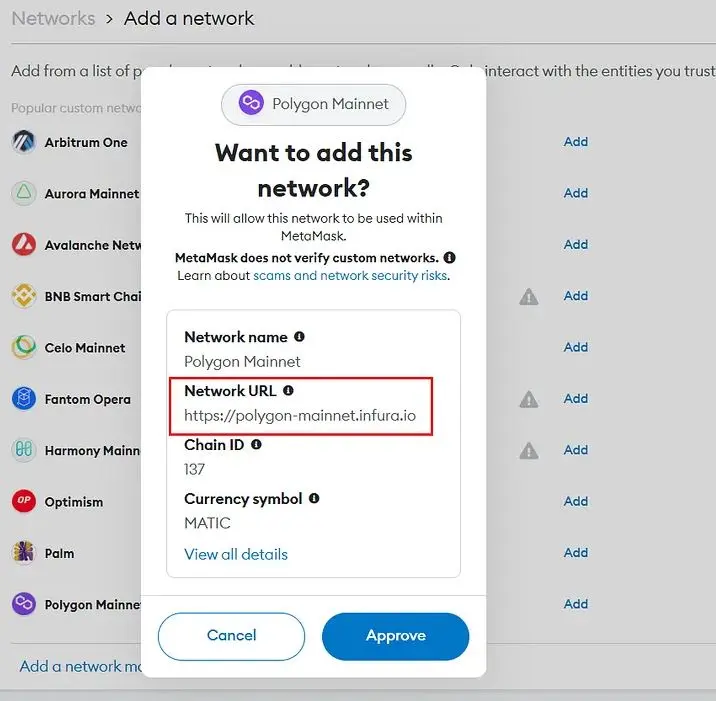
RPC “https://polygon-rpc.com/" often causes a post-connection error, which can recur quite systematically and last up to several minutes. During this time, your connection to the site (including the Floyx token panel) will be interrupted and you will not be able to use the website as expected during this time.
That’s why we recommend configuring ‘Polygon Mainnet’ through MetaMask, which uses the RPC ‘https://polygon-mainnet.infura.io' - which works very smoothly and quickly once the wallet is connected to the platform.
MetaMask has taken advantage of the most efficient RPC connection for its users and their needs.If there are any problems with the correct configuration of your wallet, we will be happy to help via our telegram.
Article posted first on Floyx Medium account. I am not the author, and I have the rights (with Floyx's permission) to repost this article on behalf of Floyx






