
Last year we have launched the Blog CoinMantra and try to share information related to Blockchain and Cryptocurrencies and we are doing well
After some time we have planned to expand our audience, so we have started sharing our content on other platforms like Medium, Steemit and Publish0x
We have started a new series of articles on Publish0x, where we are sharing the journey of CoinMantra also some tricks related to Blockchain and cryptocurrency.
Not a Publish0x account create one from here
Today I have connected our blog to Publish0X by using their plugin on our main Blog CoinMantra.co
Not understand, just check it by using this link
So We have added Publish0x on our Blog But How?
If you're a newbie on Publish0x and want to add your blog on your website that will help you to get more traffic on your Publish0X Blog.
When I talk about more traffic that means you will get more engagement so your money earning possibility will also increase 😉
Before I start the tutorial I assume that you have these ✌️ things First an account on Publish0X and your own blog with your domain ( where you will add this widget )
If you have not then I have solution use Blogger to create a free blog or any other platforms where you can put some JavaScript codes like Wordpress
Use this link to create an account on Publish0x.com
In this article, we are using Blogger so let's start
Open Your Publish0x account in Brave Browser and login with your username and password 🔒
Click on three lines button (beside of notification 🔔button)
And select Ambassador program 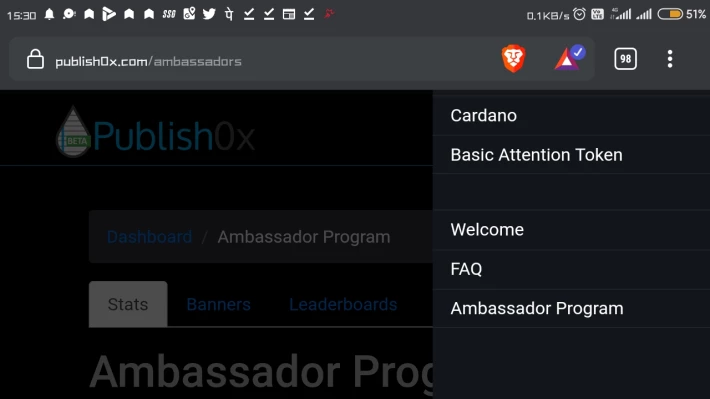
Click on website widget
Now you need to set up widget appearance
(The good thing about this widget is you can choose any publish0x blog it's no matter if it's your or not.)
By selecting desired functions
Now copy the codes and now open your blogging platform where you want to add this Widget.
I am using blogger aka blogspost for this tricks and I have ✌️different places and also ✌️different ways to put this website widget
Don't worry, we are going to share both methods
First on a separate page
You just need to open Blogspot dashboard click on pages and click on create a new page
Click on Html
Select all codes and paste the code(that copied from publish0X ) and click on save 💾
Second method through Plugin
Go to Layout and choose the desired place where you want to widget appears
Choose Html from the list of gadgets
Copy the code and save it
And yup the work is done 😌
I hope you will find this article helpful and you have learnt something.
Now it's your turn share it with your friends and family members
Till then Ta Ta 🤗
If You Like this article Then You can support Us By joining these Platforms :)
1. Binance :- Buy and Sell Crypto on World's Biggest Platforms ( With 20% fees discount )
2. Kucoin :- People's Exchange ( receive up to $500 )
3. Okex :- https://www.okx.com/join/8713931?s
4. Bitbns Create Your account
5.Huobi Get $300 Bonus Create Your account
6. FTX ftx.com/#a=CoinMantra
7 ByBit https://www.bybit.com/
8 WazirX https://wazirx.com/invite/2afb8tzd
9.Vauld (20% Discount code) https://www.vauld.com/register/l8jxx4
10. Bityard ( the copy trading app ) https://m.bityard.com/en-US/signUp?ru=gXFEJE
11. Nexo :- EARN $25 worth free Bitcoin
12:- Celsius :- EARN $50 + $100 WORTH BITCOIN use code 1839205884 at the time of signup to get bonus
13:- CakeDefi :- EARN $35 worth of $DFI TOKENS Create Your account 483214 ( use this code the time of signup to get bonus )
14. Join Gemini and get $10 Bitcoin join now
15. Buy Ledger Hardware wallet
16 join Unocoin and earn Crypto by shaking your phone use Code U-447836
to get free bitcoin





