how to backup the ARK mobile wallet

how to backup the ARK mobile wallet

By syarrf | arkindonesia | 21 Apr 2019


Sorry I use language Indonesian

190903265-c780b2d06aadb81f5738bb07a27a3e0ae02b7bc5e7f68a39b50311dc1e32c84d.jpeg


Cadangkan dompet ARK itu sangat penting , ini dapat mengantisipasi hal-hal yang tidak kita inginkan .

Bagaimana caranya? Mudah saja anda tinggal membuka dompet ARK terlebih dahulu setelah itu ikuti langkah dibawah ini
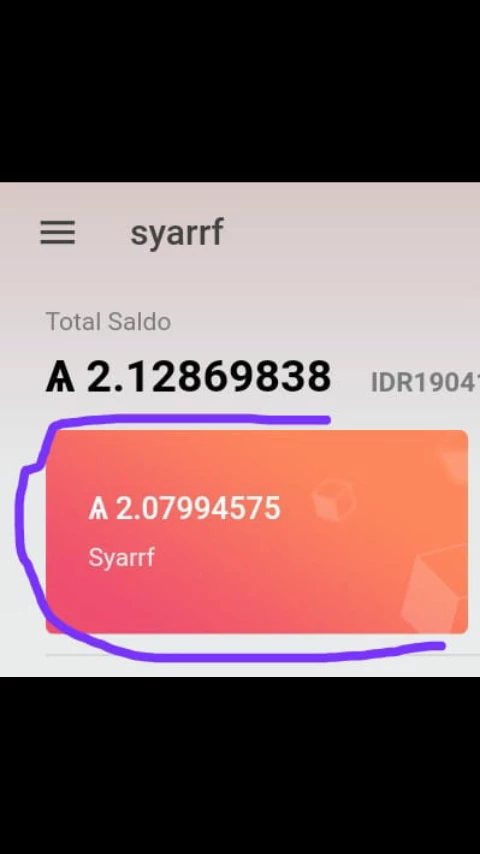
190903265-de8fcd391a3ec50323c1851533f10f72bea4bd1735bb6fa7262e036ce0cfa9bd.png

Setelah kita membuka dompet ARK dan memasukkan PIN . Anda harus klik kolom merah ark terlebih dahulu 

Setelah masuk . Anda harus mencari titik 3 untuk menampilkan menu backup

190903265-6c2a56f38e9a9c5184bce950f52bd8ecdd1a12e7ef7dd44ac3ef56aab1d3309c.jpeg

Ya di situ, kemudian klik , jika sudah klik akan tampil seperti menu di bawah 
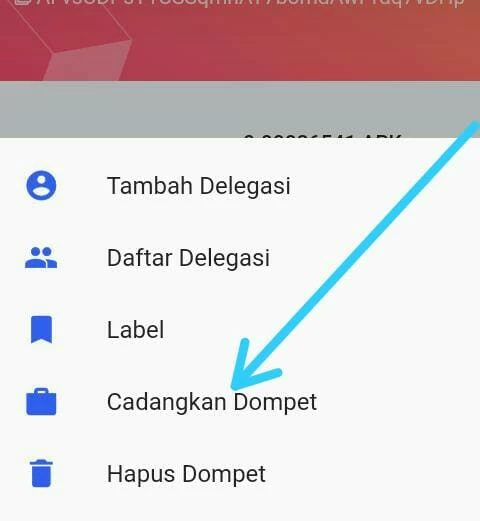
190903265-8c8d3833ed67ffb6dbb6f1d79ab5dc021f5e84c4c2f48b0f14059d5088e818c8.jpeg

Oke setelah tampil kemudian back up ... Selamat anda sudah mencadangkan dompet ARK


How do you rate this article?

0


syarrf
syarrf

life and peace


arkindonesia
arkindonesia

starting from a small community in Bojonggede Indonesia, the ARK ecosystem will build slowly

Publish0x

Send a $0.01 microtip in crypto to the author, and earn yourself as you read!

20% to author / 80% to me.
We pay the tips from our rewards pool.


