
Bit more of an update today, I've been spending a good deal of time over the last few days learning how to code a game in the 'Minesweeper' mould following the instructions laid out in the excellent 'Coding for beginners' book that I have shared a link to previously.
The project has been a great exercise in understanding a few aspects of coding that you wouldn't necessarily think of before starting - like planning the process flow of what you are trying to create. Coming from a project management/ process improvement background, these concepts were easy to relate to, there was some comfort in the familiarity of drawing out a process flow model for the game. This came in extremely useful when playtesting and tweaking the code.
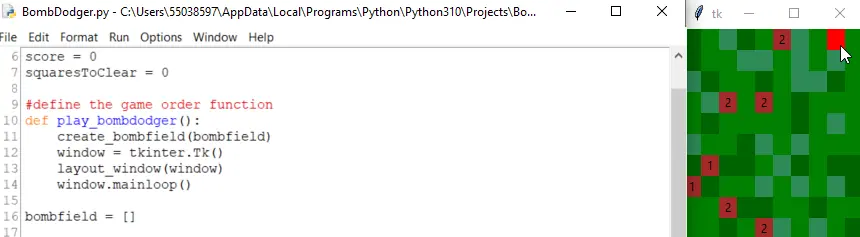
In this project, you learn how to define the game window, add bombs to the field of play, and control actions of the user via the mouse click event. As someone learning how to programme, this is a great project to start with. There is a nice introduction to some more of the complex coding, like creating lists and applying them to a grid creating the field for clearing. The coded game is also quite a nice idle clicker:
Adapting the code
As well as producing the game as instructed by the book, I opened another module and started coding some ideas I had for a sort-of-reverse-minesweeper game. Only instead of finding bombs in the field, being blown up in the process, I decided to make it more of a treasure hunt experience finding gold in a desert environment.
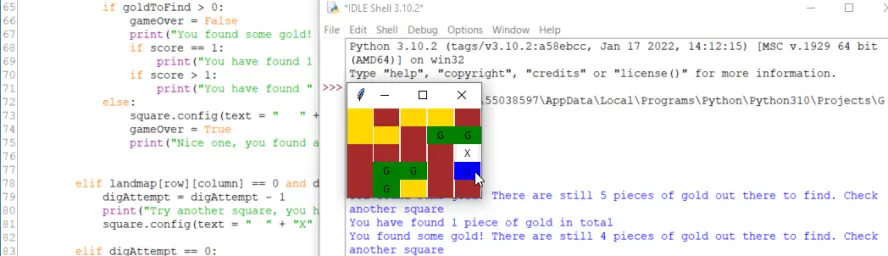
Early iterations were confusing as I hadn't quite written the programme well enough. The primary issue was that the game never ended, so you could keep clicking endlessly despite finding all the gold.
Modification 1:
Limit the number of failed attempts for the user, by adding a new 'digAttempt' variable set to 3. Once this hits zero (without finding gold) the game is over, gold is counted and the 'goldFound' score is displayed.
(As I type this, I realise I could take this further and have the 'digAttempt' value change whenever a square is clicked, rather than just missed attempts. This could equalise the playing field. For example, the player would have ten 'digAttempts' to find as much gold as possible. I could even add some hints to the field in a similar way to the minesweeper game...)
Modification 2:
Add a teaser/incentive for the player to keep searching for gold by creating a new 'goldToFind' variable set to the random total created during game field generation. I ended up using this in the displayed text when: gold was found, gold wasn't found, and at the end of the game as a sort of 'this is what you could have won' moment.
Planned modifications
- Increase the size of the game field, currently a grid of 5 x 5 and limit the availability of gold in the field, it is of course a rare commodity(!).
- Tidy up the game field - change the colours so they are more complimentary to each other. Fix a rendering issue when the square is revealed, the revealed square currently does not line up correctly.
- Changes to the text output when a square is clicked. Currently I think it's too repetitive, so I'm planning on printing random phrases on each click (depending on the outcome of the click). I.e. creating two lists of phrases and using the random.randint function to select the response.
- Play through my thought (above) of reducing the digAttempt value after each click (and not just unsuccessful). If the gold availability is small, allowing the user a 'free' dig after finding gold, could provide a 'battleships' like element and some hope for the user - so not quite sure about this yet...!
- Make a bigger deal when / if the user finds all the gold.
After the modifications are done and I've tinkered as much as I want
I'll get my act together and share the code for the finished game- either on Git or Repl.






