Hey There!
Hope this post helps you in setting up the SSH key in your local and connecting it to GitHub Repos.
An SSH key is used to securely connect the local machines to GitHub repositories. Let's see the steps:
First,
Check if your local machine has an SSH key generated or not:
- Open GIT bash and type cd ~/.ssh to move to .ssh folder in your home directory.
- Then Type ls to check for files present in that directory.
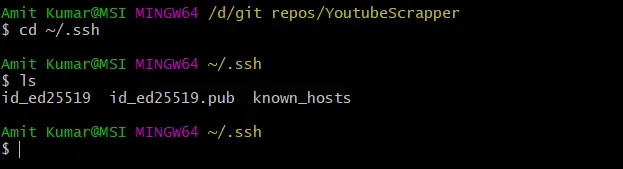
You can see id_ed25519 (contains private SSH key) and id_ed25519.pub (contains public SSH key) files. After running the above command if you see any file that has a .pub extension, It would mean that your local machine already has an SSH key generated and you can use the same key.
If you cannot see any files in the .ssh directory or the directory doesn't exist then it means your local machine doesn't have any SSH key generated and You need to,
Generate New SSH Key:
- Create the SSH Key using the ssh-keygen command:
ssh-keygen -t ed25519 -C "[email protected]"- ed25519: SSH algorithm (you can use `rsa` if `ed25519` is not supported on your machine).
Press Enter 3 times to skip the configurations and stick to default filename and no passwords. If the command is executed successfully, the SSH key will be generated.

Once the SSH key is generated (or if you already have ssh key generated), now we need to copy the public SSH key and add it to your GitHub account.
use the below command to copy the public SSH key:
clip < ~/.ssh/id_ed25519.pubNow, let's navigate to the window in your GitHub account where you need to add the SSH key.
YourProfile>Settings>SSH and GPG keys, or Here. You will see a window where you can add your machine's SSH key.
Click on the New SSH key or here. 
Add Title: give a name to the public key of your machine so that you can identify that (example: your_machine_name_ssh_key)
Key: paste copied SSH key here.
Click on Add SSH key.
Now you can access your GitHub Repos on your local machine using the SSH link.
You can try `git clone` on one of your repositories using SSH to check if you can access your repos or not.






