
Picture this: You wake up to panic emails - your bank account emptied, social media spamming scams, and your boss screaming about a data breach. Why? Because a hacker guessed your password (or you clicked one wrong link).
The good news? Preventing most cybercrime is easier than you think. You don't need to be a tech whiz - just do this one thing:
Turn On 2FA - Or Be a Hacker's Next Meal
As the Persian saying goes, "Better safe than sorry." Two-factor authentication (2FA) is your digital safety net. Even if criminals steal your password, they'll hit a wall without that second code (sent to your phone or app).
Why It Works:
Phishing? Useless - no code, no entry.
Brute-force attacks? Waste of time.
Data leaks? Your accounts stay protected.
How to Set It Up (60 Seconds):
Google/Gmail: Settings → Security → 2-Step Verification
Facebook/Instagram: Settings → Security → Two-Factor Auth
WhatsApp: Settings → Account → Two-Step Verification
Banks: Enable in your banking app - now.
Pro Tip: Avoid SMS codes (hackers can steal your number!). Use Google Authenticator or Microsoft Authenticator instead.
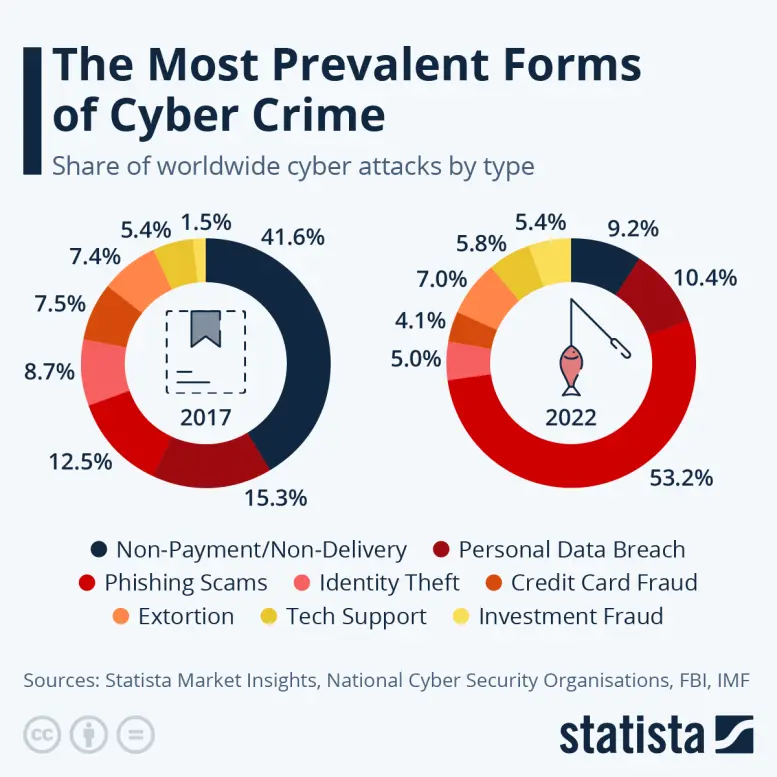
The 7 Most Common Cybercrimes - And How to Dodge Them
Cybercriminals hunt like wolves: they target the slowest in the herd. Don't be that target. Here's their playbook:
-
Phishing Scams (Fake emails/texts): "Click this urgent link!" → Verify sender addresses.
-
Ransomware (File hostage-taking): "Pay or lose everything!" → Maintain offline backups.
-
Identity Theft (Social media snooping): Freeze your credit reports.
-
Fake Shopping Sites: "Too-good-to-be-true deals" → Check site reviews.
-
Malware (Hidden in downloads): Never delay antivirus updates.
-
DDoS Attacks (Crashing websites): Use cloud protection.
-
Insider Threats (Rogue employees): Limit sensitive data access.
Final Word:
Activate 2FA today - it's the digital equivalent of "locking your door." Remember: "The wolf doesn't care about the sheep's vote." Stay alert, stay safe.









