![Git - [Part 1] What is Git?](https://www.publish0x.com/img/433285.webp?action=resize&ar=1&enc=webp&inv=0&ori=1&st=1&up=1&w=1140&signature=e61fca5f2247ed7c5dee923c372337adae6b2db620db11d1ac7c88b1b4c40c28)
Imagine you are working on your project and always save your progress into the same file. One day you realise, that the changes you made the day before are not correct and you would like to go back to a previous state. Because you saved all your progress in the same file, it's not (or only with some hardships) possible to get back to this previous state.
That is one of the reasons why developers use Version Control Systems such as Git to keep track of changes, restore previous states and make collaboration with other developers as easy as possible. In this post I will explain the very basics of what git is and how it works, while at the same time refrain from using too many technical details.
Branches and Commits
Before we answer the question how git works, we first have to clarify the definition of a commit: You can think of a commit as a safe point. Whenever you commit something, git saves a snapshot of the current changes that you made. Which means you can always come back to any state that you committed.
If you try to understand how git works, you can start by thinking of it as a timeline. The timeline is called a branch and on it you have your commits. Although the commits are independent from branches, you will always commit to a branch, to let that branch know that the changes you introduced belong there.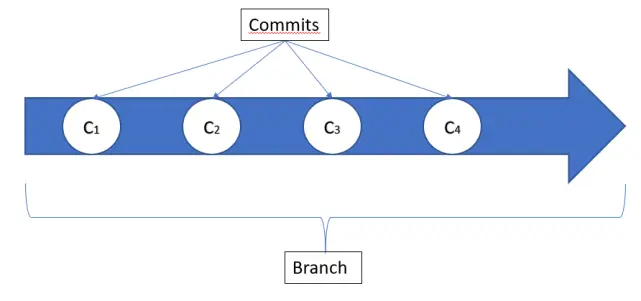
Branching off
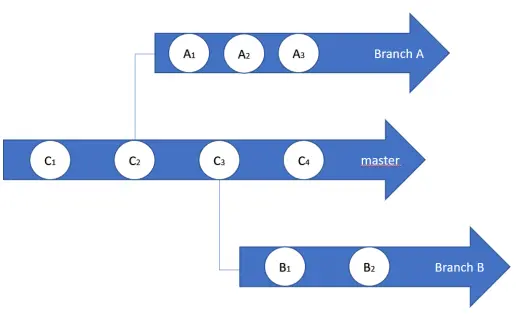
The real power of git lies in the creation of multiple branches. Per default you always have one branch called master, where you can commit your changes. However you can also create an arbitrary number of branches to fit your needs. Having multiple branches can make your life a lot easier, if you want to keep different versions of your code, organize your tasks in separate branches or work together with other developers on the same code base.
As displayed in the image below, you have to specify from where you create a new branch. In this example Branch A is branched off of C2, while Branch B is branched off of C3. You can now work on these newly created branches and commit to them in the same way. It is also possible to branch off of newly generated branches, so if you like to branch off of A2 you can easily do this.
Merge and Rebase
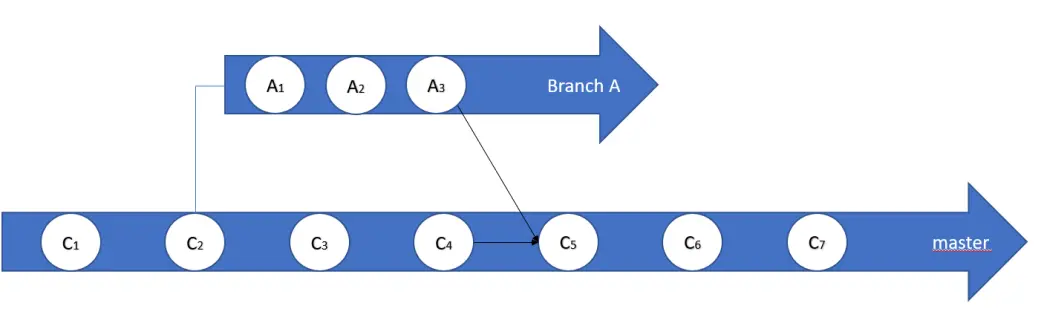
In the majority of cases you will have one branch where all commits go that you need for your project, but instead of directly committing to that master branch it is more convenient and also safer to branch off of the master branch and work on a separate branch. If you are done writing your code on the separate branch, you want to bring the changes back to master, which you can do by either using merge or rebase.
- When merging branches you will take the changes from both of the branches and create a new commit to add to one of the branches. In the example below we merge A3 with C4 and create the new commit C5 on the master branch, therefore successfully getting all the changes we did in Branch A to the master.
- Let's say you want to have it the other way round. There are changes on master that you need on Branch A, but you don't want to lose the progress you already did on Branch A. Instead of merging the two branches together on Branch A (which is a totally valid thing to do) you can also rebase Branch A to master. Here you basically "move" the first commit of Branch A to the last commit of master, therefore getting all the changes that were done on master on Branch A and only afterwards applying the commits you did on Branch A.
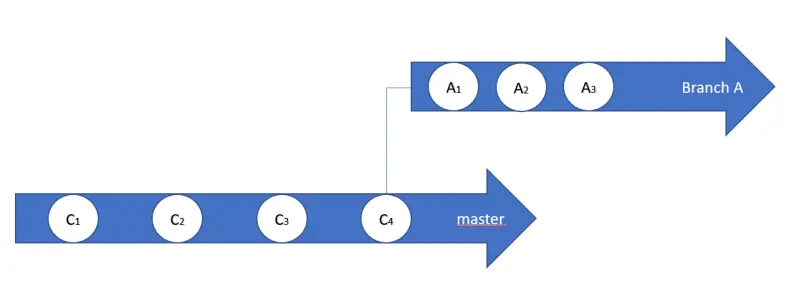
In both of the cases it might be necessary to resolve conflicts in the code you have written. When you are in the merging/rebasing process, git will guide you through the changes that were done to the same pieces of code and let's you choose what changes shall be kept and which shall be discarded.
Local and Remote
Git is a common tool used by a lot of software developing companies. Here multiple developer have to work together on the same codebase. To make this possible, git has so called remote branches. The difference between local and remote branches is exactly what their names indicate: The local branch is on your local PC and the remote branch is hosted somewhere remote (e.g. on GitHub). The big advantage hereby is that developers can make their local changes, test things and get them reviewed before pushing (that's what it's called if you bring your changes to the remote branch) to the remote branch.
You can think of the remote branch in the same way as in the above examples with Branch A and B. The only difference is, that the remote branch is not on your local PC and other developers can push their code to it (if you gave them permission to do so). Which in return means, that you need to pull these changes to your local PC to be able to work with the new changes, that someone else has introduced.
It is also possible to push generated branches (like Branch A) to the remote and give other developers the opportunity to contribute there, before ultimately merging the changes back to master.
Git is an excellent tool if you work in a team, but it's also quite convenient if you work by yourself. Using it won't slow down your coding and if you push your changes to a remote branch you are safe from losing your progress if your PC dies or you delete your code by accident. In the next parts I will explain the basics on how to use git and how to link it to a Github account.
If you have any question or want to know more of a specific topic, feel free to drop a comment and I make sure to address it.






