![C++ Basics - [Part 1] Hello, Publish0x!](https://www.publish0x.com/img/444291.webp?action=resize&ar=1&enc=webp&inv=0&ori=1&st=1&up=1&w=1140&signature=863bb5bdd685056a700ff13e462cbc300af77e2036b6c004c2c06e748a5fa997)
This series is for people with no or very little programming experience. We will be programming in C++, a programming language that is used in a lot of domains (like automotive, aerospace and many more). Although this series is dedicated to complete beginners, it might also help you if you already have some programming experience, just not with C++. I decided to make a tutorial series, because I struggled a lot when I started learning C++. I hope that this series helps you to grasp the key concepts of programming so that you soon be able able to write your own C++ code.
Setup
Before we start writing our first C++ program, we need to have the proper tools to make our life as easy as possible. If you want to have the exact same setup as I do, then you need to use VisualStudioCode on Ubuntu 20.04. (I encourage you to use the same setup so it's easier for you to code along and I am able to help you much better if you run into problems) If you have neither then have a look at these two tutorials, they will help you getting started:
Writing our first program
The first program that we are going to write is a terminal output that says "Hello, Publish0x!". Before we do so, we need to create a new file with the extension .cpp. I created the file hello_publish0x.cpp, but you can call it whatever you like as long as it has .cpp in the end.
In the image below we see the program that creates our desired terminal output. Since this little program already has a lot of new information in it, I will go through each of the points separately:
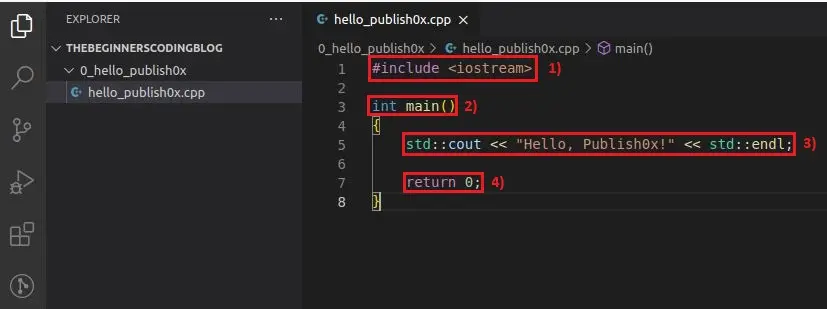
1) #include <iostream>
The keyword #include adds utilities from different files and lets us use them in our file. In this case we include the iostream (Input/Output stream), which we will discuss in the next lesson.
2) int main()
This is the main function, every C++ program needs to have one. This part of the program is the starting point, it gets executed first. In a later lesson we will look more deeply into functions in general and how they work.
3) std::cout << "Hello, Publish0x!" << std::endl;
This is the part that is responsible for writing "Hello, Publish0x!" to the terminal. std::cout and std::endl are functions that are available to use, because we included the iostream at the top. In the next lesson we will have a look at how they work, but for now it's enough to know that whatever we write between the quotes gets printed to the terminal. The semicolon at the end of the line tells the program that it is the end of one instruction. We can think of the semicolon as the punctuation in C++. We end a sentence with some punctuation and we end an instruction with a semicolon.
4) return 0;
This is another must have, that the main function needs to provide. We will look more deeply into this when we cover functions in a later lesson. For now we will always add this line at the end of the main function, without even thinking about it.
#include <iostream>

int main()
{
    std::cout << "Hello, Publish0x!" << std::endl;

    return 0;
}
Although you can copy and paste the code from here, I advice and encourage you to write it yourself. Actually writing your own code helps you a lot when learning and gets you into the habit of coding. By copy and pasting code from the internet it will take much longer until you memorize the important aspects of your own code. You will also make some typing errors while writing the code on your own, like missing semicolons at the end of instructions. Little mistakes like that help you grow as a programmer, because at one point you won't make these mistakes anymore (you won't even think about them). So make sure to embrace those little mistakes, learn from them and create good habits along the way.
Hello, Publish0x!
Before we can execute the code we first need to compile it to an executable file. To do the compilation we need a compiler, which will use our human readable code and transforms it to machine readable code. The compiler that we are going to use is the g++ compiler. To compile the code, we simply put
g++ hello_publish0x.cppinto the terminal. If the compilation is successful, a new file will appear in our directory (check out the files in the top left of VSCode). This file is by default called a.out and is an executable file. If you want to give the executable a different name, you can do so by specifying the name in the compiler call, like this:
g++ hello_publish0x.cpp -o this_is_a_different_name.outIn the last step we will need to execute the executable, to see the output of our code. Therefore we type into the terminal
./a.out./ before an executable file executes it, so make sure that you are in the correct directory, otherwise it won't work (usually VSCode terminal takes care of this). If you gave your executable a specific name, you will need to change "a" to whatever your executable is called. After the execution "Hello, Publish0x!" appears on the next line in the terminal.

Congratulation! You just wrote your very first C++ program.
That's it for the first lesson. If you face any problems with setting up the environment or executing the code, let me know in the comments and I make sure to help you. Also let me know what you think about this series, constructive criticism is always appreciated.






