This is a manual for making purchases on the SureRemit app:
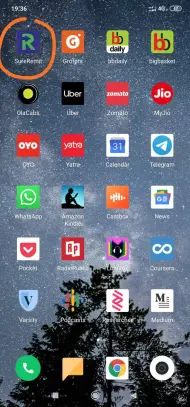
Step 1: Open the SureRemit app which looks like this (Playstore and iOS):
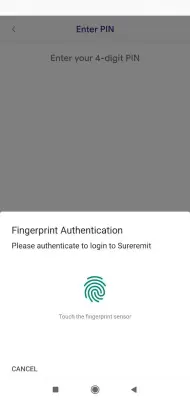
Step 2: Enter your 4 digit PIN or scan your finger to get the access (only if you made the provision while registering)
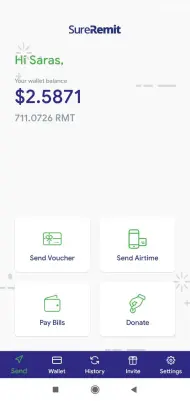
Step 3: Choose the service that you want to purchase. You can also see your RMT tokens balance in app.
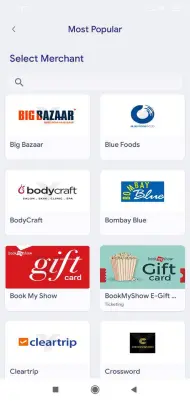
Step 4: Choose the country for which you want to make a purchase and then choose your preferred merchant.


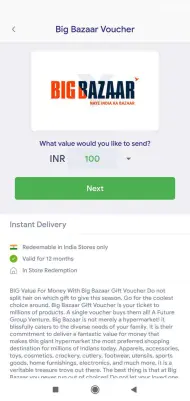
Step 5: Choose the voucher amount that you want to purchase.
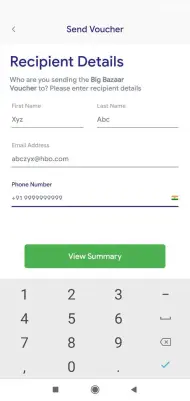
Step 6: Enter the recipient details (Phone number and Email ID on which he will receive the codes). If you are the intended beneficiary, enter your own details.
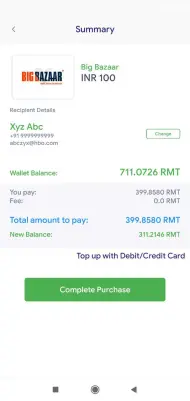
Step 7: Make the final purchase and the vouchers will be delivered instantly.
** Note: We have covered voucher purchases in this module. We will be soon covering the other payment methods where users can make payments using their Credit card, Debit cards, Paypal and other cryptocurrencies as well
Download the SureRemit App and start remitting!
Android: https://play.google.com/store/apps/details?id=com.suregifts.sureremit
iOS: https://itunes.apple.com/nl/app/sureremit/id1102261592?mt=8
JOIN OUR COMMUNITY
Website: https://sureremit.co/
Twitter: https://twitter.com/SureRemit
Facebook: https://www.facebook.com/sureremit/
Medium: https://medium.com/sureremit
Telegram: SureRemit Circle: https://t.me/sureremit
SureRemit Social: https://t.me/SureRemitSocial
WeChat: https://www.reddit.com/r/sureremit/comments/bv5hwj/sureremit_now_also_available_in_wechat/






