
The laptop I'm using to write this article is a HP Pavillion 15-f111dx, and is about 4 years old at least. It's processor is a AMD A8 processor, which is a 2.0GHz Quad core. It's not impressive but it's mine.
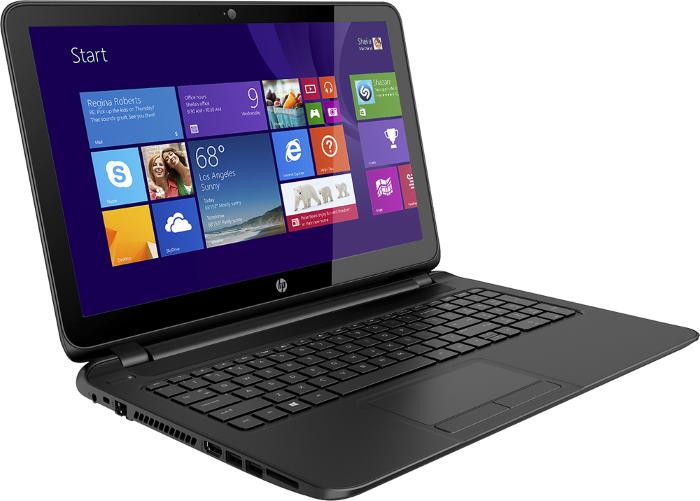
The VERY unimpressive laptop I get to use on a daily basis
If you take a look at the subject matter of my other two articles thus far you'll notice that I'm very into hobby electronics. Just take a look at my HackADay.IO Projects. I love to experiment and create new and interesting things, which means I have lots of interesting tidbits laying around like this guy.

A Raspberry Pi 3 - Model B, like the one I'm using for this segment
For the uninitiated, the Raspberry Pi is a series of SBC (Single Board Computers) that you can use for all sorts of tasks from robotics, telemetry, and penetration testing; to simply using it as a personal computer. With the latter point being the focus here as a lot of people use their personal computers for mining cryptocurrency. So just what can a Raspberry Pi pull in terms of mining hashrates compared to my laptop? I set out to find the answer this weekend, and I wanted to share my results even if the whole idea of mining on a 4 year old laptop or a SBC seems silly.

So, to start let's begin. I've chosen to mine GoldenDoge (Cryptonight) since mining it would give me a good amount of coins and it was made primarily to be CPU minable. For mining I've chosen to use XMRig because I'm familiar with the software and compiling it from source, and it's given me good hashrates from experience. Let's start with the laptop, we'll start with the test in windows first and then try the same test in linux. Firstly we need to compile it from source, the details of this are beyond this segment, but for windows we'll compile it using Visual Studio 2017 Community Edition. There's really no reason to compile it from source on windows other than the fact that we'll also be compiling it on linux, and I wanted to the process consistent.

The output of building XMRig successfully on a 64 bit Windows machine
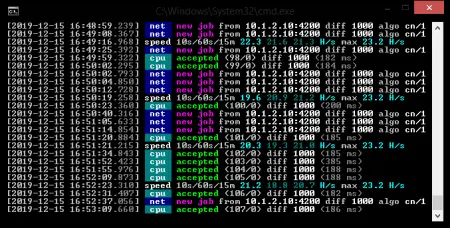
Unfortunately, since we can't tailor our build process very much for our machine, we don't really pull an amazing hashrate with this laptop by any means. As you can see above we only get a 21.5h/s. Not amazing but enough to pull in some GoldenDoge currently. Now it's time to compile it on linux and see what kind of hashrate we can get! I'm going with a Debian distribution, specifically Buster, as that is what will be install on the Pi when it comes to test on that device and again, I'd like to keep things as consistent as possible. Again, the details of building XMRig on a linux machine are beyond this article, but as you can see the default hashrates aren't too much better than windows. Sorry for the potato quality, but I couldn't take a screenshot.
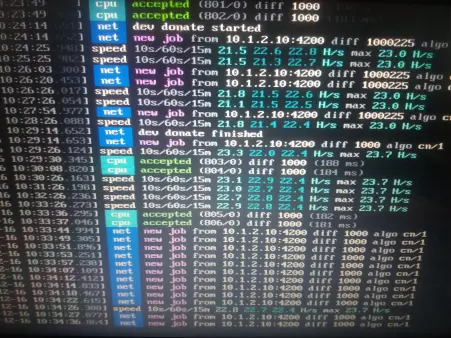
Lets see if we can improve upon that shall we? By typing the following command:
gcc -Q --help=target
We can see all sorts of helpful compiler flags we can adjust when building our project, I'm not going to go over them all here but even with compiling a few variations of flags the hashrates didn't improve enough to be noteworthy. But now that we've finished benchmarking the PC we can now move to the Raspberry Pi 3 Model B. We'll be using two different linux distributions, the standard Raspbian that is recommended and usually installed on the Raspberry Pi, and also a Pi specific 64-bit linux distribution to take full advantage of the RPi 3 Model B's capabilities. Let's see how XMRig performs by default on Raspbian:
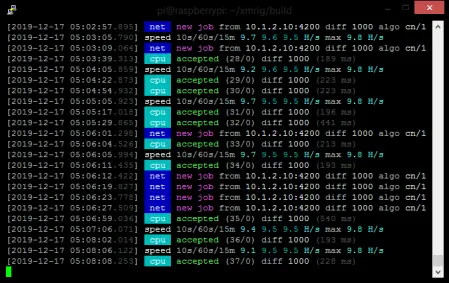
Hmmm, 9.8H/s max...definitely not too bad for a SBC. If we use the above gcc command to check the compiler flags, we can see that there are some instructions options that will allow us to take advantage of the Neon floating point processor on the Raspberry Pi, as well as tuning the code for the Cortex-A53 processor. This should give us a better hashrate, so lets recompile with those options enabled and see what we get:
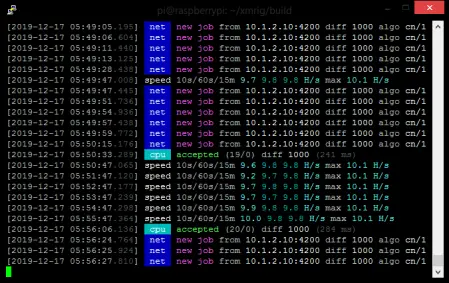
Wow...10.1H/s...that's really not much of an improvement unless you have hundreds of these but it is an improvement nonetheless. What would be better is to try to run this on an actual 64-bit OS and also enable Huge Pages to increase our performance even further. I tried a lot of Raspberry Pi x64 distributions, but the one that had Huge Pages enabled by default was the Debian Buster Preview build, so we'll be using that for the next test:
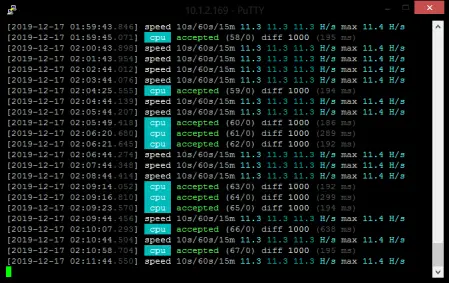
As you can see we get a hashrate of 11.4H/s! That's really impressive for just moving to a 64-bit OS and is a further increase in hash power, unfortunately...we can't optimize the program to take full advantage of the Neon floating point processor or tune the code for the Cortex-A53 since those options aren't available. Comparing it to my laptop, just 2 of these would outperform it. My desktop gets 230H/s thanks to its video card (1050Ti), but even that could be replaced by 21 Raspberry Pi's, which would consume just 84 Watts of power compared to the desktop. You could probably push the device even further with overclocking, but you would need to ensure you had a really good power supply and adequate cooling. I'm guessing you could potentially hit 15H/s on the Model B. On the Model B+ I'm sure you could hit that hashrate, considering it runs 300MHz faster and we're already pushing up to 11.5 or so.
Mining on either device still isn't profitable by any means with today's market, but it is entirely probable that when the market improves it might be possible to actually make money using a Raspberry Pi! Currently a fleet of 20 of these wouldn't even pull in pull in a single XMR over the course of a year, and at the current price it just wouldn't be worth the expense in hardware, time, or electricity; But if Monero were to return to anywhere near it's ATH you would actually break even mining with Pi's. Food for thought!
![Crypto [Neo]](https://www.publish0x.com/img/444811.webp?action=fit&ar=1&enc=webp&h=84&inv=0&ori=1&st=1&up=1&w=84&signature=10c97afa27edc509549e48a7914b56bf9a74cd60e246dcd867076490ceab93a6)





