
If you are into the crypto space for enough time you must have been heard about the Cosmos or ATOM token, it is not that popular outside the crypto space and even not in some crypto communities as the use case of the Cosmos ecosystem is for the users. Cosmos provides a Software Development Kit (SDKs) that developers can utilize for developing innovative decentralized applications or general applications. Currently, many popular projects in the crypto space are utilizing the Cosmos SDKs, that list includes Binance DEX, Terra, Akash Network, and many more. And due to these enormous powerful integrations, ATOM is one of the best fits for the long-term investment, and with the investment, you can also have around ~15% APY via on-chain staking as well as a probability to get airdrops from the newly developed coins. So in this article, we will see how easy it is to stake your ATOM tokens on-chain with a step-by-step guide.
Note: We will be using Keplr Wallet. Create account over there and make sure you keep your password and seed phrases safe. If your are on laptop you can download a web extension.
Step 1
Login to your Keplr wallet and make sure you are on 'Cosmos Hub'. Once you are sure that you are on Cosmos Hub then you can send your ATOM tokens to the wallet from a centralized wallet.
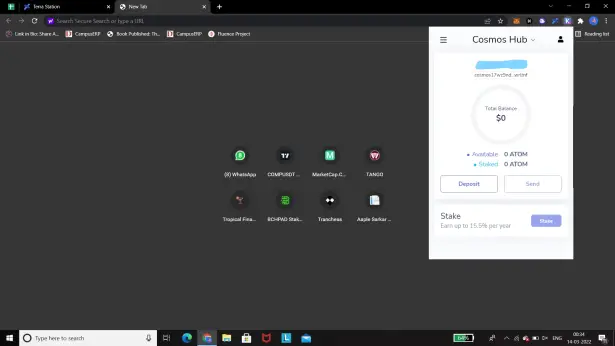
Keplr wallet: https://www.keplr.app/
Step 2
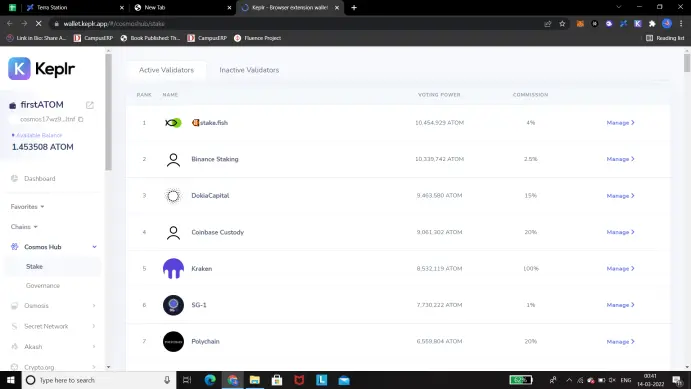
Now we have ATOM tokens in our Keplr wallet. Click on the 'Stake' button that you see right below the deposit buttons. After clicking on that, you will see the following screen.
Step 3
Go through all the providers and check for the best with low commissions or select according to you. It's always good to choose one from the top of the list but that's completely up to you. Once you choose the provider click on the manage. And the following pop-up will be on the screen. Enter the amount of ATOM you want to stake, make sure you leave some ATOM in the wallet to cover the transaction fees.
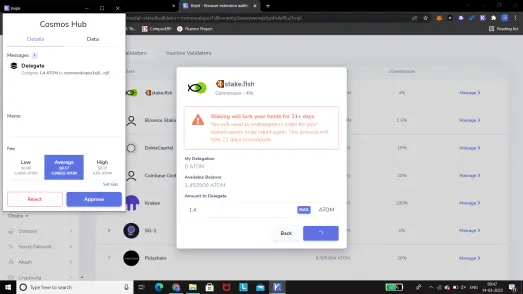
Choose the speed 'Average' transaction speed, so that it'll be done soon. Note that your staked ATOM tokens will be locked for 21 days, that's according to the Cosmos protocol, so don't worry about that.
Step 4
Now that you have submitted the transaction, after the successful transaction you will see the staked ATOMs on the dashboard.
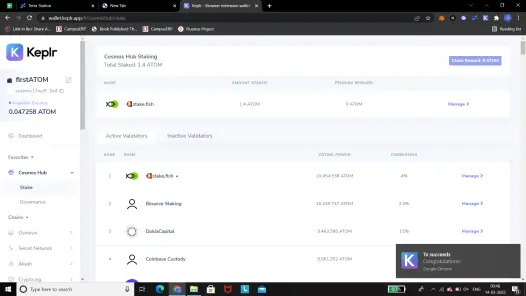
That's it, congratulations you have staked your ATOM wallet!
Last Note
Cosmos ecosystem has a huge use case and it already has been integrated with many of the leading decentralized applications in the space so it is very much sure that in the long term ATOM can be a good investment. And staking can be a good way to increase your ATOM holdings. The benefit of staking on-chain is that you secure the network and contribute to the growth and another thing is that the new launching tokens over the platforms tend to airdrop their tokens for free for the on-chain stakers. So if you are interested in the ATOM staking then I highly recommend you guys to stake it on-chain. But yes do your own research before investing in the ATOM or any other tokens.
Hope you find this article interesting and get to know something helpful in the crypto space. Thanks for your time and appreciation!






