
Meet Address Check – a new tool inside the SimpleSwap Customer Account. Enter a wallet address, select its network, and the tool screens it through third-party services and returns a risk level. The feature is available to registered users. The number of checks per month depends on your Loyalty Program level, from 5 at Bronze to 25 at Platinum.
Why check an address at all
Most safety advice about addresses covers one question: Is this the address I meant to paste? Address Check answers a different one: What is this address associated with?
That second question matters in both directions.
When you are about to send, the counterparty may be someone you have not dealt with before: a seller in a peer-to-peer deal, a new OTC contact, or a project treasury. The address looks like any other string of characters. Its transaction history does not.
When you are about to accept funds, the history travels with them. Coins that passed through a sanctioned entity or a known exploit earlier in their life can attract compliance attention on any service you later use, even if you had no part in what happened upstream. Knowing this before you accept a payment is cheaper than finding out afterward.
How it works
-
Log in to your Customer Account and open Address Check in the left-hand menu.
-
Paste the address and select the network it belongs to.
-
Press Check.
-
Read the risk level on the gauge and open the details for the connections found.
Every check you run is saved to a history tab. You can filter it by date and by risk score and search it by address, which is useful if you deal with the same counterparties repeatedly or want to recheck an address a month later.
What the result contains
The screening checks whether the address is associated with sanctioned entities or other risk categories and reports the result as a risk level. Alongside the level, the report identifies connections to trusted and suspicious sources, so you can see what drove the score rather than a bare number. A detailed report is also sent to your account email.
How many checks do you get
Checks are allocated per month by Loyalty Program level. Every registered user starts at Bronze automatically; higher levels are reached through cumulative exchange volume and, once reached, do not expire.
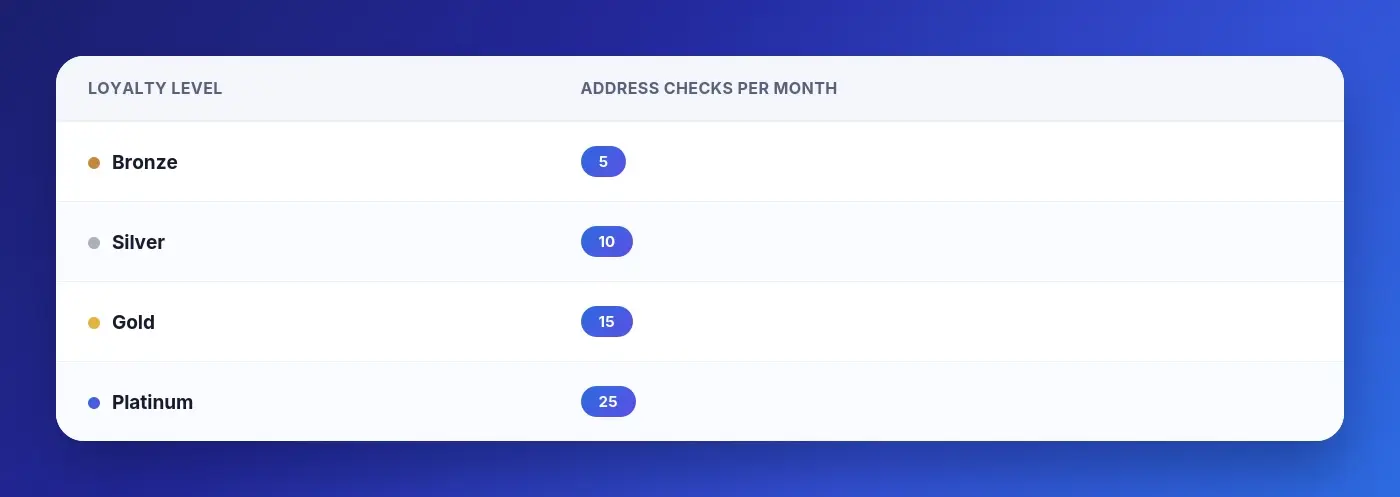
Your remaining allowance is shown directly under the input field.
What a risk level means, and what it does not
The result comes from third-party screening services. That is worth stating plainly, because it sets the limits of what the tool can tell you.
A low risk level means the screening found no association with the risk categories it covers. It is not a statement that the address, or the person behind it, is trustworthy, nor is it a guarantee about how any exchange or wallet provider will treat funds from that address. New risk indicators appear before databases catch up.
A high risk level means the screening found an association worth your attention. It is not proof that the counterparty did anything wrong. Addresses can be tainted by transactions several hops away, and exchange deposit addresses, in particular, aggregate flows from many unrelated users.
The screening may not identify all potential issues. The decision about whether to proceed remains yours.
Where does this fit in your routine
Address Check does not replace the checks that already sit on your side of a self-custodial swap: confirming the address character by character, matching the network to the asset, sending a small test amount on an unfamiliar route. Those protect you from your own mistakes. Address Check adds context about the other party.
FAQ
Do I need an account to use Address Check? Yes. The tool lives in the Customer Account. Swaps themselves still do not require an account.
Which networks are supported? The network selector next to the address field shows the current list. Choose the network the address actually belongs to; the same address string can exist on several EVM chains with different histories.
What happens if I use up my monthly checks? The allowance resets the following month. Moving up a Loyalty Program level increases the number of checks available.
Does Address Check cost anything? The checks are included in your Customer Account's monthly allowance for your level. SimpleSwap charges a service fee on exchanges; fee details are available on the website and through support.
Does a low risk level speed up my swap or exempt it from review? No. Address Check is an informational tool for your own decisions. Transaction screening on exchanges runs independently of it.
This article is for informational purposes only and does not constitute financial advice. Address Check relies on third-party screening services and may not identify all potential issues. Risk disclaimers are set out in the Terms of Service. SimpleSwap's only official domain is simpleswap.io.






