
A dynamical passwords generator (DPG) is a very simple tool, to create, restore, manage, change multiple super strong passwords for multiple accounts, devices, systems. The created dynamical passwords are not stored or saved in any place, therefore they can not be hacked, stolen, damaged, confiscated, etc. DPGs can solve multiple problems in cyber security, data protection, crypto assets protection/security.
The main advantages of dynamical passwords over passwords in encrypted files are:
-they are not based on encryption algorithms, therefore they are ready for the era of quantum computers;
-passwords are not stored in any place, therefore they can not be hacked, broken, stolen, damaged, confiscated, etc.;
-users do not need master passwords to manage their other passwords;
-users do not need to remember a lot of complex information, which they can forget;
-users do not need to install, synchronize, update, etc. any software, which can be infected with malware or spyware;
-users can convert a weak password into 100 strong passwords, with private DPGs;
-users can access DPGs from any device connected to internet via a web browser;
-simplification of management of multiple passwords for multiple accounts;
-simplification of changes of multiple passwords to multiple accounts;
-DPGs can not be exposed to supply chain attacks;
-DDoS (Distributed Denial-of-Service) attacks on DPGs or technical issues can be easily mitigated by backup DPGs;
-each user gets a unique private dynamical passwords generator (DPG), which generates unique set of passwords, for each user of a private DPG.
The most popular public DPG is available here: https://www.dynpass.online. The backup of this public DPG is available here: https://dynpass.free.nf
In this post, we consider a simple way to prevent spoofing and phishing attacks on public and private DPGs.
Spoofing masks an attacker's identity by faking an IP address, email, or website, while phishing uses deception (often via spoofing) to trick victims into giving up sensitive info or downloading malware, making spoofing a common method within broader phishing attacks.
The main difference: spoofing is about impersonation (faking the "who"), while phishing is about the fraudulent goal (stealing data/money/information/credentials/crypto) using social engineering and those faked identities.
Attackers disguise themselves as a trusted source (like a company, friend, government agency, etc.) through emails, phone calls, websites, or messages to trick victims into revealing sensitive info, clicking malicious links, downloading malware, sending money/crypto, etc.
URLs of public DPGs are known to everyone. This is the reason why users of public DPGs can be attacked by hackers with spoofing and phishing methods. If users of private DPGs do not expose their private DPGs’ URLs to third parties then the risk of spoofing and phishing attack is close to zero, for private DPGs.
A simple way to check if a DPG is legitimate or not is to use the keyword “test” (or other simple word/phrase) as input, and to compare if outputs from the current DPG are the same as outputs from the legitimate DPG. If they are the same then you are on the legitimate website, if they are different then you are on a spoofed website.
Here is a simple example.
A user enters “test” into the “Key” input field of the public DPG and click on the “Go!” button.
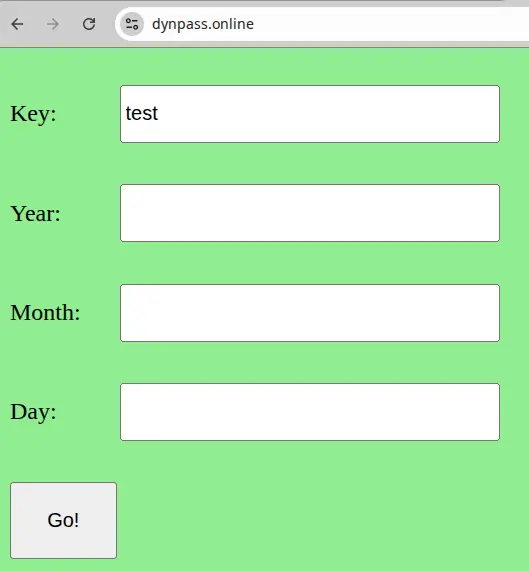
FIG. 1
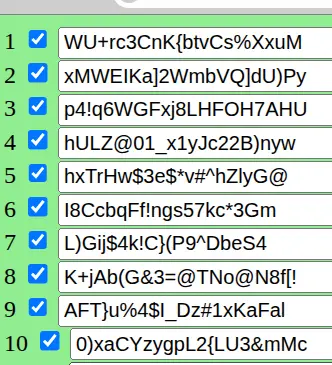
FIG. 2
The user copies the outputs into her/his notebook. Each time when the user uses public DPGs she/he runs this procedure to check if the website is legitimate, by comparing the current outputs with the outputs recorded in her/his notebook.
P.S. Users of public DPGs can use the above picture (FIG. 2) of outputs from the public DPG instead of the outputs recorded in the notebooks to check if they use the legitimate public DPG.





