
The recent hack of Coldcard most secure hardware wallets demonstrated to public that hardware wallets are not as secure as the majority believed. But, there are some ways to increase security of hardware wallets, by users.
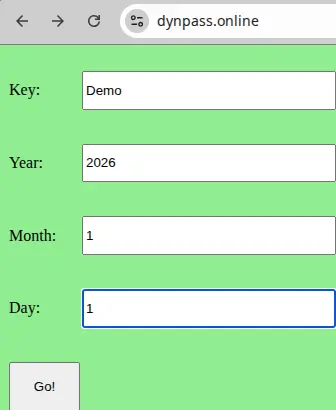
A simple way to increase security of hardware crypto wallets is to generate passphrases or PINs with dynamical passwords generators (DPGs) and use them with your current hardware crypto wallets. As an example we create a passphrase using this public dynamical passwords generator https://www.dynpass.online with a Key=”Demo” and Date=”2026/1/1”.
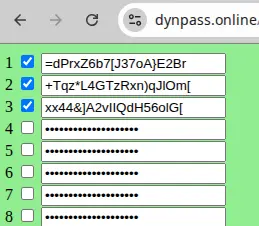
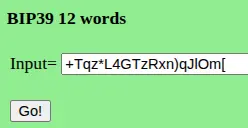
We select 2nd string of symbols and use it as a passphrase. If you want to have a bip39 12 words passphrase then use a bip39 converter, available here: https://www.dynpass.online/tools/bip39/12w.html

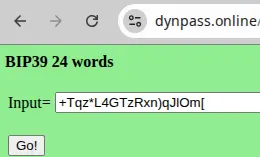
If you want to have a bip39 24 words passphrase then use a bip39 converter, available here: https://dynpass.xyz/tools/bip39/24w.html

A passphrase is an optional security feature that adds an extra layer of security to your crypto accounts on cold/hardware wallets. A passphrase can be any character or set of characters, a word, or a sentence up to 100 bytes long (~100 ASCII characters).
Passphrases increase entropy of generated accounts/wallets, therefore users can avoid the “weak entropy” vulnerability exposed in the recent hacks of Coldcard wallets, by using passphrases on cold/hardware wallets. The more complex passphrases are, the higher entropy of generated accounts/wallets is.
The passphrase is distinct from your 24-word Secret Recovery Phrase and is essentially an optional password added to your Secret Recovery Phrase that provides access to a whole new set of secret accounts/wallets.
The passphrase protects your crypto assets if your 24-word Secret Recovery Phrase were to be compromised. To access passphrase-protected accounts/wallets, an attacker will need your Secret Recovery Phrase as well as your passphrase.
Each different passphrase unlocks a unique set of secret accounts. You can use as many passphrases as you like. To simplify management of multiple passphrases, without compromising security, it is strongly recommended to use dynamical passwords generators (DPGs) to safely and securely manage all your passphrases for all your cold/hardware wallets.
Your passphrase is never saved on your device. Instead, it's only used to derive a secondary seed that safeguards a distinct set of 'secret accounts'. If you decide to attach your passphrase to a PIN, the secondary seed and secret accounts' private keys will be secured within your device's secure element. However, after the passphrase is used to generate the second seed, it's discarded and never stored. If you choose a temporary passphrase, all related data, including the passphrase, secret accounts, and private keys, is deleted after each session. This means you'll need to input the passphrase again every time you wish to access the hidden accounts. These hidden accounts are similar to virtual/brain wallets, because they do not exist most of time, outside the sessions.
Once your passphrase is set up, it cannot be verified on the device, underscoring the importance of having a reliable backup in place. Similarly, the Recovery Check app cannot be used to verify your passphrase. For these reasons it is strongly recommended to use dynamical passwords generators (DPGs) to safely and securely manage all your passphrases for all your cold/hardware wallets.
Here are some examples.
Passphrase Support in Trezor Wallet
https://www.youtube.com/watch?v=DMBxNAw3iVM
https://trezor.io/guides/trezor-suite/using-a-passphrase-wallet-in-trezor-suite
Passphrase Support in Tangem Wallet
https://tangem.com/en/blog/post/passphrase-tangem-wallet/
Passphrase Support in Coldcard Wallet
https://coldcard.com/docs/passphrase/
https://coldcard.com/docs/faq/
Ledger Nano X™, Ledger Nano S™, Ledger Nano S Plus™ :
-
Connect your Ledger device and enter your PIN.
-
Hold both buttons to access the Control Center.
-
Navigate to the Settings menu.
-
Go to Security.
-
Go to Passphrase and choose either of two options:
-
-Attach to PIN: Creates a second PIN to unlock passphrase-protected accounts
-Set temporary: Enter the passphrase each time you wish to access passphrase-protected accounts
-
-
Continue with the section below that matches the option you've chosen
Ledger Flex™, Ledger Stax™, Ledger Nano™ Gen 5:
-
Connect your Ledger device and enter your PIN.
-
Navigate to the Settings menu.
-
Go to Advanced.
-
Go to Set passphrase and choose either of two options:
-
-Set passphrase and attach it to a new pin: Creates a second PIN to unlock passphrase-protected accounts
-Set temporary passphrase: Enter the passphrase each time you wish to access passphrase-protected accounts
-
-
Continue with the section below that matches the option you've chosen
Option 1 Set temporary passphrase
Choose “Set temporary” option from the Passphrase menu in the device security settings.
-
Validate Set secret passphrase.
-
Choose and confirm a secret passphrase (max 100 characters).
-
Enter your primary PIN to validate.
-
Your device will now manage the crypto accounts protected by this passphrase. To access your primary crypto accounts, please restart the device and enter your PIN as usual.
Option 2 Set a secondary PIN
Choose “Attach to PIN” option from the Passphrase menu in the device security settings.
-
Validate Set secret passphrase.
-
Create a secondary PIN.
-
Re-enter the secondary PIN to confirm it.
-
Choose and confirm a secret passphrase (max 100 characters).
-
Enter your primary PIN to validate.
-
Your device will continue managing the accounts based on your Secret Recovery Phrase without passphrase. Please turn off the device and enter your secondary PIN to access the passphrase-protected accounts.
You can only create one secondary PIN attached to a passphrase that provides access to a unique set of passphrase-protected accounts.
Take into account that cold/hardware wallets are not as secure as the majority of users believe.
https://www.youtube.com/watch?v=v4JGLTaqbGs
The procedure of creating secure accounts with temporary passphrases (option 1) on a cold/hardware wallet is similar to the procedure of creating virtual/brain wallets with converters.
In both cases, an input string/passphrase is entered into a converter, which generates a specific wallet/account, which can be recovered with this input string/passphrase. The generated virtual wallets/secret accounts are not saved in any place and for this reason they are more secure than the primary wallet/account which keeps private keys in encrypted files on the device.
Never save passphrases and PINS in any place, because this weaken security of your crypto accounts/wallets. Instead, generate them on demand, using dynamical passwords generators (DPGs), when you need them.
P.S. 1. Check manufacturers manuals after each software/firmware update, because the procedures may change.
2. Option 1 (temporary passphrase) is more secure than option 2 (PIN), because in this case nothing is saved in secure elements of hardware wallets.
3. Passphrases may protect owners against “wrench attacks”.





