
Introduction: Leveraging AI for Audiobook Narration
In recent years, AI-driven technology has revolutionized countless industries, and audiobook production is no exception. Among the innovative tools available, ElevenLabs AI stands out for its ability to create highly realistic and expressive text-to-speech outputs. This platform offers a powerful feature: voice cloning, which allows you to replicate a specific voice with remarkable accuracy. Whether you're an independent author, a content creator, or a publisher, ElevenLabs provides an efficient and cost-effective solution for producing professional-quality audiobook narrations.
Voice cloning is transformative because it eliminates the need for costly recording studios and lengthy voice actor sessions. With ElevenLabs, you can create a consistent, customizable voice that suits your story's tone and character. Additionally, the platform’s advanced AI ensures that the generated narration maintains natural cadence, emotional expression, and clarity key factors in engaging audiobook listeners.
This tutorial will guide you through the entire process, from setting up an ElevenLabs account to cloning a voice and generating a polished audiobook. By the end, you'll have a clear understanding of how to:
- Prepare and upload a voice sample for cloning.
- Generate high-quality, expressive narrations using your cloned voice.
- Edit and refine the audio to meet audiobook publishing standards.
Whether you're new to AI narration or looking to enhance your production workflow, this guide will help you leverage ElevenLabs to streamline and elevate your audiobook creation process.
Creating an Account on ElevenLabs Platform
To get started with ElevenLabs AI, the first step is to create an account on their platform. This process is straightforward and ensures you have access to all the tools necessary for voice cloning and audiobook narration. Here’s a step-by-step guide to setting up your account:
Step 1: Visit the ElevenLabs Website
- Open your browser and navigate to the official ElevenLabs platform at this link.
- Note: By using this link, you can access a 50% discount on your subscription, making it a great opportunity to explore their premium features at a reduced cost.
Step 2: Sign Up for an Account
- Click on the “Sign Up” button located at the top right corner of the homepage.
- Provide your email address and create a secure password. Alternatively, you can sign up using your Google account for faster access.
- Verify your email address by clicking the confirmation link sent to your inbox.
Step 3: Choose a Subscription Plan
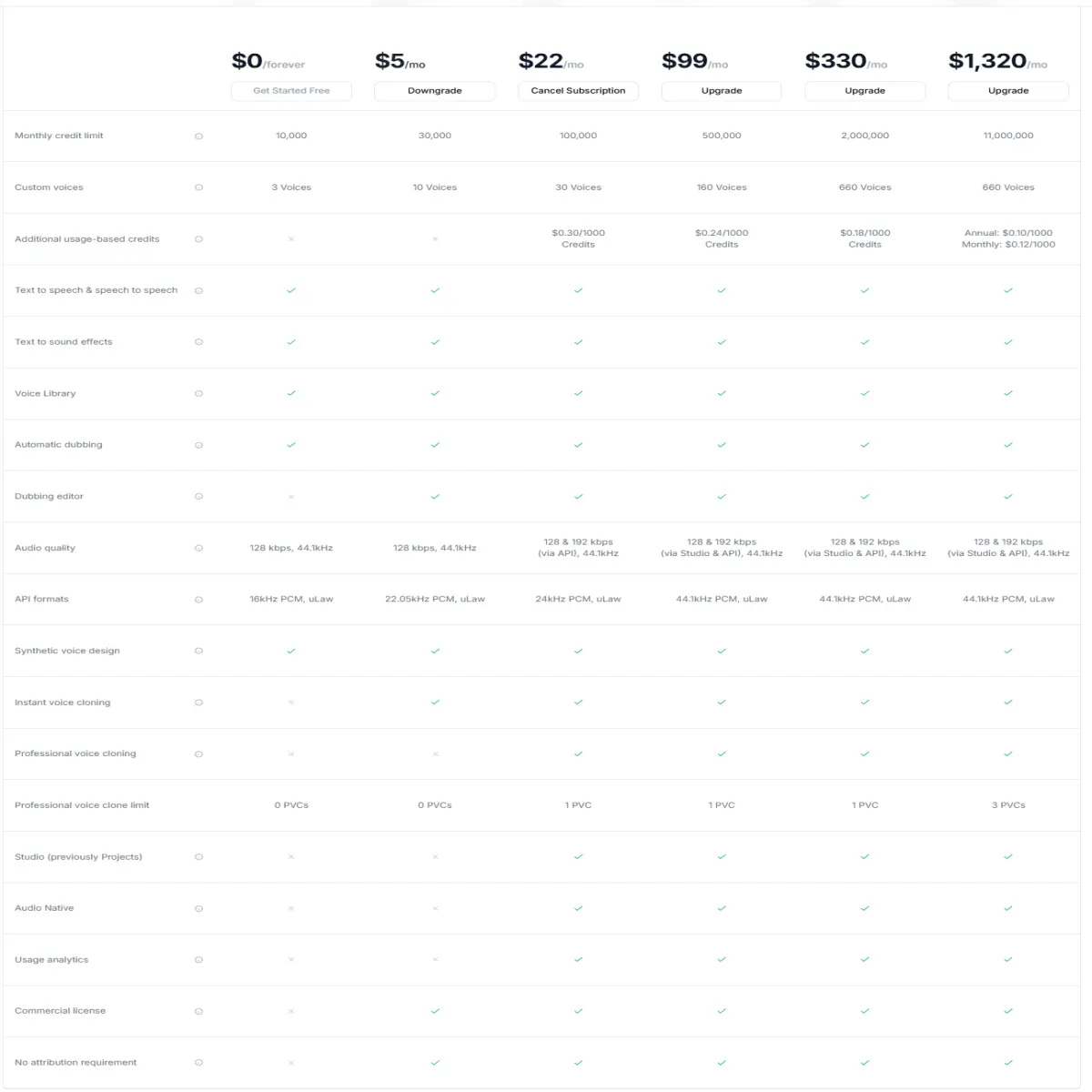
- After registering, you’ll be prompted to select a subscription plan. ElevenLabs offers both free and paid options:
- Free Plan: Limited features, including access to basic text-to-speech tools and a small quota for generating audio.
- Paid Plans: Unlock advanced features like voice cloning, higher audio generation limits, and more customization options.
- Using the discount link, you can save 50% on your first subscription, making it an affordable way to access premium tools.
Step 4: Set Up Your Dashboard
- Once you’ve chosen a plan, you’ll be redirected to your personal dashboard.
- Familiarize yourself with the interface, which includes sections for voice cloning, text-to-speech generation, and settings.
3. Preparing a High-Quality Voice Sample
The success of your voice cloning project heavily depends on the quality of the voice sample you provide. A clear and well-recorded sample ensures that the cloned voice is accurate, expressive, and natural. Below are key steps and recommendations to prepare a high-quality voice sample:
Why High-Quality Recording Matters
- Clarity: Background noise or distortion can interfere with the AI’s ability to replicate the voice accurately.
- Consistency: A consistent tone and volume in the recording result in a more natural-sounding cloned voice.
- Emotion and Intonation: Subtle nuances in speech are captured better with high-quality audio, which is essential for audiobook narration.
Recommended Tools for Recording
- Audacity (Free): A versatile and beginner-friendly tool for recording and editing audio.
- GarageBand (Free for macOS): Ideal for Mac users, offering professional-quality recording features.
- Adobe Audition (Paid): Advanced software for precise audio editing and noise reduction.
- Recording Devices: Use a high-quality microphone, such as a USB condenser mic (e.g., Blue Yeti or Audio-Technica AT2020).
Recording Tips
- Record in a quiet environment to minimize background noise.
- Use a pop filter to reduce plosive sounds (e.g., “p” and “b” sounds).
- Maintain a consistent distance from the microphone for even audio levels.
- Record in short bursts to avoid mistakes and fatigue, then edit the best takes together.
File Format and Duration Requirements
- File Format: ElevenLabs accepts common formats like MP3 or WAV. WAV is preferred for its uncompressed quality.
- Duration: Provide at least 1-5 minutes of audio for optimal results. Ensure the recording includes a variety of speech patterns, tones, and expressions.
By following these guidelines, you’ll ensure that your voice sample is of the highest quality, setting the stage for a successful cloning process.
4. Uploading and Cloning a Voice in ElevenLabs
Once your voice sample is ready, the next step is to upload it to ElevenLabs and initiate the cloning process. The platform’s user-friendly interface makes this process straightforward. Here’s how to do it:
Navigating the ElevenLabs Dashboard
- Log in to your ElevenLabs account.
- From the main dashboard, locate the “Voice Lab” section. This is where you can manage voice cloning and customization features.
Step-by-Step Instructions to Upload the Voice Sample
- Access Voice Cloning: Click on the “Add Voice” button in the Voice Lab section.
- Upload Your Sample:
- Select the voice sample file from your device.
- Ensure the file meets the format and duration requirements (e.g., WAV or MP3, 1-5 minutes).
- Provide Details:
- Name the voice profile for easy identification.
- Add optional metadata, such as the speaker’s name or intended use case.
- Submit for Processing:
- Click “Create Voice” to begin the cloning process.
- The system may take a few minutes to process the sample and generate the cloned voice.
Customization Options for the Cloned Voice
- Adjusting Tone and Style: Use the customization sliders to modify pitch, speed, and emotional expression.
- Previewing the Voice: Test the cloned voice by generating sample text-to-speech outputs.
- Fine-Tuning: If the voice doesn’t meet your expectations, consider uploading an improved sample or refining the settings.
By following these steps, you’ll successfully clone a voice using ElevenLabs. The platform’s advanced AI ensures that the cloned voice is natural, expressive, and ready for audiobook narration or other creative projects.
6. Preparing Your Audiobook Script for Narration
Before generating narration with ElevenLabs, it’s essential to properly format and edit your audiobook script. This ensures smooth AI narration and a professional-quality result.
Formatting the Script for Seamless AI Narration
- Structure: Break the script into smaller sections or chapters to make it manageable for AI processing.
- Punctuation: Use proper punctuation to guide the AI in delivering natural pauses and intonations.
- Dialogues: Clearly indicate character dialogues with appropriate formatting (e.g., quotation marks and speaker labels).
Tips for Editing Text to Ensure Natural-Sounding Output
- Read Aloud: Before uploading, read the script aloud to identify awkward phrasing or overly complex sentences.
- Simplify Sentences: AI performs better with clear, concise language rather than convoluted sentence structures.
- Add Emotional Cues: Include parenthetical notes (e.g., “(excitedly)” or “(whispering)”) to guide the AI’s tone.
Tools to Assist with Script Preparation
- Grammarly: Helps correct grammar, punctuation, and style issues.
- Hemingway Editor: Simplifies complex sentences and improves readability.
- Google Docs: Allows for easy collaboration and formatting adjustments.
By carefully preparing your script, you’ll ensure that the AI delivers a smooth and engaging narration.
7. Generating Audiobook Narration Using ElevenLabs
Once your script is ready, you can use ElevenLabs to generate the audiobook narration. The platform provides intuitive tools for uploading, customizing, and exporting audio.
Uploading the Script to ElevenLabs
- Navigate to the “Text-to-Speech” section on the dashboard.
- Copy and paste the script into the text input box. For longer scripts, upload them in sections to avoid processing errors.
Adjusting Narration Settings
- Speed: Adjust the speaking rate to match the desired pacing of the audiobook.
- Tone: Modify the emotional tone to align with the content (e.g., calm for reflective passages, energetic for action scenes).
- Voice Selection: Choose your cloned voice or experiment with other available voices for specific characters or narrations.
Exporting the Audio Files for Your Audiobook
- Generate the audio file by clicking the “Synthesize” button.
- Review the output and make adjustments if necessary.
- Export the final audio in a compatible format, such as MP3 or WAV.
This step ensures your audiobook narration is ready for post-production.
8. Editing and Enhancing the Generated Audio
After generating the audio, editing and enhancement are crucial to achieving a polished, professional-quality audiobook.
Tools for Post-Production Editing
- Audacity (Free): Ideal for basic editing, noise reduction, and adding effects.
- Adobe Audition (Paid): Offers advanced features for fine-tuning audio, equalization, and mastering.
- iZotope RX (Paid): Excellent for repairing audio issues like clicks, pops, or background noise.
Removing Artifacts and Ensuring Audio Consistency
- Eliminate any unnatural pauses, artifacts, or errors in the narration.
- Normalize audio levels to ensure consistent volume throughout the audiobook.
- Apply noise reduction to remove any remaining background hum or hiss.
Adding Background Music or Sound Effects
- Consider incorporating royalty-free background music to enhance the listening experience.
- Use subtle sound effects to emphasize key moments, such as ambient sounds for scene transitions.
By carefully editing and enhancing the audio, you’ll produce a high-quality audiobook that meets industry standards and engages listeners.
Platforms for Publishing and Distributing Audiobooks
Once your audiobook is complete, the next step is to publish and distribute it. Several platforms cater to audiobook creators, each with its own audience and technical requirements.
Overview of Platforms Like Audible, ACX, and Findaway Voices
- Audible/ACX: Audible is one of the largest audiobook marketplaces, and ACX (Audiobook Creation Exchange) is its self-publishing platform. It allows creators to distribute audiobooks to Audible, Amazon, and iTunes.
- Findaway Voices: A flexible platform offering global distribution to over 40 audiobook retailers and libraries, including Google Play and Scribd.
- Kobo Writing Life: A straightforward platform for publishing audiobooks directly to Kobo’s store.
- Authors Direct: Allows authors to sell audiobooks directly to their audience, keeping more of the revenue.
Formatting and Technical Requirements for Each Platform
Platform Audio Format Bitrate File Requirements Audible/ACX MP3 192 kbps Mono, -3 dB peak, 44.1 kHz sample rate Findaway Voices WAV/MP3 192 kbps Mono or stereo, 44.1 kHz Kobo Writing Life MP3 192 kbps Mono, 44.1 kHz
- Ensure each chapter is a separate file with proper naming conventions.
- Include an opening and closing credits file, as well as a retail sample file for promotional purposes.
Tips for Submitting Your Audiobook for Approval
- Review Platform Guidelines: Carefully read the platform’s technical and content guidelines to avoid rejections.
- Quality Check: Use tools like Audacity or Adobe Audition to ensure audio consistency and compliance.
- Metadata: Provide accurate metadata (e.g., title, author, narrator) to improve discoverability.
- Patience: Approval processes can take several weeks, so plan your release schedule accordingly.
10. Ethical Considerations and Copyright Compliance
As AI technology becomes more advanced, it’s crucial to use it responsibly. Here are key ethical and legal considerations when using ElevenLabs for voice cloning and audiobook production.
Importance of Obtaining Permission for Voice Cloning
- Always obtain explicit consent from the person whose voice you intend to clone.
- For public figures, ensure you have the legal right to replicate their voice, as this may involve copyright or publicity rights.
Avoiding Misuse of Cloned Voices for Unethical Purposes
- Do not use cloned voices for deceptive or malicious activities, such as impersonation or fraud.
- Avoid creating content that misrepresents the original speaker’s intentions or beliefs.
Legal Considerations for Audiobook Content and Voice Usage
- Ensure your audiobook script does not infringe on copyrighted material unless you have obtained proper licensing.
- Review local and international laws regarding AI-generated content and intellectual property.
- Include disclaimers in your audiobook if necessary, clarifying the use of AI-generated voices.
By adhering to these guidelines, you can use ElevenLabs ethically and maintain trust with your audience.
11. Conclusion: Streamlining Audiobook Creation with ElevenLabs
Creating an audiobook can be a complex and time-consuming process, but ElevenLabs simplifies it with its cutting-edge AI tools. From voice cloning to narration generation, the platform offers a streamlined solution for producing high-quality audiobooks.
Recap of the Steps Covered in the Tutorial
- Preparing a high-quality voice sample and cloning a voice.
- Generating natural and expressive narration using ElevenLabs.
- Editing, enhancing, and distributing your audiobook on major platforms.
Benefits of Using ElevenLabs for Audiobook Narration
- Cost-effective and time-saving compared to traditional recording methods.
- Customizable voice options to match the tone and style of your book.
- Easy integration with editing tools and publishing platforms.
Encouragement to Explore and Experiment Responsibly
AI technology like ElevenLabs opens up exciting possibilities for creators. By experimenting with its features and adhering to ethical guidelines, you can produce engaging audiobooks that captivate your audience while respecting legal and moral boundaries.
Start your audiobook journey today with ElevenLabs and bring your stories to life like never before!






