First, If you’re new to this site make sure to register so you can Get FREE CRYPTO Just for Tipping this Article from a pool of money provided free by Publish0x to reward their publishers AND readers. Register now at Publish0x to claim your $$$. It’s a great community and it only takes 15 seconds and it’s free.
I really never used the Facebook Business Suite much until recently. But, I figured something out that saved me time so I thought I would share.
I wanted to use youtube for my Affiliate product website but couldn’t come up with an idea for a video from a product image.
While I was making a post on Facebook I ended up going to the Business Suite and clicked post.
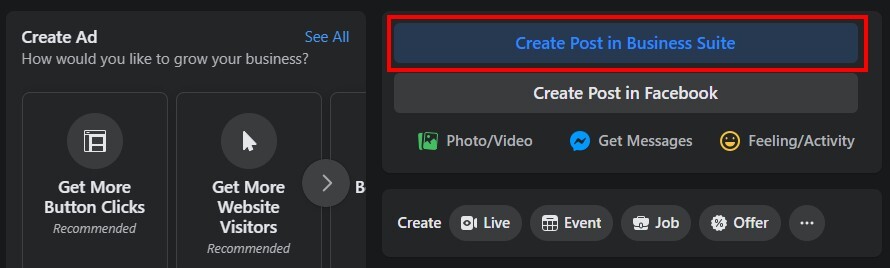

A box showed up with the normal editor. I decided to click on the settings and it asked if I wanted to use the advanced editor. I said yes and was given new options, one of which was the ability to make a video from an image “Turn into video”

I decided to give it a try and come to find out it will make a cool 10-sec video with a few clicks in about 30 seconds.
If you right-click on the Facebook preview you can save the video in a landscape format, if you save the Instagram one it will save it as a vertical video. I thought that was pretty cool so I decided to create a youtube channel to post the videos I make for each product for Instagram using this editor. Check the example below.
Since I started using this I added an intro and an ending to the videos I make now with my own software to make them more unique. Example below.
I hope this opens up some new ideas for you to use with the new YouTube Shorts category like it did for me!
If you enjoyed the article please Like, Follow, and leave a tip, if ya can. Until next time
~Justin


