Earn $KINGSFOOD, 7% Affiliate Commission and a Genesis NFT
Two years we started building a project, something I believe can grow into a meaningful and enjoyable long-term project. Not an overnight pump-and-dump. Not a “get rich quick” scheme. Just a solid, carefully-designed NFT game that rewards the people who show up early and help shape the world we’re creating.
That project is Kings of Red — and on Tuesday, 2 December 8am CST (9am Eastern time), we open the doors to the very first NFT drop in the entire collection.
This is the Genesis Sale of the Heralds.
If you’ve been following along, this post will catch you up on exactly what’s launching, what you can expect, and how you can participate safely. If you’re new here, welcome — this is a great place to start.
[ Join the Kings of Red Telegram Announcement Channel ]
What Are Heralds?
Heralds are the first NFT characters in the Kings of Red universe — the foundation layer of a long-term game economy.
Each Herald belongs to one of the seven clans:
- Smizfume
- Coalheart
- Warmdice
- Bervation
- Konfisof
- Witkastle
- Bowkin
Press enter or click to view image in full size
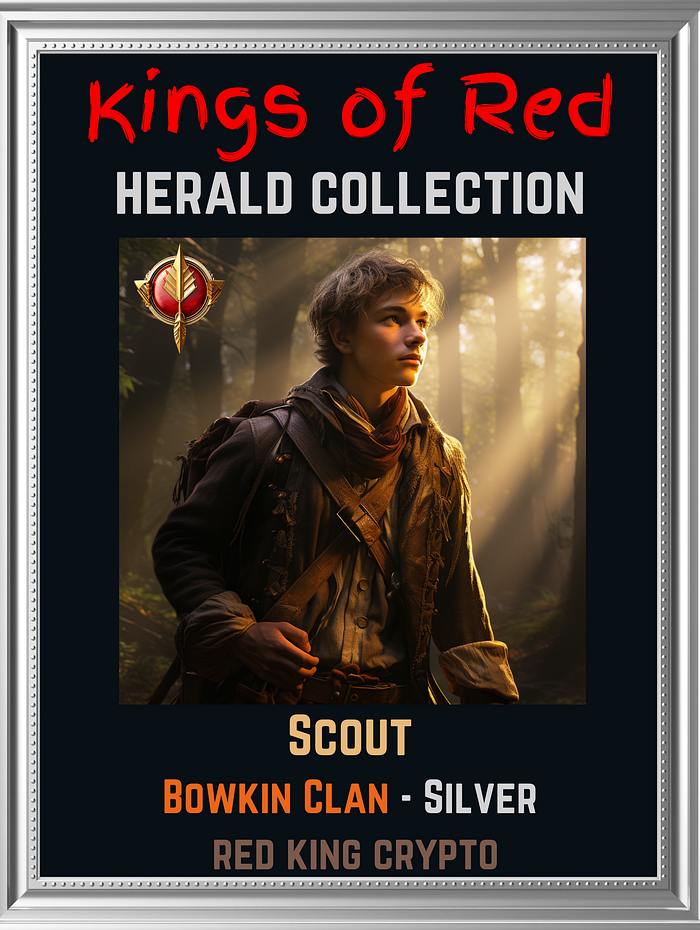 Bowkin Herald NFT — from Kings of Red
The clan of your Herald are assigned randomly on mint, but you can collect every clan! Their rarity (Bronze, Silver, Gold) affects their future earning potential once the token economy goes live.
But in the Genesis Sale, there’s something even more important than their long-term earning rates. (There is a “How to Buy” section at the bottom of the article). Again, the Genesis NFT minting opens Tuesday, 2 December 8am CST (9am Eastern time).
Why the Genesis Sale Matters
This Genesis Sale is the first public release of Heralds. Only a small number are available — and this will be the lowest price Heralds will ever sell for in the lifetime of the project.
Here are the Genesis Supply Limits:
- Bronze Heralds: 100
- Silver Heralds: 77
- Gold Heralds: 43
Once those sell out, the next phases (Early Bird and Public Sales A & B) will all be higher priced.
The Genesis supply is intentionally small because this first group of buyers will become the earliest supporters of Kings of Red, and they will be rewarded for that early trust properly.
That leads to the two biggest bonuses…
Genesis Bonus #1 — Affiliate Referral Code
Every Genesis buyer automatically receives a personal affiliate code.
Share your code with someone, and if they mint a Herald, you earn 7% commission, automatically paid to your wallet.
Two important notes:
- This works for the current Genesis sale AND all future Herald sales (early bird sale etc.).
- Commission is sent instantly, on-chain, at the time of mint.
Genesis Bonus #2 — The Genesis NFT Airdrop
Everyone who participates in the Genesis Sale will receive a special Genesis Badge NFT, which will be airdropped around late January/early February.
This NFT will carry a real in-game benefit, giving Genesis supporters a small advantage when the full game rolls out.
[ Join the Kings of Red Telegram Announcement Channel ]
Herald Staking
The Staking option is set to open in February or March, here are the upcoming four events in the roadmap:
Press enter or click to view image in full size
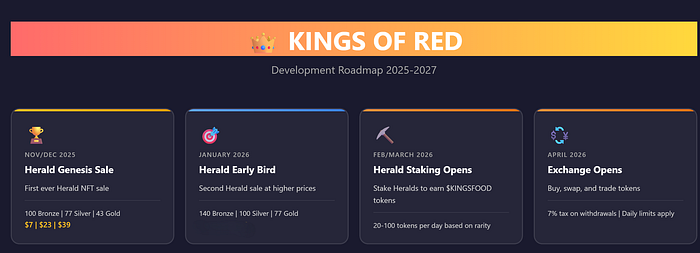 Screenshot of Kings of Red upcoming Roadmap
No Hype, No False Expectations
Kings of Red is not a “flip this and become rich” project.
It’s not a promise of guaranteed returns.
And it’s not competing with any get-rich-fast trends.
This is a game first, built slowly and deliberately.
We’re transparent about the risks and I’m open about the challenges.
And I want this community to grow because people enjoy the project — not because they were misled.
If you’ve read my writing long enough, you’ll know I approach everything the same way: honesty, clarity, and respect for the people reading.
How to Join the Genesis Sale
Minting starts on:
📅 Tuesday, 2 December
🌐 kingsofred.com (site is live)
Telegram announcements at https://t.me/kingsofred
Twitter: @RedKingDefi
You’ll need:
- A MetaMask wallet
- A small amount of ETH on Base
- Enough ETH for the Herald you want to mint (Bronze at $7, Silver at $23, Gold $39).
Mint transactions are all processed through the smart contract and fully transparent. Transaction fees are tiny, just a few cents each.
Welcome to Kings of Red.
How to Buy Kings of Red Herald NFTs
Step 1: Install MetaMask
If you don’t have MetaMask:
- Go to metamask.io
- Click “Download” and install the browser extension
- Follow the setup wizard to create a new wallet
- CRITICAL: Write down your seed phrase and store it safely
- Never share your seed phrase with anyone!
Step 2: Add Base Network to MetaMask
- Open MetaMask
- Click the network dropdown at the top (it might say “Ethereum Mainnet”)
- Click “Add Network”
- Click “Add a network manually”
- Enter these details exactly:
Network Name: Base
RPC URL: https://mainnet.base.org
Chain ID: 8453
Currency Symbol: ETH
Block Explorer: https://basescan.org
- Click “Save”
- Switch to the Base network
Step 3: Get ETH on Base Network
You need ETH on the Base network (not Ethereum mainnet) to buy Herald NFTs.
Option A: Bridge from Ethereum (If you have ETH on Ethereum mainnet)
- Go to bridge.base.org
- Connect your MetaMask wallet
- Select: Ethereum → Base
- Enter amount (minimum 0.01 ETH recommended)
- Click “Bridge to Base”
- Confirm the transaction in MetaMask
- Wait 5–10 minutes for bridging to complete
Option B: Buy Directly on Base
- Use Coinbase or another exchange that supports Base
- Buy ETH
- Withdraw to your MetaMask wallet on Base network
- Make sure you select “Base” as the network when withdrawing
Step 4: Connect to Kings of Red
- Go to kingsofred.com/mint
- Click “Connect Wallet” button
- MetaMask will pop up — click “Connect”
- Make sure MetaMask shows “Base” network (not Ethereum)
- Your wallet address should now appear at the top right
Step 5: Choose Your Herald Rarity
Herald NFTs come in three rarity tiers:
Bronze Herald
- Daily Production: 20 $KINGSFOOD
Silver Herald
- Daily Production: 65 $KINGSFOOD
Gold Herald
- Daily Production: 100 $KINGSFOOD
Step 6: Mint Your Herald
- Select the Herald rarity you want to buy
- Check the price displayed (in ETH)
- Make sure you have enough ETH in your wallet (plus ~$2–5 for gas fees)
- Click the “Mint [Rarity] Herald” button
- MetaMask will pop up showing the transaction details
- Review the details:
- Network: Should say “Base”
- Amount: Should match the Herald price
- Gas Fee: Usually a few cents
- Click “Confirm” in MetaMask
- Wait 10–30 seconds for the transaction to complete
Step 7: Verify Your NFT
Once the transaction is confirmed:
- You’ll see a success message with your Herald details
- Your Herald’s Clan is randomly assigned (one of 7 clans)
- Your Herald’s Token ID will be displayed
View Your NFT in MetaMask:
- Open MetaMask
- Switch to the “NFTs” tab
- You should see your Herald NFT!
- If it doesn’t appear immediately:
- Click “Import NFT”
- Enter Contract Address: [Contract address will be here]
- Enter Token ID: [Your token ID from the success message]
- Click “Add”
View on OpenSea (Optional)
You can also view your Herald on OpenSea and Magic Eden:
- Go to opensea.io
- Connect your wallet
- Click your profile icon
- You should see your Kings of Red Herald NFT
- Click on it to see full details and artwork
Troubleshooting
“Transaction Failed” Error
Possible causes:
- Not enough ETH for gas fees
- Wrong network (make sure you’re on Base, not Ethereum)
- Herald rarity sold out
- Contract error (try again in a few minutes)
Solution:
- Check your ETH balance on Base network
- Verify network is set to “Base” in MetaMask
- Try increasing gas fee (click “Edit” in MetaMask before confirming)
- Contact support in Discord
“Insufficient Funds” Error
Problem: You don’t have enough ETH on Base network
Solution:
- Bridge more ETH to Base using bridge.base.org
- Or buy ETH directly on an exchange and withdraw to Base network
NFT Not Showing in Wallet
Problem: NFT doesn’t appear immediately after minting
Solution:
- Wait 1–2 minutes and refresh
- Manually import NFT using contract address and token ID
- Check the transaction on basescan.org to verify it succeeded
Wrong Network
Problem: MetaMask is on Ethereum mainnet instead of Base
Solution:
- Click the network dropdown in MetaMask
- Select “Base”
- Refresh the Kings of Red website
- Try connecting wallet again
What’s Next?
Once you own a Herald NFT:
- Wait for Staking to Open (scheduled for February/March)
- Stake Your Herald to start producing $KINGSFOOD
- Join the Community
- Collect More Heralds to complete clan sets
- Watch for Alpha NFT Launch
Important Reminders
- ✅ NEVER share your seed phrase or private keys
- ✅ Always verify the website URL (kingsofred.com)
- ✅ Admins will NEVER DM you first
- ✅ Kings of Red is a game, not an investment platform
- ✅ All transactions are final and cannot be reversed
- ✅ Only spend what you can afford to lose





