
Nowadays, as I have demonstrated in an earlier post, anybody can generate an AI picture with no difficulty at all and depending on the sophistication of the AI and your willingness to pay the results can vary, but even free platforms like LightX can produce reasonable results based on just a prompt, an image or a blend of both.
Have a look at my cropped header image (to fit P0x's frame size) above - it is clearly AI, but I was able to generate it in just a couple of seconds more than it took me to write the following prompt.
A traditional artist painting a work of art in a penthouse studio with perfect lighting. Her fine brushwork and care for detail is clear on her painting
So back to the point, while I have no experience of Photoshop, I have had several false starts with its free baby cousin GIMP and have never been able to achieve a single thing with it. Frankly AI is easier.
Let's start by comparing Photoshop and AI directly before further discussion.
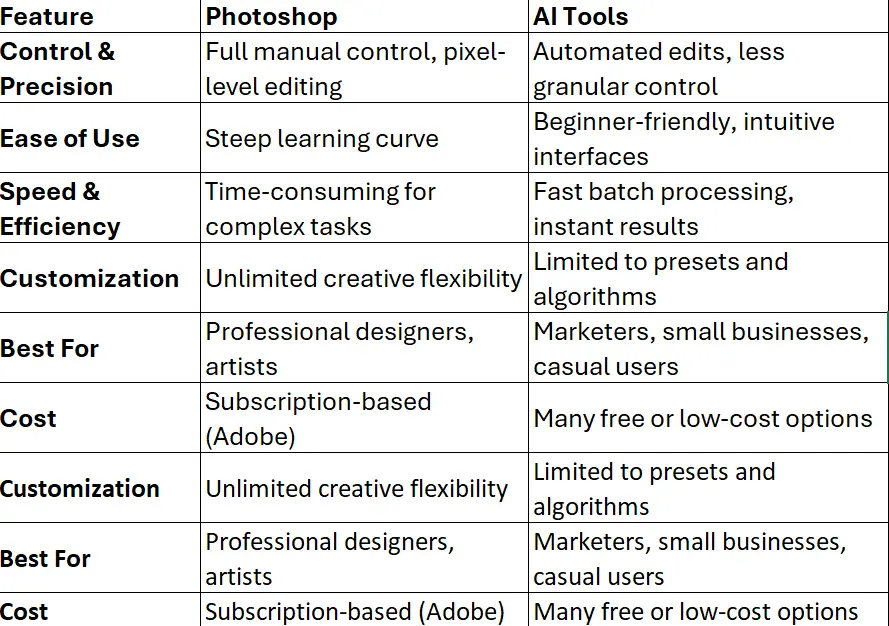
The main advantages of AI include using it for quick edits such as background removal, color correction, or upscalng and is particularly useful for creating social media content creation with templates and auto-generation, as well as batch processing for eCommerce or marketing visuals. Finally, a key thing its seamless text-to-image generation for a variety of creative reasons.
Popular AI tools include Canva, Adobe Firefly, and Fotor, although I use LightX (free version).
However, Photoshop is still the gold standard for professional image manipulation and as such is irreplaceable even in the face of AI because it can still more than compete with AI when it comes to high-end retouching (e.g., skin smoothing, jewelry editing), creating complex compositions with layers, masks, and effects and precision work for print, branding, or detailed design while maintaining creative freedom for artists and professionals.
So in the end it depends on what you are looking for. If you want speed and simplicity, AI tools are a game-changer. But if you want total creative control and finesse, Photoshop is your best bet.
For now at least...
As always stay safe and well my friends.





