
Decrypt Caesar Encryption
Discover how to decrypt an encrypted message with the Caesar cipher using a simple yet effective method in Python with the ‘decrypt_cesar()’ function.
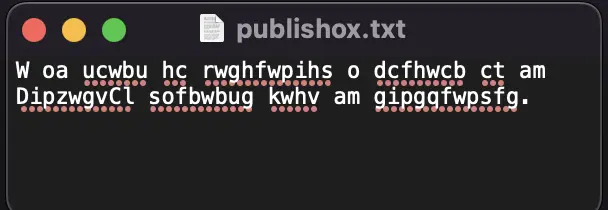
After creating my Caesar Cipher program, which allows encrypting and decrypting text using the Caesar cipher, I wanted to create a Python program to try all possible combinations to decrypt a ciphered text.
This is a basic program and is for educational purposes only.
What is BruteForce Attack ?
The decryption method used in the code is a form of brute-force attack. A brute-force attack is a cryptographic attack method that involves trying all possible combinations of keys to decrypt an encrypted message. In this case, the code tries all possible shift keys for the Caesar cipher, which has a finite number of possibilities (26 possible shifts in the alphabet).
Program :
This part of the code defines a function named 'decrypt_cesar' that takes an input of a Caesar ciphered text 'ciphertext', and attempts to decrypt the text using all possible keys.
def decrypt_cesar(ciphertext):
The function uses a 'for' loop to try each possible key from 1 to 25. For each key, it creates a variable 'plain_text' to store the decrypted text.
for key in range(1, 26):
plain_text = ''
Then, it uses a 'for' loop to iterate over each character in the ciphered text. If the character is a letter, the function calculates the letter's shift using the current key and the 'ord' function that returns the ASCII code of the character.
If the letter is uppercase, the function checks if the shift is less than the ASCII code of the letter 'A'. If so, it adds 26 to the shift value to ensure the result is a valid uppercase letter.
If the letter is lowercase, the function checks if the shift is less than the ASCII code of the letter 'a'. If so, it adds 26 to the shift value to ensure the result is a valid lowercase letter.
Finally, the function adds the decrypted character (calculated with the shifted value) to the 'plain_text' variable.
for char in ciphertext:
if char.isalpha():
shift = ord(char) - key
if char.isupper():
if shift < ord('A'):
shift += 26
else:
if shift < ord('a'):
shift += 26
plain_text += chr(shift)
If the character is not a letter, the function simply adds the character to the 'plain_text' variable.
else:
plain_text += char
For each key tested, the function displays the current testing key and the corresponding decrypted text, using the 'print()' function.
print('Key : ', key, 'Deciphered Text : ', plain_text)
Thus, the function tries all possible keys to decrypt the Caesar ciphered text and displays the decrypted text for each key tested.
Your ‘decrypt_caesar()’ function must look like this :
def decrypt_cesar(ciphertext):
for key in range(1, 26):
plain_text = ''
for char in ciphertext:
if char.isalpha():
shift = ord(char) - key
if char.isupper():
if shift < ord('A'):
shift += 26
else:
if shift < ord('a'):
shift += 26
plain_text += chr(shift)
else:
plain_text += char
print('Key : ', key, 'Deciphered Text : ', plain_text)
The rest of the code asks the user to enter the file path of the encrypted text they want to decrypt.
The 'open()' function is then used to open the file in read mode ('r'), and the content of the file is stored in the variable ‘ciphertext’.
file_path = input('Enter the file path of the ciphered text : ')
with open(file_path, 'r') as file:
ciphertext = file.read()
Finally, the ‘decrypt_cesar()’ function is called with the ‘ciphertext’ as an argument.
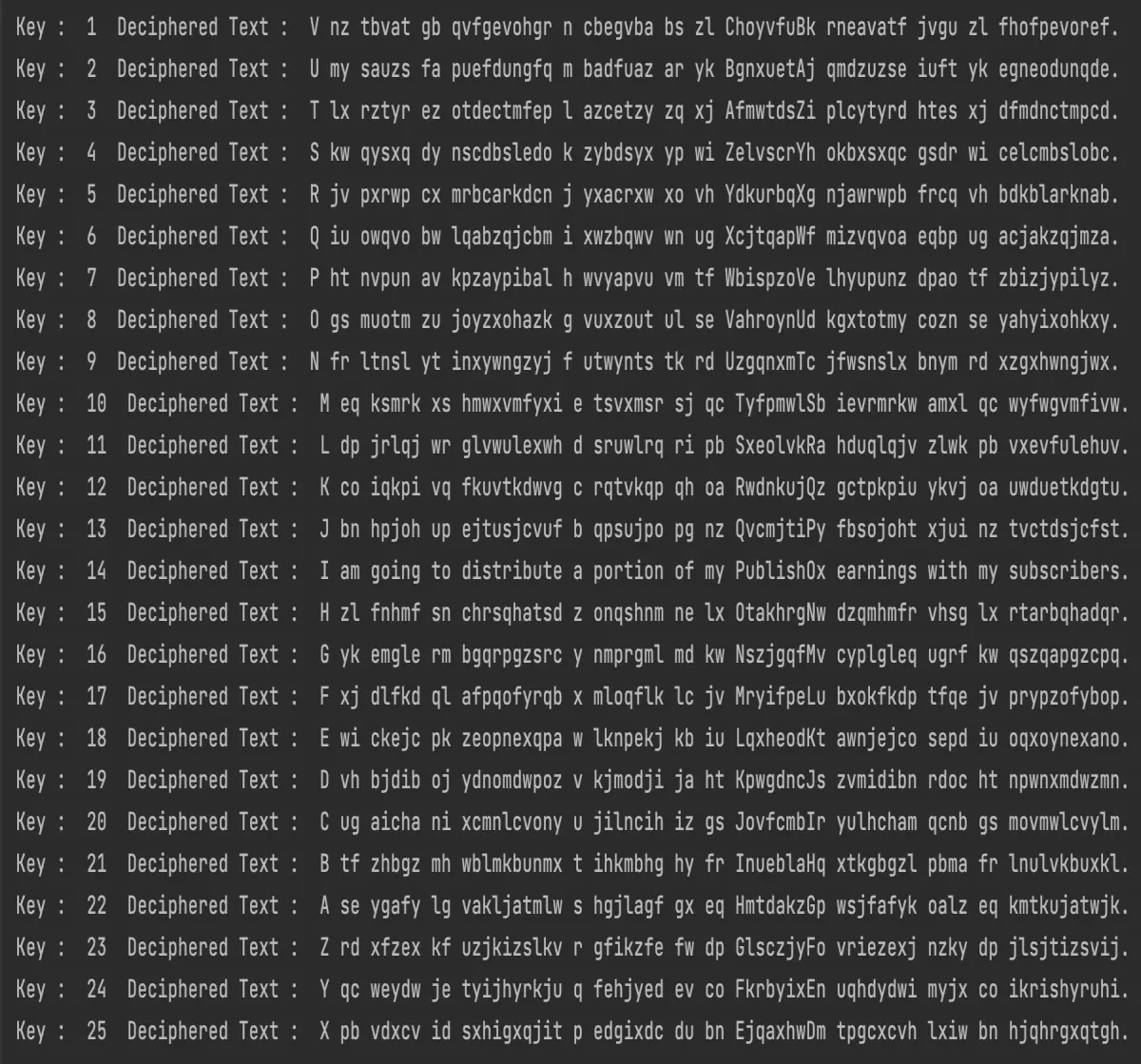
This function performs the decryption of the text using the Caesar cipher method for each possible key, from 1 to 25, and displays the corresponding decrypted text for each key.
This allows the user to see all possible decryption options and choose the key that gives the most satisfactory result.
decrypt_cesar(ciphertext)
In conclusion, the 'decrypt_cesar()' function in Python can be a simple but effective method for decrypting messages encrypted with the Caesar Cipher. By using a brute force approach to test all possible key combinations, it is possible to quickly find the correct encryption key and decrypt the message into plaintext.
However, this method may be ineffective for messages encrypted with more complex methods that require more advanced cryptography skills. Nevertheless, the 'decrypt_cesar()' function remains a good starting point for those who want to understand the basics of cryptography and Python programming.
As always, the complete code is at the end of the publication.
Thank you and congratulations to all those who didn't give up on reading this post.
Leave comment if you have find the key.
Leave a comment if you have any questions.
If you enjoy my blog posts, you can support me.
Thanks for you support 🙏
BTC : bc1qvfmetg2d36mmntrg56ld0tdrte8cqeygjxdpsg
ETH | USDC | USDT : 0x02AbfBf22fA72d068Ff305e58dF782e58F863274
EGLD : erd1jc0lms8zl64nwsy3srm0q2pllvvppkgcsa6eyaketxetcs6fpl7q0cty6a
DOGE : DLtGbPrFvwW5y7jFuvuDAkZGNB2eAErAxA
See you soon ! 🤙
Casper_X 👻
Want More Program ?
Take a look of these posts.
Scrabble Helper : https://www.publish0x.com/python-scrabble-helper/python-scrabble-helper-xvmqykg
QRcode generator : https://www.publish0x.com/python-scrabble-helper/python-qr-code-generator-xrgmxnx
Face detection : https://www.publish0x.com/python-scrabble-helper/python-face-detection-xjrwygy
Password generator : https://www.publish0x.com/python-scrabble-helper/python-password-generator-xyezmel
Caesar Cipher : https://www.publish0x.com/python-scrabble-helper/python-caesar-cipher-xvmqnex
Tkinter Scrabble Helper : https://www.publish0x.com/python-scrabble-helper/python-scrabble-helper-tkinter-xqelzgv
Sudoku Solver : https://www.publish0x.com/python-scrabble-helper/python-sudoku-solver-xkpwwvq
Want Learn More About 'Python' ?
Take a look of these posts.
Python programms : https://www.publish0x.com/python-scrabble-helper
Python module : https://www.publish0x.com/python-modules
Here is the full program :
def decrypt_cesar(ciphertext):

    for key in range(1, 26):

        plain_text = ''

        for char in ciphertext:

            if char.isalpha():

                shift = ord(char) - key

                if char.isupper():

                    if shift < ord('A'):

                        shift += 26

                else:

                    if shift < ord('a'):

                        shift += 26

                plain_text += chr(shift)

            else:

                plain_text += char

        print('Key : ', key, 'Deciphered Text : ', plain_text)


file_path = input('Enter the file path of the ciphered text : ')


with open(file_path, 'r') as file:

    ciphertext = file.read()


decrypt_cesar(ciphertext)






