
Sudoku Solver
Whether you're a casual Sudoku player or a passionate expert, this Python code for solving Sudokus is a must-have tool in your toolkit. With its powerful algorithm and ease of use, it is capable of solving even the most challenging Sudokus in no time, allowing you to focus on the pleasure of solving rather than the hassle of analysis. It is necessary to understand the Sudoku-solving problem and design an algorithm that can solve the puzzle. The presented code is an implementation of the recursive algorithm called ‘backtracking'.
What is ‘the Sudoku’ ?
Sudoku is a number puzzle where a player must fill a 9x9 grid with numbers from 1 to 9. The goal is to fill the grid in such a way that every column, every row, and every 3x3 region contains all numbers from 1 to 9 without repetition.
There are several approaches to solve a Sudoku, but the recursive algorithm called ‘backtracking' is a common method. The idea is to fill the grid incrementally, trying every possible number for each empty cell until the grid is filled or there are no more possible choices.
Program :
1. ‘solve_sudoku()’ :
This function takes the Sudoku grid ('grid') as an argument and uses the backtracking algorithm to fill the grid. It starts by looking for the first empty cell by calling the function 'find_empty_cell()'.
If no empty cell is found, it means the grid is filled and the function returns True. Otherwise, it tries each possible number for this cell by calling the function 'is_valid()'.
If a number is valid, it places it in the cell, then recursively calls 'solve_sudoku()' with the modified grid.
If 'solve_sudoku()' returns True, it means the grid is filled, and the function returns True. Otherwise, it undoes the last modification by resetting the cell to zero and continues with the next number.
If no possible number works, it means the grid is impossible to fill, and the function returns False.
We will define the functions 'find_empty_cell()' and 'is_valid()' right after.
Your ‘solve_sudoku( )’ function must look like this :
def solve_sudoku(grid):
# Find the first empty cell in the grid
empty_cell = find_empty_cell(grid)
# If there are no more empty cells, the sudoku is solved
if not empty_cell:
return True
row, col = empty_cell
# Try each possible number in the cell
for num in range(1, 10):
# If the number is valid in the cell, fill it and continue solving
if is_valid(grid, row, col, num):
grid[row][col] = num
if solve_sudoku(grid):
return True
# If the number is not valid, backtrack and try a different number
grid[row][col] = 0
# If none of the possible numbers work, backtrack and try a different path
return False
2. ’find_empty_cell()’ :
This code defines a function called 'find_empty_cell()’ that takes in a 9x9 grid as an argument. The purpose of this function is to find the first empty cell (a cell with a value of 0) in the grid and return its row and column indices.
The function first loops through each row in the grid using a ‘for’ loop. Within that loop, it also loops through each column in the grid using another ‘for’ loop. At each cell, it checks if the value in that cell is 0 using an if statement.
If the value is indeed 0, it returns the row and column indices of that cell as a tuple.
If no empty cells are found, the function returns None.
Your ‘find_empty_cell( )’ must look like this :
def find_empty_cell(grid):
# Loop through each cell in the grid to find the first empty cell
for row in range(9):
for col in range(9):
if grid[row][col] == 0:
return row, col
# If there are no more empty cells, return None
return None
3. ’is_valid()’ :
This code defines a function called ‘is_valid()’ that takes in a ‘grid’, ‘row’, ‘col', and ‘num’ as arguments. It checks whether the number ‘num’ is valid in the given cell (‘row’, col) of the grid.
To check whether ‘num’ is valid, the function first checks whether ‘num’ is already present in the same row or column. If it is, the function returns False as the number violates the rules of Sudoku.
Next, the function checks whether ‘num’ is already present in the corresponding 3x3 box of the ‘grid’.
The ‘row_start’ and ‘col_start’ variables are used to determine the starting indices of the 3x3 box that contains the cell (‘row’, ‘col’).
If ‘num’ is already present in the box, the function returns False.
If ‘num’ is not already present in the same row, column, or 3x3 box, the function returns True.
Your ‘is_valid( )’ must look like this :
def is_valid(grid, row, col, num):
# Check if the number is valid in the row and column
for i in range(9):
if grid[row][i] == num or grid[i][col] == num:
return False
# Check if the number is valid in the 3x3 box
row_start = (row // 3) * 3
col_start = (col // 3) * 3
for i in range(row_start, row_start + 3):
for j in range(col_start, col_start + 3):
if grid[i][j] == num:
return False
# If the number is valid in the row, column, and 3x3 box, return True
return True
4. Create 9x9 grid :
To use the program, the 0's in the grid need to be replaced with the visible numbers of the Sudoku.
# Create a 9x9 grid with all empty cells
grid = [[0, 0, 0, 0, 0, 0, 0, 0, 0],
[0, 0, 0, 0, 0, 0, 0, 0, 0],
[0, 0, 0, 0, 0, 0, 0, 0, 0],
[0, 0, 0, 0, 0, 0, 0, 0, 0],
[0, 0, 0, 0, 0, 0, 0, 0, 0],
[0, 0, 0, 0, 0, 0, 0, 0, 0],
[0, 0, 0, 0, 0, 0, 0, 0, 0],
[0, 0, 0, 0, 0, 0, 0, 0, 0],
[0, 0, 0, 0, 0, 0, 0, 0, 0]]
5. Solving and Printing the Sudoku Grid :
The end of this code allows to solve the Sudoku stored in the variable 'grid' using the ‘solve_sudoku()’ function.
If a solution is found, the result is displayed as a grid using a 'for' loop. If no solution is found, an error message is displayed.
# Solve the sudoku and print the result or an error message
if solve_sudoku(grid):
print("Here is the result of your Sudoku :\n")
for row in grid:
print(row)
else:
print("Error : No solution exists !")
6. Example :
Here is an empty Sudoku grid to fill.
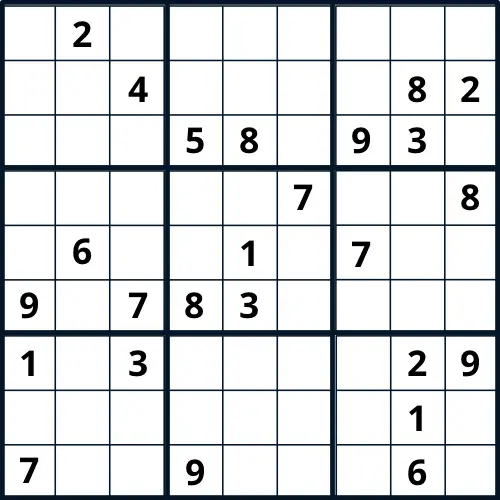
I will use the program to solve it in no time.
Just fill in the cells with the numbers shown in our grid and run the program.
grid = [[0, 2, 0, 0, 0, 0, 0, 0, 0], [0, 0, 4, 0, 0, 0, 0, 8, 2], [0, 0, 0, 5, 8, 0, 9, 3, 0], [0, 0, 0, 0, 0, 7, 0, 0, 8], [0, 6, 0, 0, 1, 0, 7, 0, 0], [9, 0, 7, 8, 3, 0, 0, 0, 0], [1, 0, 3, 0, 0, 0, 0, 2, 9], [0, 0, 0, 0, 0, 0, 0, 1, 0], [7, 0, 0, 9, 0, 0, 0, 6, 0]]
Try solving the Sudoku yourself before testing your program.
Here is the result :
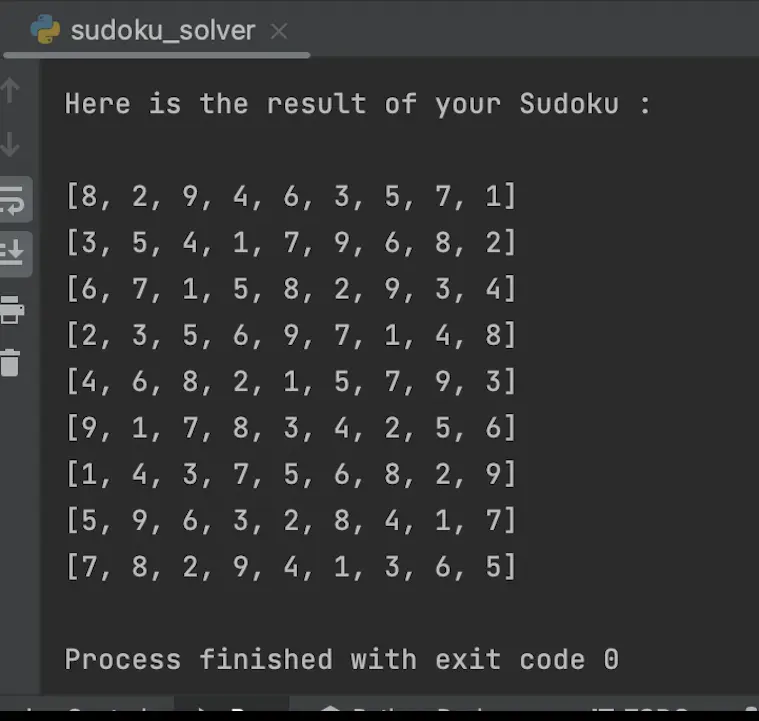
As always, the complete code is at the end of the publication.
Thank you and congratulations to all those who didn't give up on reading this post.
This post is not as detailed as the previous ones, so feel free to send me a comment if you need more explanations.
Leave a comment if you have any questions
If you enjoy my blog posts, you can support me.
Thanks for you support 🙏
BTC : bc1qvfmetg2d36mmntrg56ld0tdrte8cqeygjxdpsg
ETH | USDC | USDT : 0x02AbfBf22fA72d068Ff305e58dF782e58F863274
DOGE : DLtGbPrFvwW5y7jFuvuDAkZGNB2eAErAxA
See you soon ! 🤙
Casper_X 👻
Want more program ?
Take a look of these posts.
Scrabble Helper : https://www.publish0x.com/python-scrabble-helper/python-scrabble-helper-xvmqykg
QRcode generator : https://www.publish0x.com/python-scrabble-helper/python-qr-code-generator-xrgmxnx
Face detection : https://www.publish0x.com/python-scrabble-helper/python-face-detection-xjrwygy
Password generator : https://www.publish0x.com/python-scrabble-helper/python-password-generator-xyezmel
Caesar Cipher : https://www.publish0x.com/python-scrabble-helper/python-caesar-cipher-xvmqnex
Tkinter Scrabble Helper : https://www.publish0x.com/python-scrabble-helper/python-scrabble-helper-tkinter-xqelzgv
Here is the full program :
def solve_sudoku(grid):
    # Find the first empty cell in the grid
    empty_cell = find_empty_cell(grid)
    # If there are no more empty cells, the sudoku is solved
    if not empty_cell:
        return True

    row, col = empty_cell

    # Try each possible number in the cell
    for num in range(1, 10):
        # If the number is valid in the cell, fill it and continue solving
        if is_valid(grid, row, col, num):
            grid[row][col] = num
            if solve_sudoku(grid):
                return True
            # If the number is not valid, backtrack and try a different number
            grid[row][col] = 0

    # If none of the possible numbers work, backtrack and try a different path
    return False


def find_empty_cell(grid):
    # Loop through each cell in the grid to find the first empty cell
    for row in range(9):
        for col in range(9):
            if grid[row][col] == 0:
                return row, col
    # If there are no more empty cells, return None
    return None


def is_valid(grid, row, col, num):
    # Check if the number is valid in the row and column
    for i in range(9):
        if grid[row][i] == num or grid[i][col] == num:
            return False

    # Check if the number is valid in the 3x3 box
    row_start = (row // 3) * 3
    col_start = (col // 3) * 3

    for i in range(row_start, row_start + 3):
        for j in range(col_start, col_start + 3):
            if grid[i][j] == num:
                return False

    # If the number is valid in the row, column, and 3x3 box, return True
    return True


# Create a 9x9 grid with all empty cells
grid = [[0, 0, 0, 0, 0, 0, 0, 0, 0],
        [0, 0, 0, 0, 0, 0, 0, 0, 0],
        [0, 0, 0, 0, 0, 0, 0, 0, 0],
        [0, 0, 0, 0, 0, 0, 0, 0, 0],
        [0, 0, 0, 0, 0, 0, 0, 0, 0],
        [0, 0, 0, 0, 0, 0, 0, 0, 0],
        [0, 0, 0, 0, 0, 0, 0, 0, 0],
        [0, 0, 0, 0, 0, 0, 0, 0, 0],
        [0, 0, 0, 0, 0, 0, 0, 0, 0]]

# Solve the sudoku and print the result or an error message
if solve_sudoku(grid):
    print("Here is the result of your Sudoku :\n")
    for row in grid:
        print(row)
else:
    print("Error : No solution exists ! ")






