
We all love to earn free crypto, but earning free crypto while helping cancer research (and other diseases) is a much more fulfilling feeling. Folding is a method of giving away your computing power in exchange for points to earn Banano - A fast and feeless crypto that is a fork of nano.
Essentially, the process involves using your computing power to simulate proteins that will help with scientific research. For every successful 'fold', you will earn a Work Unit (WU) - For every Work Unit you complete, you will be rewarded with Banano.
It it advised to use a strong computer to fold, but it is possible to fold on a laptop. Though I highly advise monitoring the temperature of your hardware to ensure that it doesn't overheat and fry it. If you do use a laptop, try and fold through using GPU only, as it's much more efficient than CPU folding - this will be explained in more detail further on.
1) How do I get started?
Firstly to be able to earn Bananos for folding, you will need to set up a Banano wallet. The best wallet to use is the Kalium app on mobile, though you can also use https://vault.banano.cc/ if you are only on desktop.
This wallet will provide with a Banano address which you will need for your folding payouts.
2) How do I begin to fold?
After setting up your wallet, head over to:
https://bananominer.com/ - When you are on this page you will see the following:

Input your Banano address in the box as stated and click 'Start Now!'.
After inputting the address, you will get the following pop-up:

You need to make sure to note down your unique name and number - This is an important step!
3) Start Folding!
Click on the 'Start Folding' text on the pop up linked above.
Clicking it will bring you to the following site to download the folding software - https://foldingathome.org/start-folding/
Next, download the folding software on the page, it will look as follows:

Download the link and follow the steps it will tell you to. This may take a few minutes to download fully.
4) Folding Browser
After downloading, you will be brought to your folding dashboard. It will look like this:

Make sure to input the name and number that you were given earlier in the top left - Click on 'Change Identity' to make this happen. You need to ensure that the name and number are correct to get your payout. It will also ask you here if you want a passkey - you should add one to earn extra points if you complete the folding quickly.
To add the passkey, simply enter your e-mail and the key will be sent to you.
5) Turn on GPU mining for better efficiency
CPU folding is slower and less efficient, so it's recommended to fold with GPU power. To access your folding settings, look at the bottom right of your monitor and select the folding settings:
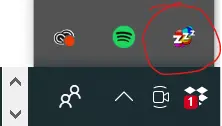
After clicking this you will get a pop-up - Click on the 'Advanced Control' - it will bring you to the following menu:

This is your folding control center. Next, you will press 'Configure' which is on the top left of the control center. After clicking 'Configure' you will be brought to another menu:

Click on 'Slots' and you will be able to remove CPU folding from here. Once you have removed it, make sure to hit 'Save' on the bottom right to lock your settings in. Though this part is optional as you can fold with both, but CPU folding is not as efficient - and will heat up your laptop if you are using one.
6) Proceed to Fold
After that step, go back to your folding dashboard. From here you can select which disease you wish to donate your computing power to and help:

Choose whichever one you like. Then simply select how much power you wish to use - either 'Low', 'Medium' or 'Full' and click on the button 'Start Folding'. You should start to see the progress bar fill up towards completing your first Work Unit.
Obviously the stronger your computing system, the more efficiently you will fold. I would also recommend downloading software that keeps track of your CPU/GPU temperature.
If using a powerful computer you can expect upwards of 30 Banano per day - some will make much more and some much less. But, obviously a big part of folding is not the profit but simply helping a good cause.
7) Turn in your Work Units for crypto!
The final step is to actually receive your Banano. To be eligible, you must have first completed two Work Units. Once you have done this, proceed to https://www.monkey2monkey.com/fh-stats/ and enter your folding ID. Again, make sure that the ID is correct or you will not receive your payout.
You can then gather your Banano and hold and engage with the community, or sell it on CoinEx if that is preferable. You will get 10% off your trading fees using my referral link.
You can find out more about Banano on their subreddit or discord.
I hope some of you engage in folding as it is a worth while cause that earns you a very fun crypto that has a lot of potential upside!
Thank you for reading!






