
Setting a full bitcoin node
This is one of the few guides out there
https://bitcoin.org/en/full-node
This setup is valid for any x86 machine. If own a RPi3 or RPI4 I would recommend using raspiblitz.
And soon raspiblitz will run on x86 machines as easy at runs on a RPi.
You can run a full bitcoin node in almost hardware out there, like Satoshi says in the white paper "The network itself requires a minimal structure".
But if you are a miner that is different thing and for that you need more powerful hardware.
Some people claim that miners or mining nodes, because everyone on the network is a node, should say what are the rules and change them at their will. And that's not true because in a P2P network every node is equal and everyone share their resources that they put on the network.
But because miners are using lot of energy to mine bitcoin they are reward for that. Actually in the bitcoin network, miners apply security doing computational work.
An example how this works is looking to a lock like this one:
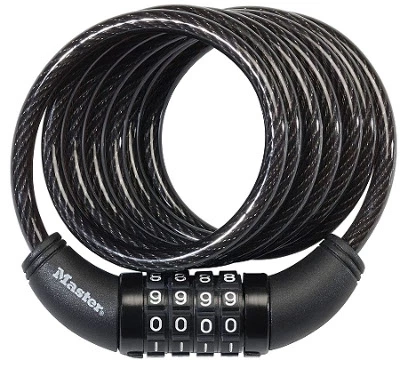
Everyone with a bike should know this kind of looks!
This looks open with a combination but for someone that doesn't knows the combination the only way to open it is trying every single combination. And this what mining nodes do! They do brute force until they find the combination.
Then the other nodes on the network check if that combination really opens the lock and they do it very fast because when you know the combination it's easy to open the look.
Because the hard work that miners do, every time they do this job that it's similar to open a look, they receive bitcoin. That's called the block reward and that's the way that the bitcoin is generated on the network. But this block reward is reduced with time, so the bitcoin supply is limited to 21M.
Besides this block reward, miners also receive the fees of every transaction on the block that was mined. And in this way, when every bitcoin was already mined there is still incentive for miners spend energy applying security on the network doing computational work aka PoW (Proof of Work).
And doesn't matter if you can do this job faster with more computational power because PoW was difficulty adjustment. This means that every time that there is more miners or more powerful hardware on the network the job goes harder. And the opposite also applies, less hash rate (capacity to do PoW) means less difficulty.
In this way the bitcoin network is sustainable in the future and the devs working on the software, are doing an amazing job adding new features to bitcoin making it better every time.
Best of all is that who runs the node software can choose or not to use that software.
So in fact no one controls the network! It runs by consensus.
Notes:
In fact a miner don't run any node software, unless is running a pool. Only pools have the node software.
Some people say that not mining nodes are irrelevant to the their network or they don't make any PoW.
Let's say we have a very small network with node A, B, C and D and every node is a mining node and runs the node software.
The nodes A, B, C and D are trying to find the next block. And the B is the lucky winner to find it. All the PoW done by the other nodes to try to find that block was wasted and that is how mining works.
The only thing that the node A, C and D did, was to receive to block mined by B and see if it is by the network rules and broadcast the block between them.
But did the node A, C and D did the same PoW? No! Most likely they don't have the same hashrate or even worked the same amount of time in that block.
And now lets say that the node A, is just waiting for the other nodes to find the next block and check if it is valid on the network and broadcast it on the network. Node D find the next block. But is the node A still part of the network? Of course!
And did the node A any PoW? Yes! The node A didn't generate any block, like nodes B and C. But like nodes B and C, the node A validate the block that node D found.
Mining is risk reward game and business, but that does't mean that only mining nodes vote on the network.
Any node that runs the node software can accept or not a block generated by a miner. Any invalid block will be rejected by the network and who broadcast it, banned!
Hardware - An $35 computer, an RPi3
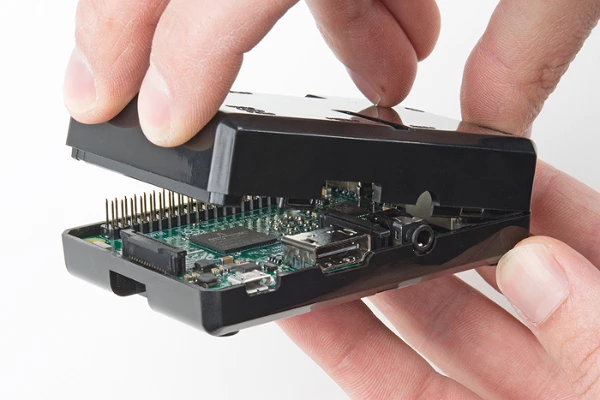
This is a setup of a bitcoin full node running on a RPi3 hardware. I run other nodes but this is my first bitcoin full node on an ARM machine.
My RPi3 run a Linux OS, without X. This even make the cost of running this node lower, because I won't need a monitor. I don't need a software license because Linux is Free Open Source Software (FOSS).
And bitcoin is also FOSS.
And I access my node through SSH, so I don't even need a mouse or keyboard. It's only the RPi3, it's power supply, micro sd card and an 2,5'' external hard drive like this one
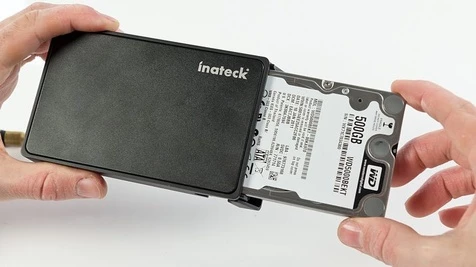
The final cost of this setup is less than 200 usd with cables, the plastic box to put the RPi3 and the hard drive.
Software - Download the client
I will use the Sathoshi client also known as reference client or bitcoin core.
So on https://bitcoin.org/en/download or https://bitcoin.org/bin/
$ wget https://bitcoin.org/bin/bitcoin-core-0.15.1/bitcoin-0.15.1-arm-linux-gnueabihf.tar.gz
$ wget https://bitcoin.org/bin/bitcoin-core-0.15.1/SHA256SUMS.asc
Check the client integrity and authenticity
$ sha256sum --ignore-missing -c SHA256SUMS.asc
bitcoin-0.15.1-aarch64-linux-gnu.tar.gz: OK
sha256sum: WARNING: 20 lines are improperly formatted
Integrity is checked and now I will check it's authenticity.
And in where get the public key I want to verify.
$ wget https://bitcoin.org/laanwj-releases.asc
But the website says
If you know how to use PGP, you should also click the Verify Release Signatures link on the download page to download a signed list of SHA256 file hashes. The 0.11 and later releases are signed by Wladimir J. van der Laan’s releases key with the fingerprint:01EA 5486 DE18 A882 D4C2 6845 90C8 019E 36C2 E964
Let check that
$ gpg --with-fingerprint laanwj-releases.asc
pub 4096R/36C2E964 2015-06-24 Wladimir J. van der Laan (Bitcoin Core binary release signing key) <[email protected]>
Key fingerprint = 01EA 5486 DE18 A882 D4C2 6845 90C8 019E 36C2 E964
It's correct!
So will import it to my keyring and sign it.
$ gpg --import laanwj-releases.asc
gpg: key 36C2E964: public key "Wladimir J. van der Laan (Bitcoin Core binary release signing key) <[email protected]>" imported
gpg: Total number processed: 1
gpg: imported: 1 (RSA: 1)
gpg: 3 marginal(s) needed, 1 complete(s) needed, PGP trust model
gpg: depth: 0 valid: 1 signed: 0 trust: 0-, 0q, 0n, 0m, 0f, 1u
$ gpg --list-keys
$ gpg --sign-key 36C2E964
Let's check if the software is authentic.
$ gpg --verify SHA256SUMS.asc
gpg: Signature made Sat 11 Nov 2017 13:52:22 WET using RSA key ID 36C2E964
gpg: checking the trustdb
gpg: 3 marginal(s) needed, 1 complete(s) needed, PGP trust model
gpg: depth: 0 valid: 1 signed: 1 trust: 0-, 0q, 0n, 0m, 0f, 1u
gpg: depth: 1 valid: 1 signed: 0 trust: 1-, 0q, 0n, 0m, 0f, 0u
gpg: next trustdb check due at 2019-02-14
gpg: Good signature from "Wladimir J. van der Laan (Bitcoin Core binary release signing key) <[email protected]>"
Extracting the file
Extract the file
$ tar zpvfx bitcoin-0.15.1-aarch64-linux-gnu.tar.gz
Some people run the client as root or create a new user just for that. I will run it with my regular user.
And I use a symbolic link to make it easier to upgrade in the future.
$ ln -s bitcoin-0.15.1 bitcoin
$ vim ~/.bash_profile
And add this at the end
#PATH to bitcoin client
export PATH=$PATH:$HOME/BITCOIN/bitcoin/bin/
Be aware to not leave any blank space at the end of that file.






