
Hey there 😊
Thank you for joining my first post in Learning Python Programming and on to a new world of using the language to benefit you as best as possible.
This Lesson will be split into two Points:
- Variables
- print() function
What can you expect from this lesson?
In this lesson you will be able to understand how the programming language stores what you want in the form of a variable. Then we will be utilising our first function namely the print() function, which you came across in my previous post here.
Okay enough of that…
Variables:
In my opinion a variable could be considered as a container, something that is able to hold almost anything if not everything 😊. In the Python Programming language, a variable is used exactly as I described to store a certain data type.
Let us pick up where we left off from the environment setup in the previous post (Getting started with Python and the environment setup).
Creating a new script file and saving in our new code location
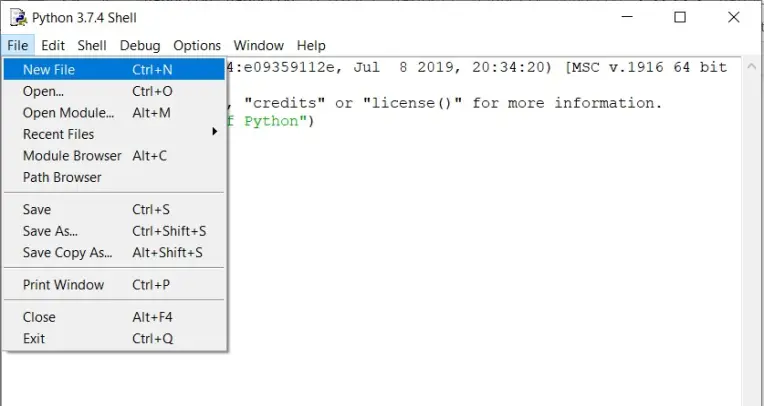
- Once you have Python IDLE open select file and New file
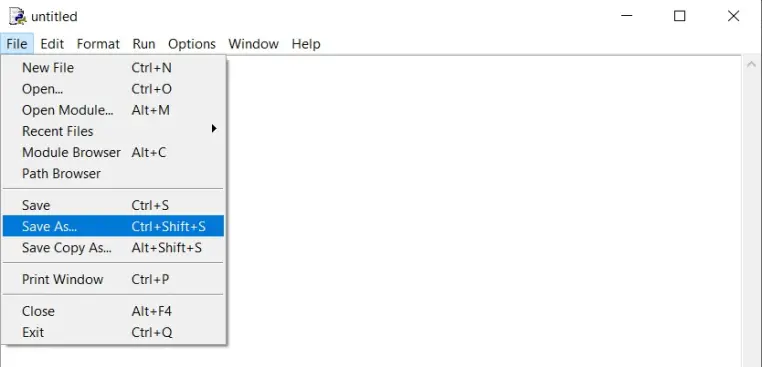
- A new window should have popped up as untitled let us select file and save as in a new location
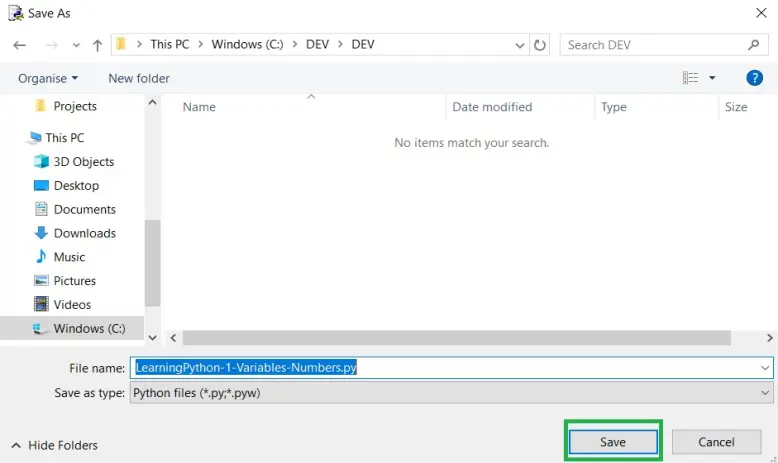
- I have chosen the following location:
- C:\DEV\DEV
- Once saved we can dive into some code YEAAAAH!!! (My favourite part) as learning is best in a practical sense.
Note!! I shall be using code blocks for ease of copying code 😉
# The hash symbol is used for comments and will not execute with your code consider it as a note to self.

# Assigning an name to a variable is as simple as putting a name best understood by you
# I believe to stick to a certain standard, for example:
# 	user_name
#	user_passord
# another note a variable cant start with a number ;)


variable_a = 2
variable_b = 6
- Well done, lets ctrl-s (short for file and save) and run our first file by clicking run and run module
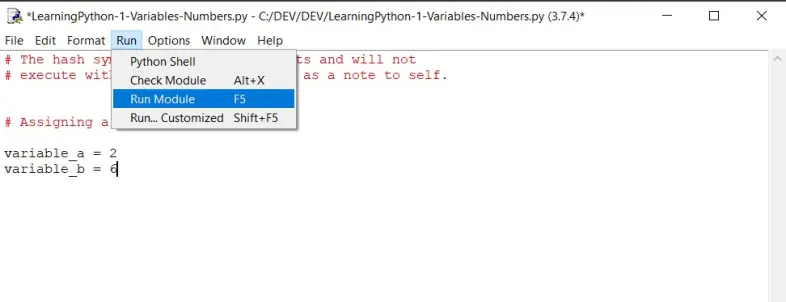
- If you ended up with this output :

Then all is working, Yeaaaah....
...but MonsterNur there is nothing to see. True but if you did soemthing wrong you would see errors :)
Lets get into the next part where we actually see the variables we have assigned on the screens output after we run it.
Using the print() function to print our variables
Remember the previous post we used the following line of code to print a sentence to the screen:
print(“Hello World of Python”)
- Well the “print()” part is actually called a function and its “function” is to print a data type which you place inside its parenthesis, lets check this out next.
Remember I shall be using comments in code blocks for ease of copy paste
# The hash symbol is used for comments and will not execute with your code consider it as a note to self.

# Assigning an name to a variable is as simple as putting a name best understood by you
# I believe to stick to a certain standard, for example:
# 	user_name
#	user_passord
# another note a variable cant start with a number ;)


variable_a = 2
variable_b = 6

# Printing our variables
# simply add the variable assigned above like this:

print(variable_a)
print(variable_b)
- Lets run this code now with the added print function
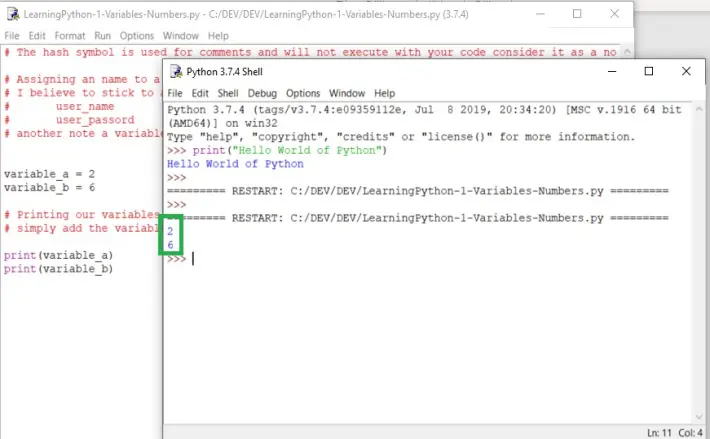
Well done !!!
that is how easy it can be to start writing code, storing a value in a variable and then printing the variable on request using the print() function.
I think that quick guide will get you started with ease.
Remember make sure to follow so you can check in daily for new content on our journey to learning Python Programming Language.






