
You spot a wallet making profitable trades, open its latest purchase and start checking the token. By the time you decide to buy, the price may already have moved.
That is the difficulty with manually following fast-moving memecoin traders. Finding a wallet is only the first step. You also need a way to act on its trades without watching the feed all day—and rules that keep each position within your own budget.
This guide walks through that process, from researching wallets on Fomo to setting up an automated copytrade task.
Why use an automated copytrading tool?
Fomo is a social crypto trading app where you can discover traders and follow their activity. For this workflow, we use it to research wallets and choose whom to follow.
Automating the next step requires a tool that can monitor a selected wallet and attempt trades according to rules you set in advance. Those rules should cover how much to spend, whether to copy sells, how much price movement to tolerate and when to exit.
Automation can reduce the manual work involved, but it cannot guarantee the original trader’s entry price or returns. Your order comes later, and fees, liquidity and execution delays still matter.
This is where DAWN comes in. We are using its Telegram copytrading workflow to turn a chosen Fomo wallet into a task with defined trade sizes and exit settings. Fomo is the research starting point; DAWN handles the automated execution in this walkthrough.
1. Research the wallet before copying it
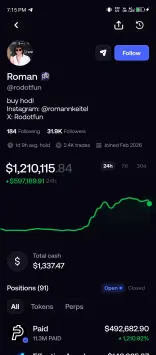
Open Fomo’s leaderboard or activity feed and look beyond the largest profit figure. A strong recent result is a reason to investigate, not proof that a wallet will keep performing.
- Compare time periods. Review the available 24-hour, 7-day and 30-day results rather than relying on a single good session.
- Check realised profits and trade count. Look for results across multiple closed trades. One outsized win can make the overall record look stronger than the typical trade.
- Review position sizes. A trader with a much larger balance may take risks or absorb costs that do not suit your budget.
- Look at the tokens and liquidity. Thinly traded tokens can be difficult to enter and exit, particularly after other traders start copying the same wallet.
Once you have chosen a trader to investigate further, note their public wallet address, Fomo handle or profile link. Check that you have the correct identity before creating a task.
2. Open DAWN and check the setup
Open DAWN’s website and use its Telegram link. Check the current supported networks, deposit instructions and fees before funding a trading balance.
If you decide to test the workflow, use an amount you can afford to lose and allow for transaction costs. A small order can still be expensive relative to its size once fees are included.
The screens in this guide illustrate the supplied walkthrough. Labels and available settings may change; use the current bot prompts when configuring your task.
3. Add the trader you want to follow
In DAWN’s main menu, open Copytrade, then choose Follow a Trader.
The setup screen shown here accepts a wallet address, a Fomo @handle or a fomo.family profile link. Paste the identifier and check the trader and wallet that DAWN resolves. Give the task a recognisable name so you can find it later.
4. Set the trade size and copying mode
Buy amount
Choose how much each copied buy can spend. The walkthrough offers fixed dollar amounts and a percentage of the leader’s buy. A fixed amount makes the cost of each new position easier to understand.
The $5 and $10 amounts shown in the interface are examples, not suitable amounts for everyone. Also consider how many buys a wallet might make: a small amount per trade can build into a much larger total exposure.
Buys only or buys and sells
- Buys Only: the task copies entries; you remain responsible for exits through manual decisions or configured exit rules.
- Buys + Sells: the task also follows the trader’s sells. The illustrated prompt describes selling the same share when the trader sells.
Check this selection carefully. Copying someone’s buys without following their exits can leave you holding tokens after they have reduced or closed their position.
5. Configure the execution and exit rules
Slippage
Slippage controls the price movement you are willing to accept during execution. A tighter limit can cause trades to fail or be skipped; a wider limit can allow a much worse fill. It does not prevent a token from falling after you buy.
Stop loss
A stop loss sets a price-drop trigger for an attempted sale. Choose a level that fits your risk limit rather than selecting a preset without considering the loss it represents. A trigger is not a guaranteed exit price, especially during sharp moves or poor liquidity.
Take profit
A take-profit rule sets a gain at which the bot attempts to sell. In the illustrated setup, +100% means twice the entry price before costs. This is an explanation of the setting, not a forecast or recommended target.
Minimum market cap
This filter skips buys below your chosen market-cap threshold. It can narrow the tokens a task follows, but market cap alone does not establish liquidity, legitimacy or safety.
6. Review the task before activating it
Check the review screen from top to bottom:
- The intended trader, wallet and supported network.
- The amount committed to each copied buy.
- Whether sell mirroring is on or off.
- The slippage limit and any stop-loss or take-profit rules.
- The minimum market-cap filter.
When those settings match your intention, the walkthrough’s Create task button activates the setup. DAWN then monitors the selected wallet and attempts eligible trades under your rules. Creating a task does not guarantee that every trade will execute.
Managing an active task
The illustrated task page includes Pause, Edit Size, Change Wallet, Settings, Filters, Activity and Delete Copytrade.
Use Activity to check what actually executed and compare your own results with the trader’s. Review fees, failed orders, entry prices and remaining positions instead of assuming that the leaderboard reflects your experience.
Pausing or deleting a copying task should not be treated as confirmation that existing holdings have been sold. Check your portfolio and manage any open positions separately.
The risks to keep in view
You can copy a winning wallet and still lose money. Your entry may be later, your exit may differ and your trading costs may take a larger share of each position.
Memecoins can lose value rapidly or become difficult to sell. Historical wallet performance can also be distorted by a small number of wins, unrealised gains or trading activity you cannot fully interpret. Automation repeats the selected behaviour; it does not judge whether the next trade is sensible.
Begin by understanding one task and its actual results before adding complexity. Keep total exposure within your own limits, review the setup regularly and stop copying when the behaviour no longer matches your reasons for following the wallet.
Frequently asked questions
Do I need to share a private key to follow a trader?
No private key belonging to the trader is needed. The illustrated follow flow uses their public address, Fomo handle or profile link. Never confuse a public wallet identifier with secret recovery information.
Can every Fomo trade be copied?
Do not assume so. The wallet, network, token and transaction must be supported, and the trade must meet your task’s filters and execution requirements.
Will my returns match the trader’s?
No. Timing, position sizing, liquidity, fees and your exit rules can all produce different results.
This guide explains a workflow for educational purposes. Copytrading does not guarantee profit, and funds used for memecoin trading can be lost.






