How To Verify Brave Creator With An Email

How To Verify Brave Creator With An Email


Download Brave Browser here

First, you need to have a Youtube channel.

Step 1: Sign in Youtube account by your email
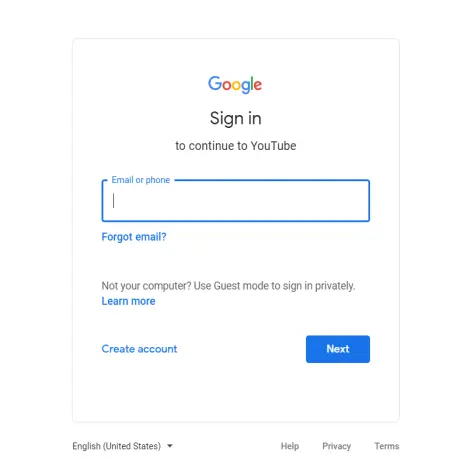
Sign-in email

Step 2: Go to your profile and select “Create a channel”
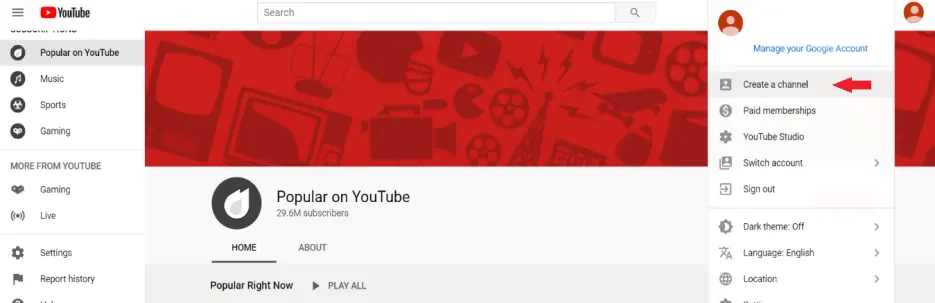
choose create a channel

Step 3: In “Choose how to create your channel” select “Use your name”
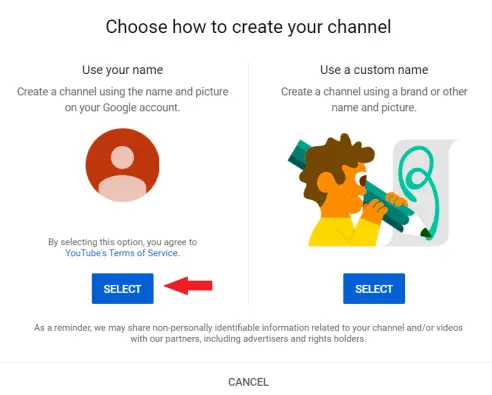
choose how to create your channel

Step 4: Write something you want in “Channel description” at “Tell viewers about your channel” and Click “Save and continue”
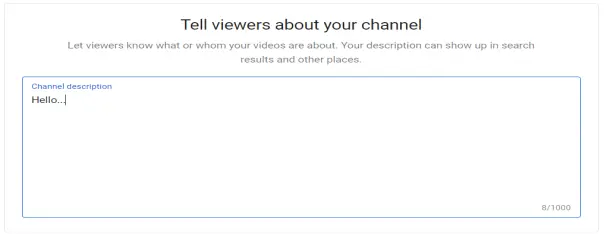
tell viewers about your channel

Well, you have a Youtube channel now.

Add Your Youtube Channel To Brave Creator


Learn how to verify your Youtube Channel with Brave Payments so that you can begin receiving monthly contributions from Brave users and monetize your website.

How do you rate this article?

1


Making Money With Brave Browser

Looking for ever more ways to earn free Bitcoin and cryptocurrency- without investing a penny upfront or adding hours to your day? Then you may consider ditching Chrome for Brave Browser. Brave is a faster, safer and more secure browser than any other web browsers out there. Brave Browser offers several ways to make money for both everyday users and content creators.

Publish0x

Send a $0.01 microtip in crypto to the author, and earn yourself as you read!

20% to author / 80% to me.
We pay the tips from our rewards pool.


