
1. Introduction
The world of terminals and command shells can be confusing, especially for beginner users. However, understanding the difference between a terminal and a shell is the first step to effectively working with Unix-like systems. This article will explain what terminals and shells are, how they are related, and how they differ.
2. Terminal: The Interface to the System
A terminal is a program that provides a text-based interface to interact with the operating system.
What does a terminal do?
- Processes commands entered by the user.
- Displays the results of command execution.
- Facilitates interaction with the command shell.
Examples of terminals:
- Graphical terminals: GNOME Terminal (Linux), iTerm2 (macOS), Windows Terminal (Windows).
- Text-based terminals: tty in Linux.
3. Shell: Your Personal Interpreter
A shell is a program that accepts user commands and passes them to the system's kernel for execution.
Role of the shell:
- Interprets user commands.
- Executes scripts and automates tasks.
- Manages processes and the file system.
- Configures environment variables and aliases.
Examples of shell operations with processes:
- Running tasks in the background:
nohup long_running_task & # The task continues running even after exiting the terminal.• Managing processes:
bg  # Resume a background task.
fg  # Bring a task to the foreground.
4. Key Differences Between Terminal and Shell
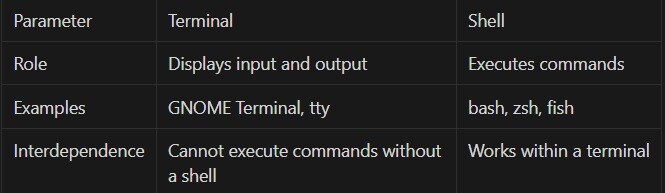
5. Simple Examples of Interaction
To see how the terminal and shell work together, try the following commands:
pwd       # Show the current directory
ls        # List files
echo "Hello, world!"  # Print a message
cat filename.txt  # View the contents of a file
top       # Monitor processes in real-time
6. Conclusion
The terminal is the window for communicating with your system, while the shell is the tool that interprets your commands and interacts with the OS kernel. Understanding their differences and how they work together will make your experience with Linux and Unix systems more productive.
Let me know if you'd like any adjustments or further clarifications!
What aspects of Linux would you like to explore in greater depth? Would you be interested in learning more about system calls, kernel operations, useful commands, or system configuration nuances? Share your ideas — your feedback helps us choose the most valuable topics!





