
By now, you must have heard about unMineable. If not, to quote them:
An automated system takes care of all the exchanging and transferring, to deliver a seamless experience for PoW miners.
It is, by far, one of the most straightforward websites to start mining cryptocurrency from. The hardest part of it is choosing which wallet you will use!
Note: I am not by any means suggesting you will end up making money using this method recommended here. It all depends on your computer setup and electricity cost. Please use your judgement to decide if it is worth mining crypto for your particular need.
Step 1: Create a Wallet
The first step is creating a wallet. Choose your favourite crypto wallet. I use Coinbase, but Google around to find your favourite service and sign up.
Step 2: Download the Mining App
For Windows: Head over to https://unmineable.com/miner and download the app.
For Linux/macOS: Head over to https://github.com/xmrig/xmrig/releases and download a tar file corresponding to your OS and architecture. Then, unzip the file and move the directory to the location of your choice.
Step 3: Choose a Coin to Mine
Visit https://unmineable.com/coins and decide which coin to mine. I will use Algorand as an example for the rest of this tutorial.
Step 4: Find the Address of the Coin From Your Wallet
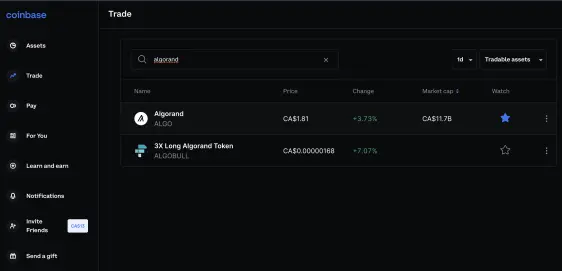
Now that you have chosen a coin, go to your wallet from Step 1 and find the token's address. This step differs for each wallet that you are using. For example, on Coinbase, go to the Trade section on the left, search for your coin, and select it.
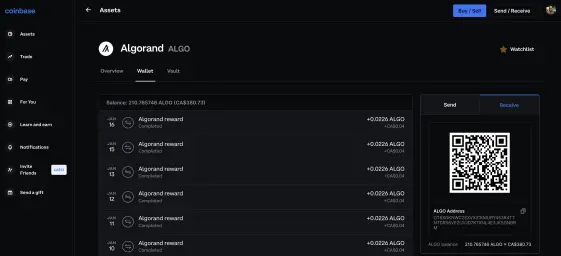
Then go to the Wallet section, and on the right, select the Receive tab. Copy the address and keep it for the next step.
Step 5: Setup for Windows
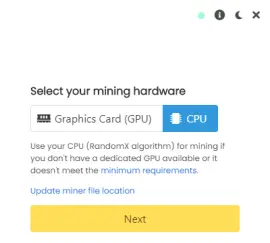
Windows setup is super easy. Just open the app you downloaded in Step 2 and follow the guide. First, you'll have to choose whether you want to mine using your CPU or GPU. There are requirements for each, and you can find out if your computer can mine using GPU by following the minimum standards link from the app itself.
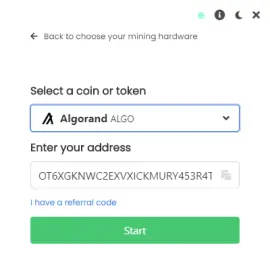
Next, select the coin you want to mine. You should also paste the address of the currency that you got from the previous step here:
You are now done! It may take a few seconds to set up, but you should start seeing the mining.
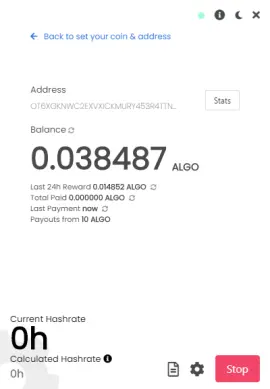
You may also select the gear icon to the left of the STOP button to customize the name of this application. Finally, if you do not see anything happen after a few minutes, click the page icon to the left of the gear icon to see the logs.
Step 5: Setup for Linux/macOS
On Linux/Mac, open the folder you unzipped. You will see three files:
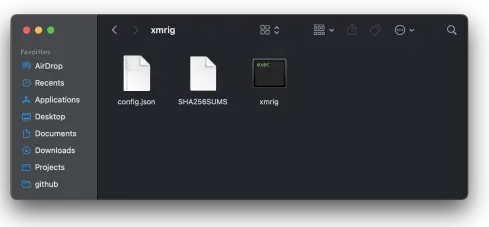
Open the config.json file using your favourite text editor and scroll down until you find pools. Set algo to "rx/0", url to "rx.unmineable.com:3333", and user to "COIN:address.DeviceNumer". You can find the COIN name from the https://unmineable.com/coins page (it will show up in the URL after selecting the coin. The address is the address you've copied from the previous step. The DeviceName is a friendly name for this device. For my setup, I have: "ALGO:OT6XGKNWC2EXVXICKMURY453R4TTNTDR56VEZUVJD7K7XNL4E3JKSGNBRM.MBP". Here is a screenshot of my config file:
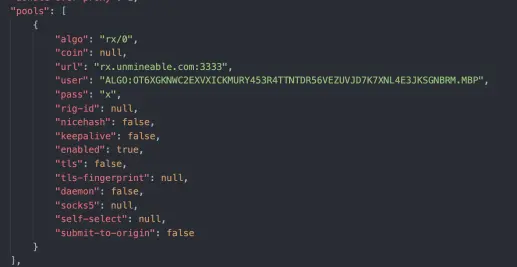
Save this file, then open the xmrig Bash script. It will open a terminal, and it should start mining automatically:
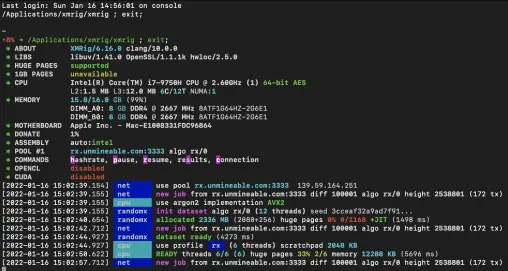
This is it! To check how much total token you've mined, you can visit https://unmineable.com/coins/ALGO/address/COIN_ADDRESS (replace ALGO and COIN_ADDRESS with your own).






