
So as you are likely already aware, you are currently looking at this web page using some kind of browser application, be it the conqueror Chrome, the feisty Firefox or some other window which simply makes the internet viewable on a device.
We all have our browsing habits but do we REALLY know how browsers actually work, and how they process and display data?
I present to you (a somewhat technical) presentation on how browsers really work!
Let us begin by listing a brief history of the browser.
- 1990: First ever browser called WorldWideWeb was created, later renamed to Nexus.
- 1992: Lynx was a text-based browser that couldn't display any image-based content.
- 1993: Mosaic was the first browser to allow images embedded in text.
- 1994: A noticeable improvement over Mosaic was created and named Netscape Navigator.
- 1995: Internet Explorer made it's debut as Microsoft's first web browser.
- 1996: Opera started as a research project in 1994 and went public two years later.
- 2003: Apple's Safari browser was released specifically for Macintosh computers.
- 2004: Mozilla launched Firefox just as Netscape Navigator was faded out.
- 2008: Google Chrome took the world by storm as well as the browser market.
- 2015: Microsoft Edge was born.
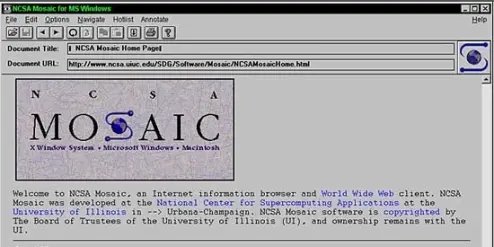
figure 1: Mosaic browser for MS Windows showing the actual mosaic homepage (1993).
Okay so now we have a basic idea of the when, time to move to the how, so let's dig into a brief architectural overview.
Browsers are made up of a bunch of components which work together like a set of gears in order to fulfil their functionality, and the high level structure of those components is:
- User interface: address bar, back/forward button, bookmarks menu, etc.
- Browser engine: dispatches actions between the UI and the rendering engine.
- Rendering engine: displays requested (and processed) content inside the browser viewport (viewable area).
- Networking module: handles the triggering and receiving of HTTP/network requests.
- UI backend: OS dependant, draws widgets such as form inputs, checkboxes, and select fields.
- JavaScript interpreter: parses and executes JavaScript.
- Data storage: persistence layer which handles cookies, or database mechanisms like WebSQL.
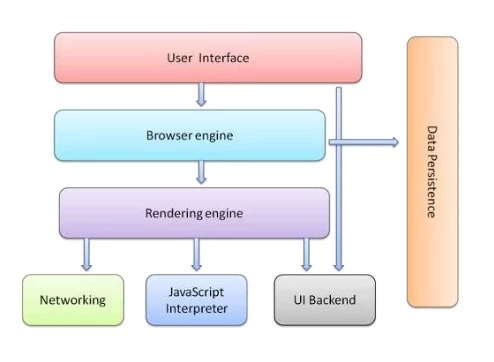
figure 2: The common browser's architectural overview
So besides the complex diagrams and explanations above, and in order to avoid too much further confusion, I will only delve into the most important component: The rendering engine or also known as the layout engine.
Rendering Engine
This component displays requested content inside the browser's window - it shows us the actual webpage. By default the only supported content types which are processed are HTML, XML and images. All other content types are displayed and rendered through plugins (usually made by a third-party).
Each browser comes with its own rendering/layout engine (either theirs or borrowed) and here is a list of some of them which may actually look familiar!
- Chrome: Blink (Chromium)
- Opera: Blink (Presto up until version 14)
- Firefox: Gecko
- Internet Explorer: Trident
- Internet Explorer Edge: EdgeHTML (announced switch to Chromium)
- Safari: WebKit
Okay so the next logical question regarding this so-called rendering engine is, how does it actually...render?
The main process flow for rendering engines differ depending on the version and manufacturer, however they are all very similar in how they process and display data.
- The HTML document is parsed into a set of DOM (Document Object Model) nodes within a content tree (like a hierarchical representation of HTML elements).
- The style data is parsed (inline and external CSS) and then it is combined with the HTML nodes created above to create what is called a "render" or "frame tree".
- Each node from the constructed tree is iterated over and repositioned on the viewport based on the style data.
- Each node is iterated over once more and actually "painted" using the UI backend layer giving the structure visual life!
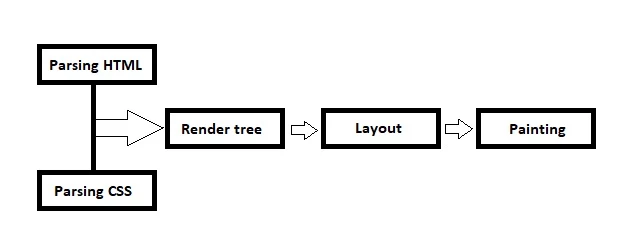
figure 3: The processes in the browser's rendering engine
Now that we know what the parsing steps do, lets take a short look at the Render tree.
- Combines the generated DOM and style resolution from the CSS parser.
- Creates a representation of the content that will be displayed.
- Not fully a one-to-one representation of the HTML since the following are omitted:
- non-visual elements (head, script, title...)
- nodes with display: none;
- nodes with parent with display: none;
- Consists of multiple trees (RenderObjects, RenderStyles, RenderLayers, LineBoxes).
To summarize the render tree in one phrase: It combines parsed HTML and CSS data.
Next we have the Layout step which does the following basic functions:
- Iterates through the new render tree (going through node children first)
- It batches together some changes such as:
- font size changes (triggers immediate full re-layout).
- browser resizing.
- accessing node properties, like node.offsetHeight.
- This is all done in a completely asynchronous fashion.
The final step of note is the Painting step which does the following:
- Iterates through layered (and processed) render tree.
- Creates stacking layers (dictates what is infront or ontop and what is behind if there are layers which overflow)
- Uploads bitmaps to the GPU (graphics card) as a texture.
- This process has 12 phases and is the most computation-heavy step in the rendering process.
Once this painting step has completed, the web page will be fully loaded and becomes visible the end user.
Well that was about it...It wasn't too complicated was it?
I know there seem to be way too many "iterations" of "nodes" going on behind the scenes in the topic described above, but dont let that confuse you, it simply really takes a lot of iterations when the browser reads its own data from top to bottom, making adjustments along the way to correctly place and style every element, every image, every word. It does this multiple times since each iteration would only update the layout for certain nodes and the process needs to start again in order to update the next nodes in the tree.
With everything being said, let us recap this presentation in one short and sweet sentence.
Browsers are complicated.






