Codice sconto per l'acquisto di Ellipal Titan : https://www.ellipal.com/collections?r...
Ciao a tutti, questo è un tutorial dell'Ellipal un Cold Wallet che permette di tenere nascoste le chiavi private delle nostre crypto. Se hai un conto exchange detenere all'interno di esso le tue monete non è sempre la cosa migliore. con questo puoi avere tanti portafogli delle crypto a portata di mano e nessuno potrà mai portartele via.
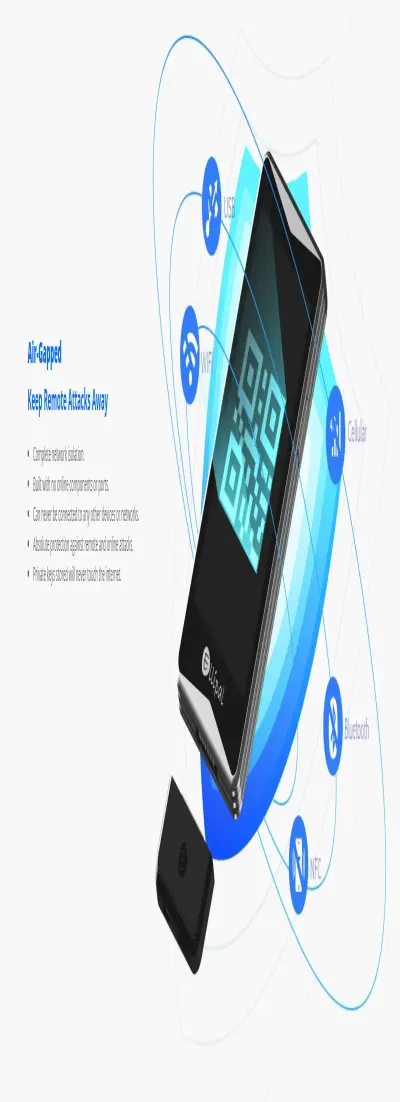
Ellipal Titan è una nuova offerta offerta per $ 169. Ma c'è una cosa che lo differenzia dagli altri portafogli ed è quella totalmente OFFLINE, quindi non richiede una connessione a Internet. Sì, esattamente il Titano vive alla sua luce e per buone ragioni, vale a dire garantire un livello di sicurezza più elevato.
Titan: un grande successo che puoi tenere in mano
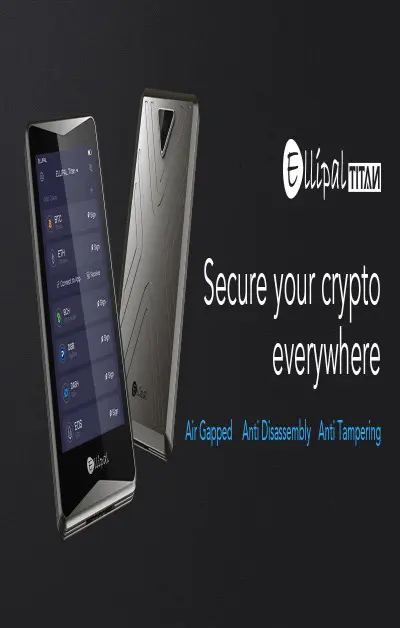
Questo portafoglio, l'Ellipal Titan è stato creato per offrire agli amanti del mondo delle criptovalute un portafoglio ultra sicuro proprio perché non richiede una connessione a Internet. Come puoi facilmente dedurre, questa è una caratteristica che lo rende attraente e unico.
Essenzialmente un aggiornamento di "Cold Wallet 2.0", Titan viene fornito con una serie di formidabili funzionalità di sicurezza. La sua configurazione con airgap è il punto essenziale, ma anche la possibilità di impostare fino a tre passaggi di verifica incluso un PIN piuttosto lungo. L'assenza di connessioni, anche cablate, mitiga completamente gli attacchi di rete. Ciò non significa che Titan sia inespugnabile, ovviamente, poiché nessun portafoglio hardware è immune da ogni attacco immaginabile, specialmente da quelli fisici. Mantieni Titano in un posto sicuro e mantieni la tua frase mnemonica (seme) in un posto ancora più sicuro e le tue criptovalute non saranno da nessuna parte senza il tuo consenso.
Inoltre, viene fornito anche un kit di lettere per registrare la tua frase mnemonica in modo permanente e indelebile e farla scorrere nella custodia in metallo fornita.
Il dispositivo su cui vengono generate le chiavi del portafoglio di Titan - essenzialmente un semplice smartphone - è molto più robusto del suo predecessore in plastica, The Cold Wallet 2.0. Il Titano è il massimo del suo prezzo anche per le sue caratteristiche materiali che lo rendono resistente nonostante sia rifinito in plastica nera con una cornice in ardesia. Il dispositivo è piuttosto robusto per garantirne la durata e può essere facilmente utilizzato anche con una sola mano.
Grazie al suo design, senza cavi, la ricarica del supporto richiede il collegamento di un piccolo connettore, un cavo USB di tipo C. Una superficie di lavoro, si ricarica perfettamente. Una volta che sei abituato alla sua sensibilità, sembra naturale metterlo in carica in un luogo in cui non è possibile essere inavvertitamente toccato.
Come installarlo
Dopo aver scansionato il codice QR sul tuo smartphone, verrai indirizzato al Play Store per installare l'app Ellipal. Quindi il processo di installazione continua sul portafoglio, dove è possibile selezionare un indirizzo BTC o Segwit standard e abilitare una passphrase opzionale. Il processo di creazione dell'account impiega circa 30 secondi prima che il mnemonico appaia sullo schermo. C'è un seme di 12 parole di default, che può essere aumentato fino a 24 parole se lo si desidera. È gratificante creare un portafoglio su un dispositivo completamente isolato dal web. Fino a quando non invii o ricevi criptovalute all'indirizzo BTC che viene generato, il resto del mondo non avrà modo di conoscere l'esistenza della tua coppia di chiavi pubblica-privata.
Titan supporta più di una dozzina di criptovalute tra cui BCH, ETH, DASH, XRP, EOS e BNB. Il portafoglio offre la possibilità di disabilitare quelli che non ti interessano. Quindi il laptop Titan verrà configurato e l'app Ellipal installata sullo smartphone. Il prossimo passo è farli comunicare tra loro. Questo viene fatto scansionando due codici QR che verranno visualizzati sul portafoglio. È possibile passare da un codice a un altro scorrendo sullo schermo. Ellipal ha lavorato duramente per migliorare il proprio software dall'ultimo portafoglio hardware con airgap, con risultati eccellenti.
Invio e ricezione di Crypto
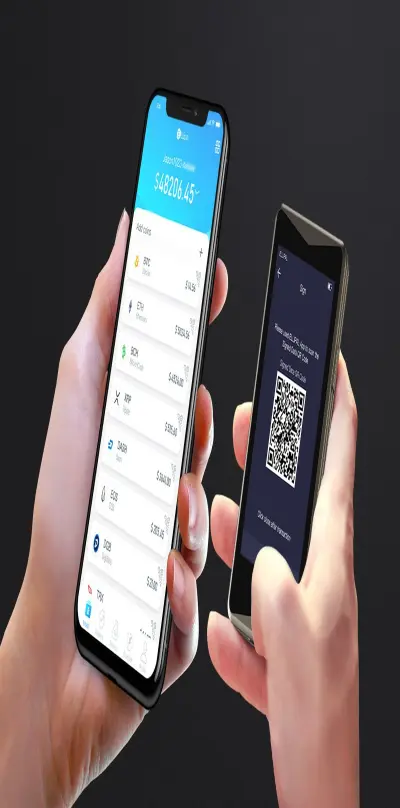
Supponiamo di avere già criptovalute; inviamo le nostre criptovalute al portafoglio e in pochi minuti il nostro portafoglio Ellipal conterrà le nostre criptovalute. Nel momento in cui vogliamo inviare le criptovalute, lo smartphone entrerà in gioco. Tutte le transazioni in uscita devono essere firmate utilizzando il codice QR generato su Titan e successivamente scansionate utilizzando l'app mobile. Nel caso in cui non sei in possesso di criptovalute o sei disposto ad acquistare altri, potresti semplicemente e tranquillamente andare a uno dei nostri bancomat dove puoi vendere o acquistare bitcoin e criptovalute in pochi passaggi.
Mentre per Cold Wallet 2.0 questa fase è stata un po 'complicata a causa dello scanner che non ha sempre letto il codice al primo tentativo, con il portafoglio Ellipal non ci sono problemi di questo tipo: l'intero processo può essere completato in meno di 20 secondi dopo aver inserito la password. Diciamo che vogliamo restituire le criptovalute al nostro portafoglio: questo processo può essere eseguito anche in pochi minuti. La capacità di inviare piccole quantità di criptovalute praticamente a costo zero è estremamente utile quando si testano i portafogli o quando si cerca di convincere nuove persone ad avvicinarsi al mondo delle criptovalute.
La mia opinione
Titan non è l'unico portafoglio offline sul mercato, ma rispetto ad altri come Coldcard è uno dei più user-friendly. Il software e la UX non sono ancora chiari come su Ledger Live e alcuni schermi con relative traduzioni nell'app mobile Ellipal avrebbero bisogno di miglioramenti, ma questo non è un punto essenziale. Ciò che conta è che in Titan, esiste un portafoglio hardware multi-criptovaluta che trova un equilibrio tra sicurezza e usabilità. Prezzi ragionevoli per un buon dispositivo, il Titano è una forza da non sottovalutare.
Segui il video e vedrai con i tuoi occhi quanto è facile usare un Ellipal cold wallet.
https://www.youtube.com/watch?v=WVxrohzkjHs
English
Discount code for the purchase of Ellipal Titan: https://www.ellipal.com/collections?r...
Hi everyone, this is a tutorial of the Ellipal a Cold Wallet that allows you to keep the private keys of our crypto hidden. If you have an exchange account, holding your coins in it is not always the best thing. with this you can have many crypto wallets at your fingertips and nobody can ever take them away.
Ellipal Titan is a new offer offered for $ 169. But there is one thing that differentiates it from other wallets and is the totally OFFLINE one, so it doesn't require an Internet connection. Yes, exactly the Titan lives in its light and for good reasons, namely to guarantee a higher level of security.
Titan: a great success that you can hold in your hand
This wallet, the Ellipal Titan was created to offer lovers of the world of cryptocurrencies an ultra secure wallet precisely because it does not require an Internet connection. As you can easily deduce, this is a feature that makes it attractive and unique.
Essentially an update to "Cold Wallet 2.0", Titan comes with a number of formidable security features. Its configuration with airgap is the essential point, but also the ability to set up to three verification steps including a rather long PIN. The absence of connections, even wired, completely mitigates network attacks. This does not mean that Titan is impregnable, of course, since no hardware wallet is immune to every attack imaginable, especially physical ones. Keep Titan in a safe place and keep your mnemonic phrase (seed) in an even safer place and your cryptocurrencies will not be anywhere without your consent.
In addition, a letter kit is also provided to record your mnemonic phrase permanently and indelibly and slide it into the metal case provided.
The device on which the keys of Titan's wallet are generated - essentially a simple smartphone - is much more robust than its plastic predecessor, The Cold Wallet 2.0. The Titan is the maximum of its price also for its material characteristics that make it resistant despite being finished in black plastic with a slate frame. The device is rather robust to ensure its durability and can be easily used even with one hand.
Thanks to its design, without cables, the charging of the support requires the connection of a small connector, a USB type C cable. A work surface, it recharges perfectly. Once you are used to his sensitivity, it seems natural to put him in charge in a place where it is not possible to be inadvertently touched.
How to install it
After scanning the QR code on your smartphone, you will be directed to the Play Store to install the Ellipal app. Then the installation process continues on the wallet, where you can select a standard BTC or Segwit address and enable an optional passphrase. The account creation process takes about 30 seconds before the mnemonic appears on the screen. There is a 12-word seed by default, which can be increased up to 24 words if desired. It's rewarding to create a wallet on a completely isolated device from the web. Until you send or receive cryptocurrencies to the BTC address that is generated, the rest of the world will have no way of knowing about the existence of your public-private key pair.
Titan supports more than a dozen cryptocurrencies including BCH, ETH, DASH, XRP, EOS and BNB. The wallet offers the possibility to disable those that don't interest you. Then the Titan laptop will be configured and the Ellipal app installed on the smartphone. The next step is to get them to communicate with each other. This is done by scanning two QR codes that will be displayed on the wallet. You can switch from one code to another by scrolling on the screen. Ellipal has worked hard to improve its software since the latest hardware portfolio with airgap, with excellent results.
Sending and receiving Crypto
Suppose we already have cryptocurrencies; we send our cryptocurrencies to the wallet and in a few minutes our Ellipal wallet will contain our cryptocurrencies. The moment we want to send cryptocurrencies, the smartphone will come into play. All outgoing transactions must be signed using the QR code generated on Titan and subsequently scanned using the mobile app. In the event that you are not in possession of cryptocurrencies or are willing to buy others, you could simply and safely go to one of our ATMs where you can sell or buy bitcoins and cryptocurrencies in just a few steps.
While for Cold Wallet 2.0 this phase was a bit complicated due to the scanner that did not always read the code on the first attempt, with the Ellipal wallet there are no problems of this type: the whole process can be completed in less than 20 seconds after entering the password. Let's say that we want to return cryptocurrencies to our wallet: this process can be performed even in a few minutes. The ability to send small amounts of cryptocurrencies practically at no cost is extremely useful when testing wallets or when trying to convince new people to get closer to the world of cryptocurrencies.
My opinion
Titan is not the only offline wallet on the market, but compared to others like Coldcard it is one of the most user-friendly. The software and UX are still not as clear as on Ledger Live and some screens with related translations in the Ellipal mobile app would need improvements, but this is not an essential point. What matters is that in Titan, there is a multi-cryptocurrency hardware wallet that strikes a balance between security and usability. Reasonable prices for a good device, the Titan is a force to be reckoned with.
Follow the video and you will see for yourself how easy it is to use an Ellipal cold wallet.
https://www.youtube.com/watch?v=WVxrohzkjHs