HOW TO PLAY YOUTUBE VIDEOS AT BACKGROUND
Are you able to play Youtube videos in the background while reading news on the internet webpages? Most of the people face this problem however you can find a solution to this problem.
Applications like Spotify and Fizy compete with Youtube application. At the same time, Youtube does not allow its users to play videos in the background. Moreover, they are removing the apps which have this feature from Google Play Store. Isn’t it a boring situation?
This Problem is Solvable
The browser named Brave Browser solves this problem. Brave Browser is a browser like Google Chrome and has 20 million active users in the world. In the same breath, it becomes the most used browser in a short time.

What Brave Browser does?
- By removing the advertisements automatically, increases the speed of their users’ internet speed.
- At the same time, you can save 20% of your battery and the internet package.
- You can play Youtube videos in the background, of course!
You can play Youtube videos just after downloading the app Brave Browser without dealing with any setting. However, if necessary, you can go to settings and check if the background feature is activated or not.
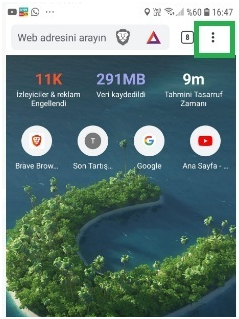
I.) The browser menu opens by clicking the three dots that are highlighted in green in the picture.
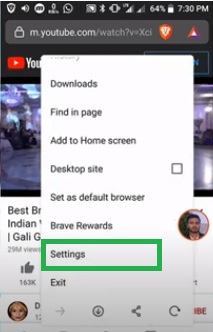
II.) Click the settings option from the menu.
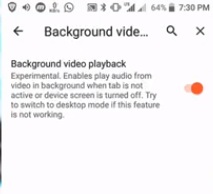
III.) Change the option of play video playback to enable if it is disabled.


That’s it! Wasn’t it too simple? You can play Youtube videos in the background whenever you want!