
Let’s be completely honest for a moment. Cryptocurrency is a high-stakes, fast-moving world. We are dealing with decentralized finance, cryptographic keys, and the promise of absolute financial freedom — some might say. But do you know what the ultimate gatekeeper to all that revolutionary tech is?
Your left thumb. Specifically, your left thumb when it accidentally hits the "O" key instead of the "A" key while you are typing on your phone.

Welcome to the lucrative, deeply annoying world of typo-squatting and phishing scams. Today, we are diving deep into how scammers use microscopic visual tricks to separate you from your hard-earned crypto— the horror😭.
Let's take a look at some real-world examples, explore the surprisingly lazy (yet effective) psychology of the modern scammer, debunk some myths about browser security, and give you a somewhat bulletproof strategy to keep your hard earned or airdropped🙂 funds safe.
Grab a coffee or tea, double-check your URLs, and let’s look at this madness from both sides of the screen.

PLOT 1: THE CONFESSIONS OF A PHISHING SCAMMER (A SATIRICAL LOOK INSIDE A SCAMMER'S MIND)
To understand how to beat a scammer, you have to understand how lazy they actually are. Let’s look at the world through the eyes of "CryptoSteve" (*cough* *cough* not his real name), a fictional phishing scammer sitting in his underwear, drinking an energy drink, and waiting for you to make a typo.
SCAMMER LOG: DAY 362
"Today was a masterpiece. I didn’t hack into a blockchain. I didn’t breach a multi-billion-dollar server. Why bother? That takes actual coding skills and mathematical geniuses — which I clearly don't have. No, today I just bought a domain name that exploits the fact that human beings have fat fingers and short attention spans — humans are always in a hurry.
I looked at FaucetPay.io, a perfectly good micro-wallet platform. People love it, they share it to their friends and enemies — who cares. People use it daily. So, I thought to myself: 'How can I ruin this?'
First, I tried standard extensions. I registered Faucetpay.org. It’s a classic. Why? Because the internet has conditioned humans to trust '.org'. They see '.org' and think, 'Ah, yes, a distinguished, non-profit organization of digital faucets. Surely, no one evil could buy a dot-org.' (Spoiler alert: anyone with twelve dollars and a credit card can buy a dot-org).
But then I wanted to get artsy. I wanted to create a visual illusion. So, I registered:
--> faucetpoy.io.in
Beautiful, isn't it? It’s a work of art. I replaced the 'a' with an 'o'. On a mobile screen, the letter 'o' is right there, whispering to your thumb. Then, instead of just a clean '.io', I dragged India’s country extension '.in' into the mix, making it look like some highly technical, localized subdomain. (Psst: subdomain is simply an extension of a real domain; think cryptosteve.vercel.app; Where Vercel.app is the main domain)
When users land on my beautiful, fake page, it doesn't even work properly. It just throws up a generic text block: 'You need to enable JavaScript to run this app.'
Does that scare them away? Nope! They just stare at it, assume their browser is acting up, and frantically type their master password into the login box anyway. Boom — Credential harvested. Thank you for the Bitcoin, my friend. See you in the next tab!"
While that narrative is satirical, the mechanics behind it are entirely real. Scammers aren’t hacking the blockchain; they are hacking you.
The fact is "You don't need to be a hacker to hack".
Plot 2: Dissecting the Fake Links (The Anatomy of the Trap)
Let’s pull back the curtain on the specific domains we just discussed. When you look at them side-by-side, the danger becomes glaringly obvious.
[REAL SITE] --> https://faucetpay.io
[FAKE 1] --> https://faucetpay.org
[FAKE 2] --> https://faucetpay.com
[FAKE 3] --> https://faucetpoy.io.in
— 1. The Authority Illusion (faucetpay.org)
The .org TLD (Top-Level Domain) was originally intended for non-profit organizations. Decades of internet browsing have trained our brains to view .org sites as authoritative, educational, or charitable. Scammers leverage this psychological bias. They register the exact name of a financial platform with a .org or .net extension, betting that your brain will subconsciously categorize it as a safe alternative or an official mirror site.
— 2. The Typo-Squatting Masterclass (faucetpoy.io.in)
This is where the scams become incredibly subtle. Typo-squatting relies on omission or substitution, like what happened to Donald Trump early last year.
— The Substitution: Changing faucetpay to faucetpoy. Because humans read by scanning words as whole shapes rather than individual letters, your brain automatically corrects the word in your mind. You see "faucetpoy" but your brain reads "faucetpay."
— The Appended Domain: Adding .io.in. The addition of multiple dots makes the URL look complex and official. Users often assume the site is a regional variation (like how Google uses google.co.uk or google.co.in). In reality, it is a completely separate malicious domain engineered to mirror the login interface of the original platform.
— 3. The Broken Script Smoke Screen
When you visited faucetpoy.io.in, you encountered a message stating, "You need to enable JavaScript to run this app." In this case it said "Registration is closed due to the shutdown of our service. Please withdraw your funds." This will definitely get people panicking because this happens a lot in the crypto world due to mismanagement of funds.
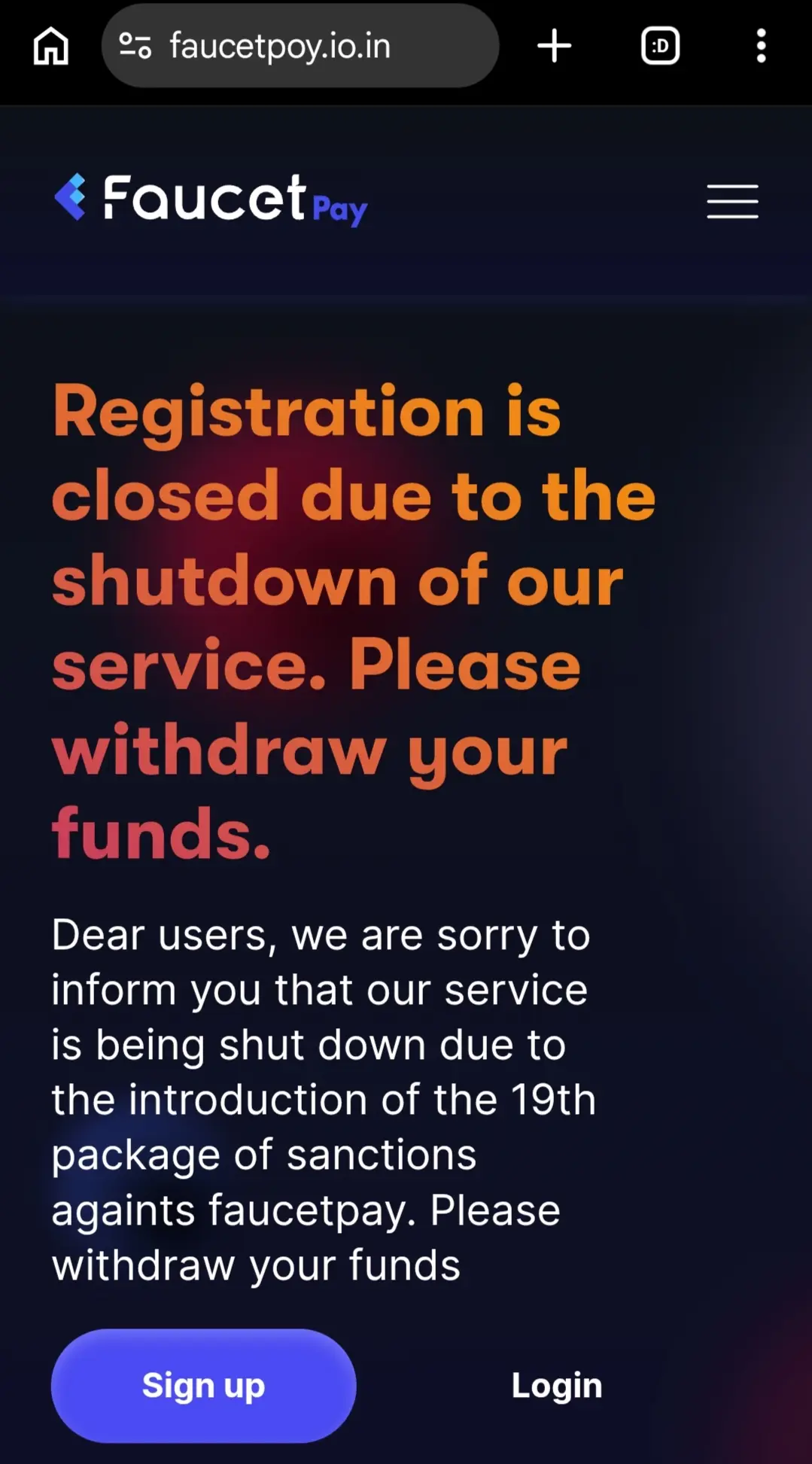
This is a common tactic. Sometimes, it is simply poorly written code by a lazy scammer whose script broke. However, more dangerous variants use this as a deliberate stalling tactic. It convinces the user that the site is legitimate but experiencing a somewhat technical glitch. While you are trying to figure out why JavaScript isn't working, hidden scripts behind the scenes may be attempting to fingerprint your browser, track your IP address, or load a secondary prompt designed to trick you into entering your private keys or seed phrases just like the "withdraw your funds text".
PLOT 3: THE MULTI-TAB MYTH (CAN THEY SPY ON YOUR OTHER TABS?)
When you realize you have accidentally wandered into a digital trap house like faucetpoy.io.in, a wave of panic usually sets in. You might wonder: "If I keep this fake page open in Tab 1, and I open my real, authentic FaucetPay account in Tab 2, can the scammers look across the tabs, see what I'm typing, and steal my real password?"
The short answer is: well... No Jeremy!. They cannot.
To understand why you are safe in this specific scenario, we need to talk about the unsung hero of internet security — the Same-Origin Policy (SOP).
— How the Same-Origin Policy Saves Your Assets?
Your web browser (whether you use Google Chrome, Brave, Mozilla Firefox even Opera mini — yes Opera mini) acts as a strict prison warden for websites. Every single tab you open is placed into an isolated, digital solitary confinement cell — literally.
Under the Same-Origin Policy, a website loaded from faucetpoy.io.in is completely forbidden from accessing data, cookies, local storage, or active sessions from faucetpay.io.
* No Spying: The fake site has absolutely no idea what you are doing in your other tabs. It cannot see your screen, it cannot read your clicks, and it cannot intercept your keystrokes outside of its own webpage.
* No Password Sniffing: If you type your real password into the real FaucetPay tab, the fake tab is completely blind to it.
However... Don't Leave the Tab Open!
While the fake site cannot read your other tabs, leaving a malicious site open is still a bad idea. If left active, a malicious site can execute:
1. Cryptojacking: Running hidden JavaScript loops that utilize your computer or phone's CPU to mine obscure crypto tokens. This causes your device to overheat, lag, and drain its battery.
2. Exploit Kits: If your web browser is severely outdated, sophisticated phishing sites can attempt to trigger unpatched software vulnerabilities to force a malicious download onto your system.
The Golden Rule: The moment you spot a fake URL, don't analyze it, don't play with it, and don't try to log in with fake details just to fool them. Close the tab immediately. Closing the tab instantly cuts the power cord to the scammer's scripts.

PLOT 4: HOW SCAMMERS GET THEIR LINKS IN FRONT OF YOU
You might think, "I never type out URLs manually, so typo-squatting won't affect me!" Unfortunately, scammers know this, and they have adapted. They don't just wait for you to make a typo; they bring the typos to you.
Here are the three primary ways these fake links end up on your screen:
— 1. Sponsored Search Engine Ads (Ad-Hijacking)
This is currently one of the most dangerous vectors in crypto. When you search for "FaucetPay" on Google or Bing, the very first results are often labeled "Sponsored" or "Ad".
Scammers routinely buy legitimate ad space through Google Ads. They bid on keywords like "FaucetPay login" and display a headline that reads "FaucetPay - Official Site." However, the actual hyperlink directs you straight to faucetpay.org or faucetpoy.io.in. Because it appears at the very top of Google, users trust it implicitly, click it, and hand over their credentials — here you go CryptoSteve😏
— 2. Social Media Phishing & Spambots
If you browse crypto-related channels on Telegram, Discord, X (formerly Twitter), or even publish0x, you will constantly see automated bots or malicious accounts posting things like:
* "FaucetPay is giving away free 0.05 BTC! Claim here: faucetpay.org"
* "System update required for all wallet holders. Verify your account at faucetpoy.io.in"
They use urgency, fear, or greed to force you into clicking the link before your logical brain has time to analyze the spelling of the domain.
PLOT 5: YOUR ULTIMATE BLUEPRINT FOR ABSOLUTE CRYPTO SAFETY
Now that we know exactly how the scammers operate, let’s build an impenetrable wall around your crypto assets. If you follow these five steps, it will become practically impossible for a phishing scammer to compromise your accounts.
THE CRYPTO SAFETY CHECKLIST
Step 1: The Bookmark Rule (Bypass search engines)
Step 2: Use a Dedicated Password Manager
Step 3: Enforce Hardware or App-Based 2FA
Step 4: Keep Browsers and OS Updated
Step 5: Report Fake Sites to Protect the Community
* Carefully type out the authentic domain exactly once: https://faucetpay.io
* Verify that you are on the correct site.
* Press Ctrl + D (or tap the star icon on mobile) to bookmark the page.
* From this day forward, only access the platform through your bookmarks folder. It's tedious it's strenuous but it's safe. Cause this completely bypasses malicious Google ads and typo-squatting traps. You wonder Google ads too? — yeah nothing is perfect.
— 2. Use a Password Manager
Password managers like Bitwarden, 1Password, or Dashlane do more than just generate strong passwords; they are actually the world's best anti-phishing defense systems.
Password managers bind your saved credentials to a highly specific URL. If you save your password for faucetpay.io, and you accidentally open faucetpoy.io.in, your password manager's autofill feature will refuse to show up. It looks at the domain, realizes it doesn't match the authentic record exactly, and locks down. If your password manager isn't autofilling your details, it means you are on a fake/wrong website.
— 3. Enforce Two-Factor Authentication (2FA)
If a scammer successfully tricks you and captures your password via a domain like faucetpay.org, 2FA acts as your secondary shield.
— Avoid SMS-based 2FA (which can be intercepted via SIM-swapping).
— Use app-based authenticators like Google Authenticator, Authy, or a physical hardware key like a YubiKey.
Even if the scammer got your password, they cannot access your funds without the 6-digit code living on your phone.
— 4. Keep Your Software Updated: Always update your browsers, especially the ones you use for your finance.
— 5. Strike back: Report the Scammers
When you find an incredibly subtle fake domain like faucetpoy.io.in, don't just walk away. Spend 30 seconds reporting it to protect the global crypto community.
— Copy the malicious URL.
— Go to [Google Safe Browsing Report Phishing](https://safebrowsing.google.com/safebrowsing/report_phish/).
— Paste the link and submit it.
— Once verified, Google will push a massive red warning screen to millions of browsers worldwide, completely killing the scammer's traffic and saving innocent users from losing their funds — Haha Say hello to my pinky finger CryptoSteve🙂↕️

Final Thoughts: Stay Vigilant, Stay Safe
The decentralized nature of cryptocurrency means that you are your own bank. There is no manager to call, no fraud department to reverse a transaction, and no physical vault door. The security of your digital assets rests entirely on your shoulders—like Merlin—and on your ability to spot a malicious "o" pretending to be an "a".
Scammers will continue to buy domains, they will continue to build clever lookalikes, and they will continue to pray that you are browsing while tired, distracted, or in a bit of a rush.
Be methodical. Bookmark your favorite platforms, embrace password managers, turn on 2FA, and always take a deep breath before hitting that login button. Let the scammers waste their money buying domain names; your crypto belongs exactly where it is—safely inside your Faucetpay wallet.
If you found this guide helpful, feel free to share it with your fellow crypto enthusiasts to keep our community safe from phishing networks!
I'm not a financial guide — I'm just a software engineer who sometimes loves to talk about finance and expose scam.
And if you don't know what a Faucetpay wallet is — click to check out this article
Click to register for a free Faucetpay account — Yes this is the legitimate platform Steve.
Cheers!





