
It’s been a few weeks since you regularly read articles on Publish0x and you have started accumulating cryptocurrencies. On top of that, you have obviously accumulated new knowledge about the cryptosphere! This is obviously the most important and if this is your case, congratulations! Welcome to the large family of crypto lover.
Step 1: Intro
Before you can withdraw your digital currency, you need to know that there are certain conditions to be able to make a withdrawal:
1) Reach the minimum amount to make a withdrawal
2) Own a wallet to transfer your currency
Personally I use Coinbase wallet and My Trust wallet to store my cryptocurrencies. There are hundreds of wallet. For those who don’t know what a wallet is, it’s simply a wallet that allows you to store your digital currencies. Attention, there is a very wide variety of wallet and they do not allow you to store all cryptocurrencies.
Step 2: Go to the right place
Once you have installed your wallet, you will be able to move on to the second step. To do this, you must of course go to Publish0x. Here is the home page.
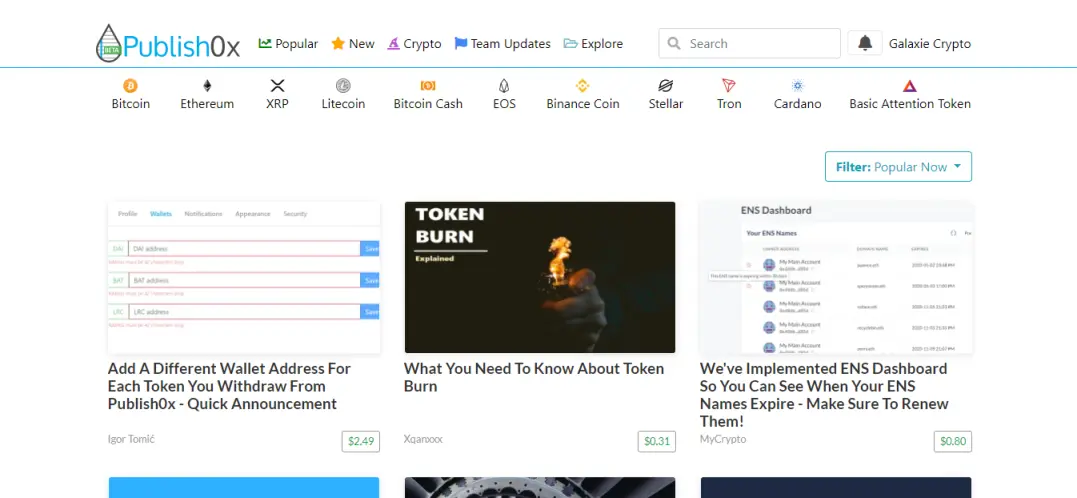
Click on your ‘profile’. In my case Crypto Galaxy.
Then click on ‘Dashboard’. Once you have done this simple manipulation, this page will be displayed:
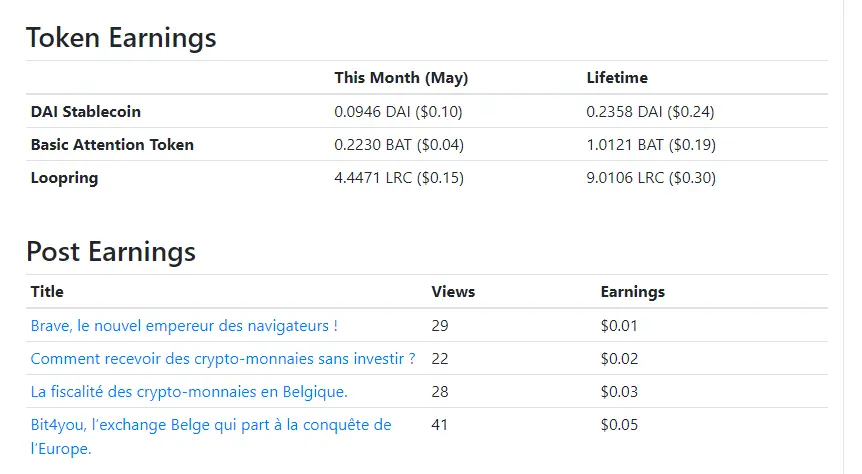
On this page you can find the statistics of your performance. You can see the money you have collected. This statistic is displayed in two tabs:
- Money collected this month.
- Money collected from your Publish0x registration.
If you are an author, you can also view your earnings per article.Only the last 5 articles are displayed on this page.If you would like to see your earnings from all other articles, just click on ‘your posts’ to see all your articles written.
To find out if you have enough money to withdraw your cryptocurrencies, simply click on ‘Payments’ in this bar.
Step 3: Payment page
After clicking on “Payments”, this page will be displayed:
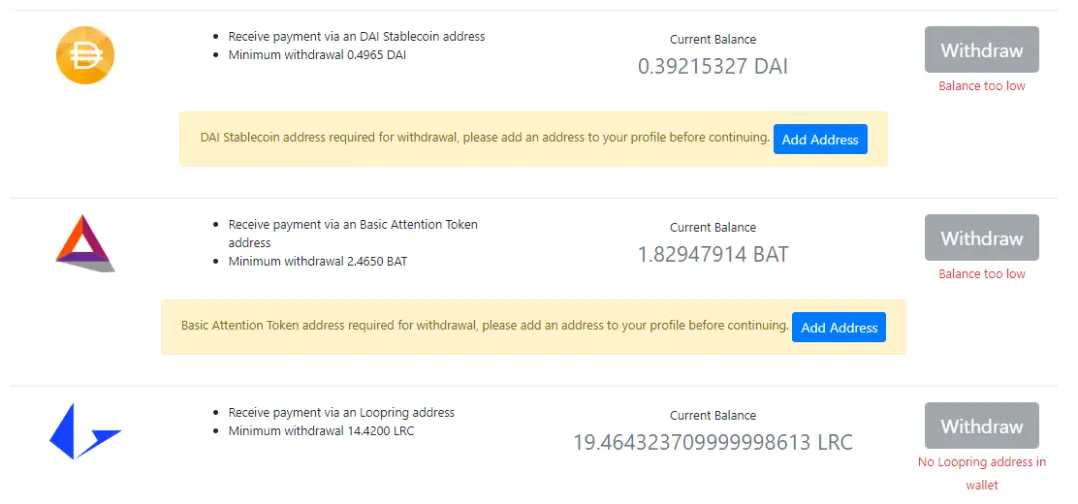
Now pay attention. To the right of each cryptocurrency, you can see if you have enough cryptocurrency to withdraw them. Here, as you can see below the BAT and ICD button, it says 'Balance too low'. So I can’t transfer from BAT and DAI yet because I just don’t have enough. Not against I have enough Loopring to be able to transfer them! Finally! For information, you can make a transfer from the following accumulated amounts:
• ICD: 0.4965
• BAT: 2.4505
• LRC: 14.5600
If you have not yet reached this level, you will have to wait a little longer. If on the other hand, if you can already get enough digital currencies, here’s how it works.
Step 4: Find your address for a transfer
To be able to make your transfer you must find the correct address. To do this follow these steps:
- Go to your wallet (you can download Atomic Wallet from publish0x on the ‘Payments’ page, you will receive a bonus!).
- Once in your wallet, go to ‘receive’
- Once in the ‘receive’ tab, type the name of the cryptocurrency you want to withdraw (for example: LRC)
- You will find the name of your cryptocurrency (for example: LRC), click on its name.
- A QR code and a written address is displayed.Copy of this written address.
- Click on ‘Add adress’ and copy the address to the corresponding box.
- Click on ‘Save’.
- You will receive an email asking you to confirm that you wish to register this address.Confirm this operation.
- Once done, return to the ‘Payments’ page
- Click on ‘Withdraw’.
Step 5: Waiting for confirmation
Your transfer is now waiting for confirmation! Once it is confirmed, it will leave on the Monday following the confirmation. You will therefore always receive your cryptocurrencies on a Monday. Transfers are therefore not instantaneous.
I hope this little 'Tuto'' will be useful to you! Good reading, good learning and good gains!
For more articles of all kinds on cryptocurrency, don’t forget to subscribe!
Disclaimer: This article is an adapted translation of one of my articles on my French blog. I write in English to increase my visibility and to practice writing in English. If I make language mistakes tell me in the comments, it will help me to write even better in the future! Thank you very much.
Pour lire cet article en Français, rendez vous sur mon blog Galaxie Crypto !





