KeePass Password Safe 2
Today, you have to remember many passwords. You need a password for a lot of websites, your e-mail account, your webserver, network logins, etc. The list is endless. Also, you should use a different password for each account, because if you would use only one password everywhere and someone gets this password, you would have a problem: the thief would have access to all of your accounts
Features:
- Strong Security
- Multiple User Keys
- Portable and No Installation Required, Accessibility
- Export To TXT, HTML, XML and CSV Files
- Import from Many File Formats
- Easy Database Transfer
- Support of Password Groups
- Time Fields and Entry Attachments
- Auto-Type, Global Auto-Type Hot Key and Drag&Drop
- Intuitive and Secure Clipboard Handling
- Searching and Sorting
- Strong Random Password Generator
- Plugins can extend the functionality of KeePass
- Open Source (KeePass free)
Multi-Language Support (Language files):
Arabic, Belarusian, Bulgarian, Burmese, Catalan, Chinese, Croatian, Czech, Danish, Dutch, English, Estonian, Finnish, French, Galician, German, Greek, Hebrew, Hungarian, Icelandic, Indonesian, Italian, Indian, Japanese, Korean, Latin, Latvian, Lithuanian, Macedonian, Malay, Norwegian, Pashto, Persian, Polish, Portuguese, Romanian, Russian, Serbian, Slovak, Slovenian, Spanish, Swedish, Thai, Turkish, Ukrainian, Vietnamese
Link to KeePass 2 Language files
Database Login:
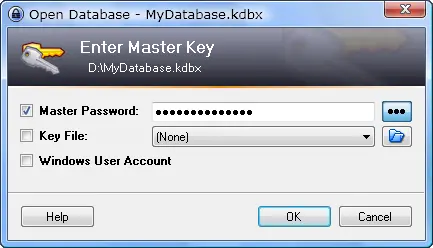
- One master password decrypts the complete databas
- Can use additional keyfile to be even more secure (keep separately)
Main Menu:
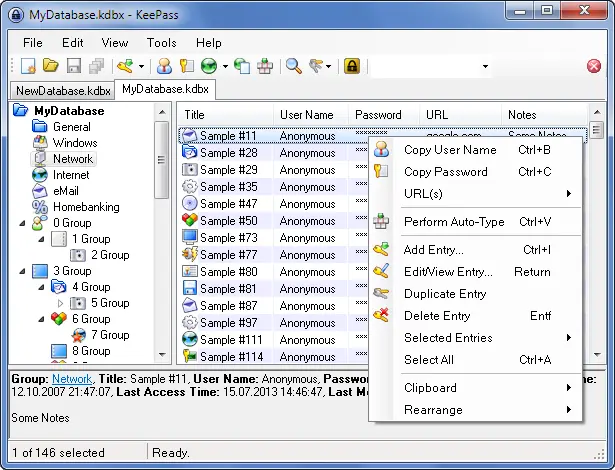
- You can create, modify and delete groups, in which passwords can be sorted into.
- The groups can be arranged as a tree, so a group can have subgroups, those subgroups can have subgroups themselves, etc.
- Timed clipboard clearing: KeePass can clear the clipboard automatically some time after you've copied one of your passwords into it.
- Database Auto-Lock Timer after x min inactivity (e.g. 5 min mouse and keyboard not used)
Add Entry:
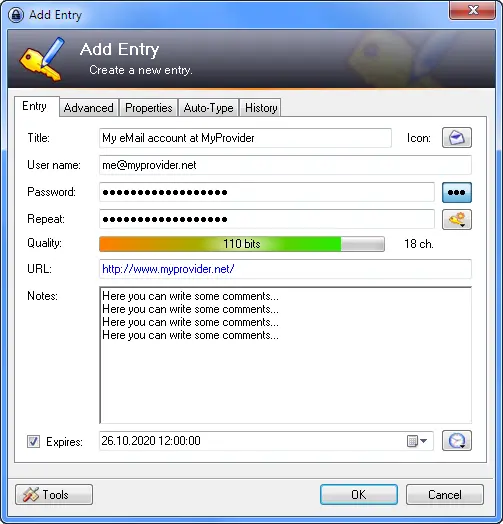
- Write additional comments
- KeePass supports time fields: creation time, last modification time, last access time and expiration time
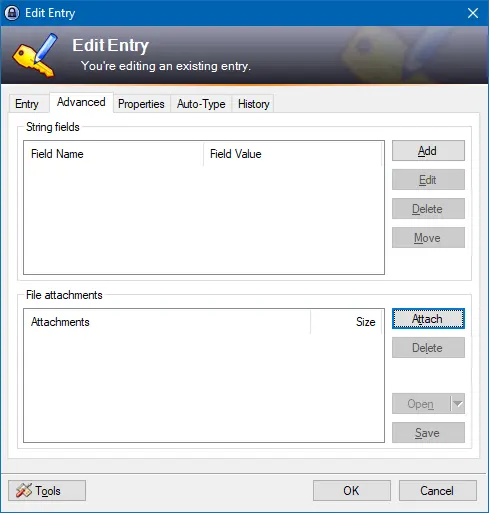
- Add String fields (e.g. Credit-Card number, Bank-Account number, etc.)
- You can attach files to password entries (e.g. images, documents etc.)
- KeePass has a powerful internal viewer/editor for text files, images, documents. You don't even need to export attached files to view/edit them!
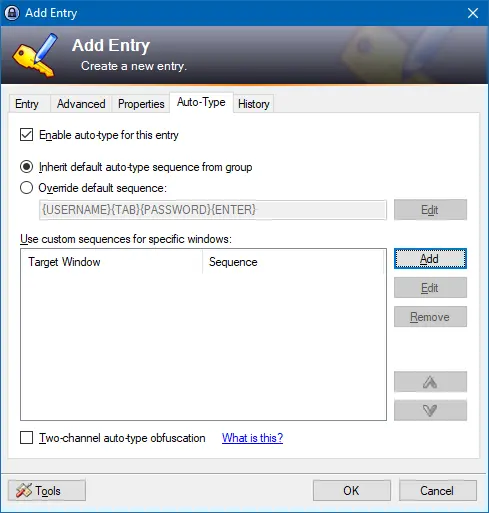
- KeePass can minimize itself and type the information of the currently selected entry into dialogs, webforms, etc. Of course, the typing-sequence is 100% user-customizable
- KeePass features a global auto-type hot key. When KeePass is running in the background (with opened database) and you press the hot key, it looks up the correct entry and executes its auto-type sequence.
- Two-Channel Auto-Type function
- All fields, title, username, password, URL and notes can be drag&dropped into other windows.
Password Generator:
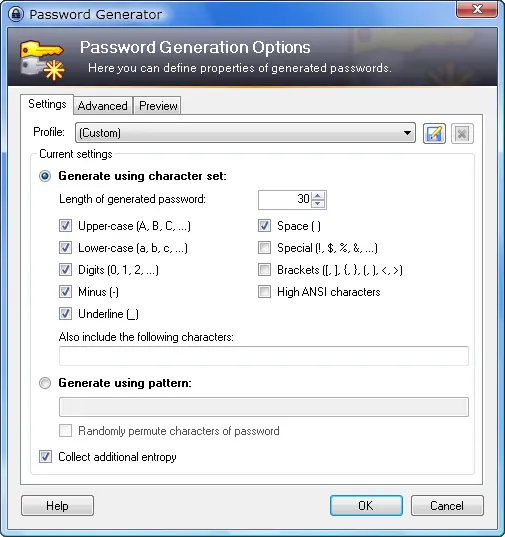
- KeePass can generate strong random passwords for you.
- You can define the possible output characters of the generator (number of characters and type).
- Random seeding through user input: mouse movement and random keyboard input.
KeePass Homepage
KeePass Download for Windows only
KeePass Plugins
Alternatively for Linux, MacOS and Windows
KeePassXC
- KeePass Cross-Platform Community Edition
- KeePassXC does not support plugins at the moment
I use KeePass 2 Portable for:
- Webpage login
- Desktop-Wallet login
- Email client, Skype
- Open encrypted Word, Excel and Zip/Rar files
- Gaming clients (Origin, Uplay, Epic Games, Battle.net, Steam)
I use these Plugins:
I use on IOS:
Note: In my opinion, a Password-Manager is an important tool that everyone should use. You always have to Login to different pages, and with KeePass (strong passwords) and the Auto-Login (Hotkey) function this is very easy and saves a lot of time.
I know that some people don't like Password Manager tools because all the login information is stored in a file on the PC and therefore there is a higher risk that someone can have access to all the data. I have been using KeePass for years and i am happy with it so I wanted to write about it. As long as you handle everything on your PC and on the Internet with care, the risk is very low. Please don't take it as a criticism.
Important: Do not forget to make regular backups (external devices)

Use my referral link https://platinum.crypto.com/r/44knqe3ff4 to sign up for Crypto.com and we both get $50 USD :)
(You must Stake 50 MCO to get the $50 Bonus)






