
INTRODUCTION
Lately I have seen a lot of new players streaming modded versions of Doom and the most popular of them is Project Brutality, But fear no more In this simple quick guide I will teach you how to install it.
In order to play great modified versions of Doom, you will need a modern doom engine / port.
I highly Recommend using GZDoom for this purpose.
Simply go to : https://www.zdoom.org/downloads
and Download , Decompress & Install the GZDoom version of your choice (Windows , GNU/Linux , Mac)
Main Project Repository
https://github.com/pa1nki113r/Project_Brutality
Step 1: Go to https://github.com/pa1nki113r/Project_Brutality
Step 2: Download the Zip Master File (see image below)
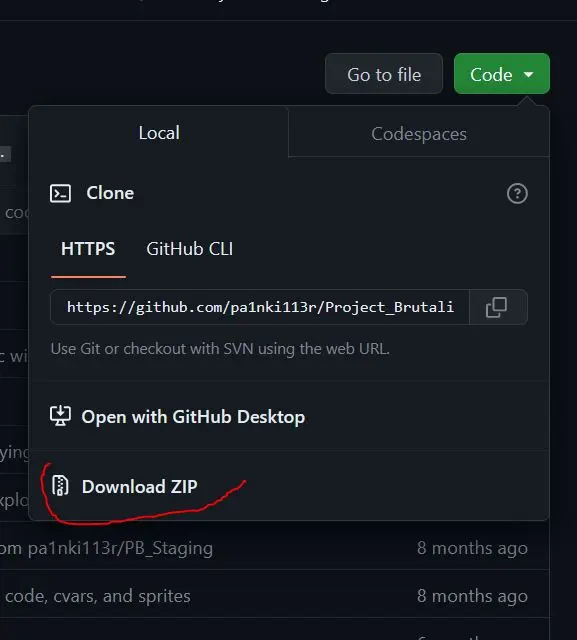
Step 3: After downloading the Zip file (default name: Project_Brutality-master.zip) - Copy (or move) Project_Brutality-master.zip to the same folder as your GZDoom Installation Folder
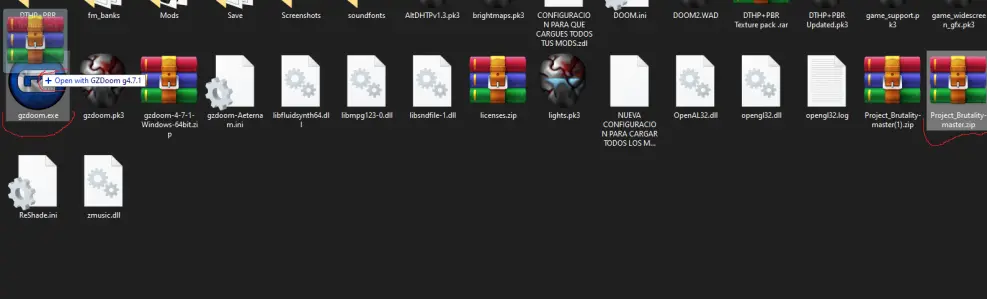
Step 4: From there (GZDoom Folder) simply Drag & Drop the ZIP Project_Brutality-master.zip to your GZDoom.exe file (see image below), And that's it! Project brutality will load and you will be able to Play!
DISCLAIMER: I hereby declare that I do not own the rights to this Game (DOOM) Neither to Project Brutality. All rights belong to the owner/s (ID Software). No Copyright Infringement Intended. I'm Merely sharing my knowledge of how to set up and play such a great old game for the new generations of gamers out there.
HAVE FUN! :D





