

<Introduction>
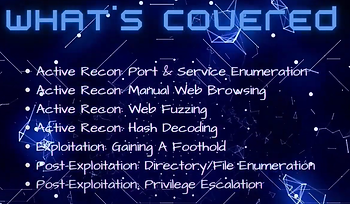
In this blog post, I perform a walk-through of the OffSec Proving Grounds CyberSploit 1 vulnerable host. I provide a walk-through of reconnaissance through post-exploitation. This includes performing recon, enumeration, exploitation, and post-exploitation. As this will be CTF style the main goal will be to capture the flags.
If you find this content informative and you are interested in cybersecurity, please like and subscribe to the Cyb3r-0verwatch channel. Also for more free content please regularly check back on www.Cyb3r-S3c.com. You can also watch the video on my YouTube Channel Cyb3r_0verwatch.
<OVERVIEW>

CyberSploit 1 is a vulnerable host created by Cybersploit to allow users to practice ethical hacking techniques. It provides experience on searching for exploit via ExploitDB and the use of Encoders/Decoders. This virtual machine is downloadable from VulnHub (owned by OffSec) and also accessible from the OffSec Proving Grounds virtual training lab. If you run the vulnhub version then Cybersploit has three flags for users to locate.
<Active Recon - Enumerating What's Running>

The target host, as noted earlier is Cybersploit 1. After logging into the Offsec Proving Groungs console, I launched the host and verified it registered online. Once the target host was online I began performing information gathering by doing port scans and service enumeration scans.

In this scenario, I was executing this more as an assessment then trying to stay under the radar. If I were to try to keep a low profile, I would probably run nmap at -T2 or -T1, if I was real paranoid. I ran the following command shown in the screenshot above, “nmap -sS - A -T4 -vv <IP> -oA /kali/Downloads/Nmap/cybersploit1”. In most cases, it is best to run the scan on all 65,535 ports by using -p- switch to detect any non-standard ports that may have services listening on them.
<Active Recon - Analyzing the Results>

With the nmap scan completed, reviewing the scan results it only detected two open ports 22 (ssh) and 80 (http).

Based on the output I can assume a few things:
1) The host is a linux box due to the service info showing OS and CPE as Linux
2) The service banners are showing ubuntu.
3) The host is using ssh for remote login. As these are only assumptions based on the current info, verification is always recommended.
<Active Recon - HTTP_The Weakest Link>

Due to SSH rarely being exploitable, I chose to focus on http. I browsed to port 80 where the following webpage “Welcome to Cybersploit CTF” loaded. I usually look at the page source to verify if there is any data leakage from devs. The information I've seen devs sometimes document in the page sources range from corporate ID's to hardcoded passwords.
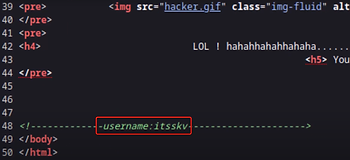
In this case it appeared that a dev noted a username “itsskv”. After reviewing the page source, I could not find any more useful information.

I ran Ffuf (Fuzz Faster U Fool) to crawl the entire site looking for hidden directories. I ran the following command shown in the cli (ffuf -w /usr/share/seclists/Discovery/Web-Content/common.txt -u http://192.168.161.92/FUzz) The -w is for the wordlist, -u is for the URL, and the -fc tells ffuf to exclude 403 responses. This will hopefully only give me the 200 ok responses.

Ffuf found a total of five pages. The hacker page looked interesting, but it was just a gif image. The index pages points to the main page. There are also two pages titled robots.txt and robots. The robots.txt file is used to tell search engines what pages it can access. There will sometimes be pages documented by web admins that they don't want a search engine to access, so robots.txt can provide some good information.

I reviewed both the robots page and the robot.txt page. Both appear to have the same base64 hash. Base64 can normally be identified because it has an equal character at the end.

There are several resources you can use to decipher what hash method was used. One site is called Hashes.com.

In this case, the hash was base64. I ran the following command shown in the CLI “echo -n <hash> | base64 -d”. Which basically means that echo will display the text on the screen, -n requests that a new line is not appended, the pipe feeds base64 command with the output and -d is used to decode the output.
<Exploitation - Getting a Foothold>

After the hash was decoded, I was able to view the output ”cybersploit{youtube.com/c/cybersploit}”.

Since I already had a username, I decided to try running a dictionary attack on SSH using Hydra. But I decided to first see if I could use the output from the base64 hash as a password. In this case, "cybersploit{youtube.com/c/cybersploit}"

Sure enough, using the decoded output from the base64 hash allowed me authenticate to the target host.

Once authenticated, I was in the users home directory. I performed a little recon and I can see in the home directory flag two.

When I performed a cat on flag2.txt, it appeared to be a rabbit hole and did not contain the flag.

A second file local.txt actually contains the flag, OffSec likes to use local.txt and proof.txt on their vulnerable lab machines to contain the flags. When I performed a cat on the file it contained the MD5 hash flag.

With OffSec Proving Grounds, once you get a flag you can submit the flag through the console to get credit for capturing the flags. I submitted the first flag successfully.
<Post-Exploitation - Privilege Escalation >
When doing these vulnerable host labs, the last flag will likely involve getting root and accessing the root directory. The fun part is figuring out what we needs to done to get root.

In most cases, I normally run Linpeas, as it enumerates the host looking for possible privilege escalation paths.

Peass-ng is downloadable from the kali repo, so you don't have to download it from Github anymore. Peass-ng is an awesome tool that provides a lot of information.

Since I already have peass on kali, I started my http.server in order to upload Linpeas to the target host. Http.server is a good way to upload your payloads because a lot of Linux systems have wget or curl installed and for Windows systems you can use tools like Certutil, as an example to download to the target host from your pentest system.

I changed directory to the /tmp folder then I ran the wget command shown in the image above to download the Linpeas to the /tmp folder from kali. Linpeas is now on the target host.

Before I can even use Linpeas, I needed to verify that I could execute the script.

After doing "ls -la" I could see that the Linpeas did not have the "x" bit. Since Linpeas didn't have the "x" bit, I had to run the chmod command to make it executable.

Since I had verfied that Linpeas didn't have the execute permissions, I ran "chmod 777 Linpeas.sh" to make it executable.

With the permissions for Linpeas modified, I executed Linpeas to start enumerating for possible privilege escalation paths.

Looking at the "Basic information" section of Linpeas (image below), I could see it showed the linux version in orange (the legend says yellow, but it looks orange to me) with red text. If we look at the Linpeas "LEGEND", it advises that orange with red text is 95% of the time a privesc vector.

Linpeas found a possible privesc with linux version 3.13.0-32-generic, as shown in the image above.
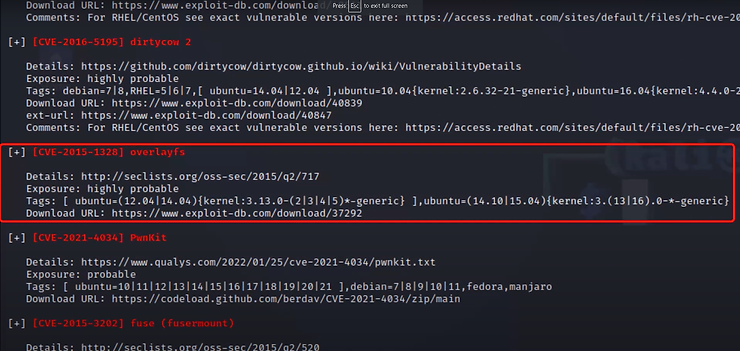
Looking at the "Linux Exploit Suggestor" section of Linpeas, I could see a variety of suggested exploits, but "cve-2015-1328 overlayfs" looked to be a good candidate because if closely matches the linux version of the target host.

Now that I had a possible exploit to use, I used Searchsploit to see if the exploit is already accessible in Kali’s local repository. When I run the Searchsploit command as shown in the image above, the results were displayed.

In this case I used the second exploit list that is highlighted in the image above. In order to access the exploit code I need to use the path located on the right side that says "linux/local/37292.c".

By typing "locate" and the path shown in the the image above, I was able to determine where the exploit code is being stored.

I copied the exploit code to the Downloads folder and renamed it "overlayfs.c" as shown in the image above.

Now that the exploit code is in the downloads folder, I ran wget from the target host and downloaded the exploit code to the /tmp folder.
With the exploit code is in the /tmp folder of the target host, I now just needed to compile the exploit.

I got the code compiled and ran the exploit. I used the command is shown in the image above.

After running the code, it looks like the exploit worked and I was able to get a hash prompt. This usually indicates a root shell.

In order to verify that I had a root shell, I ran the "whoami" command and it showed I was root.

Now that verified I had a root shell, I changed directory to /root to see if the flag was located in the folder.

Sure enough, the proof.txt is there. I cat the proof.txt file to get the root flag.

I submitted the root flag in the OffSec PG console to complete the host.
</CONCLUSION>
There you have it folks, I was able to gain root privileges by executing several processes including active reconnaissance like port scanning, service enumeration, and manual browsing. Performing those steps allowed me to gain the knowledge necessary to gain a foothold on the target host. Upon gaining access, performing further enumeration allowed me to find a workable escalation path to root in order to gain the final flag.
Thank you for checking out this blog post on the OffSec Proving Grounds Cybersploit1 vulnerable machine. Thank you for also checking out the Cyb3r-S3c website. If you find this content informative and you are interested in cybersecurity, please also subscribe to the Cyb3r-0verwatch YouTube channel. This blog post was not meant to provide a thorough explanation of this vulnerability, but I hope it provided you with valuable insights. If you have any questions, please feel free to send me a message from the Cyb3r-S3c contact page. Until next time keep learning, the only way to improve is to keep learning.
/Signing Off,
Pragmat1c_0n3





