
Adding interactive crypto visuals to your website can significantly improve user engagement. One of the easiest ways to do this is by using the Crypto Bubbles widget. This is a dynamic and visually appealing way to display cryptocurrency market data.
In this tutorial, you’ll learn how to embed the widget on your website in just a few steps.
Step 1) Open Crypto Bubbles
Visit the official website https://crypto-bubbles.net/ and click the Embed button.
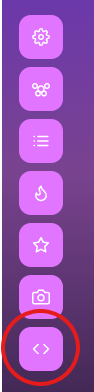

Step 2) Customize Your Widget
After clicking the Embed button, a configuration dialog will open.
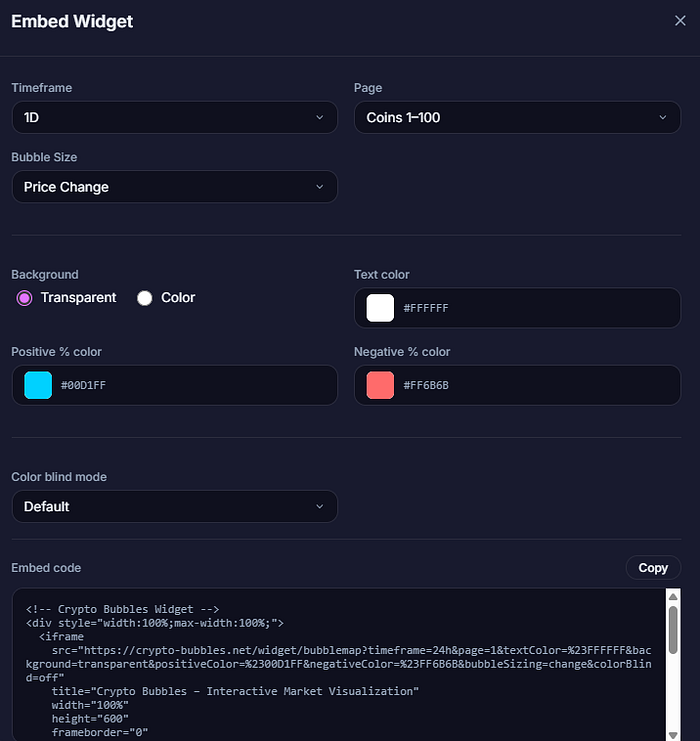
Here you can fully customize your widget, including:
- Positive and negative color schemes
- Background color
- Color-blind mode
- Display preferences and more
Take your time to adjust the settings so they match your website’s design and user experience.
Step 3) Copy and Embed the Code
Once you’re satisfied with your setup:
- Click on Copy
- Paste the code anywhere in your website’s HTML where you want the widget to appear
Why Use Crypto Bubbles?
- ✅ Completely free to use
- ✅ No signup required
- ✅ Interactive and visually engaging
- ✅ Easy to integrate into any website






