
The world of crypto has evolved so much in the past few years such that you can actually carry a crypto wallet in your pocket. Do you sit in front of a computer all day? Well, you can use a wallet on your desktop or laptop.
Atomic Wallet is one such versatile wallet. It supports over 300 coins and tokens, and is available for both desktop (Windows/Linux) and mobile. I primarily use it on android so my guide will be biased towards mobile but you can basically use Atomic on any operating system.
Here we look at some of its functions. After downloading it here you automatically become eligible for 10 AWC Airdrop upon registration. An additional 5 AWC is awarded for each referral if you are active Atomic Wallet users with a balance of $10 in any popular asset.
More about this on Atomic Wallet Knowledge Base.
For now, let’s just explore the features of Atomic Wallet.
Besides being a wallet, Atomic provides other functions like Exchange, Stake and buy Crypto.
All these functions are easily accessible on the home screen of the wallet. 
Once you login Atomic defaults to the wallets tab where you can choose a wallet to send and receive coins or tokens. List of wallets too long? Find this filter  at the top left and select the wallets that you use most, then click apply.
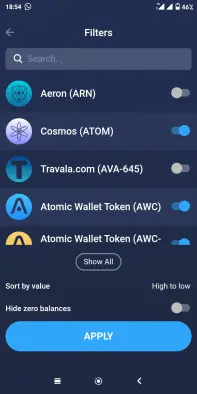
Once that is done, you can simply select a wallet to send and receive coins or tokens.
To see your respective wallet address just click receive. You can then copy the address or simply share it with your contacts on social media.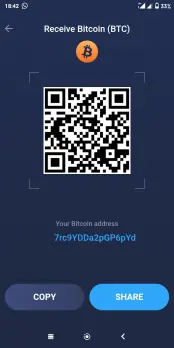
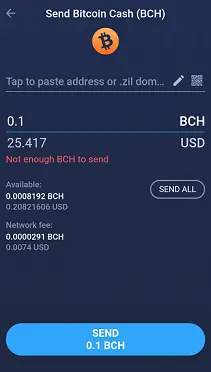
Clicking on the send tab will give you the option to paste recipient address. For most coins the available balance and the network fee will be shown before you send the transaction.
The cool thing is that you get to see the value of the asset you are sending in Fiat,(in my case USD). And it’s smart enough to tell me when I don’t have enough coins to send :-)
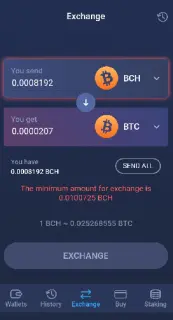
Want to exchange your coins or tokens? The exchange tab is right there for you. It will show you how much you get for the exchanged coin or token, and the minimum you can send is indicated.
You can also buy crypto using your VISA Card within Atomic Wallet. Just tap on the buy tab and input the amount of USD you want to spend. The equivalent crypto you can get is then displayed in real time.
Another cool feature of Atomic Wallet is staking (storing your tokens to earn interest). Simply go to the staking tab 
and you can see Tokens you can stake and the expected annual percentage yield. 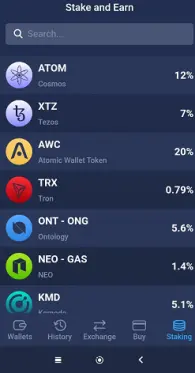
You can stake a multitude of Assets including Cosmos, Tezos, Komodo, Tron, Neo and AWC.
Find more about the different options for staking each token on the Atomic Wallet Knowledge base.
Otherwise just head over to the Atomic Wallet Page and try out all its great features.






