

Are you feeling annoyed of not being able to withdraw funds from your crypto currency wallet in cctip_io bot? Do you have balance of ERC20 token on cctip_io bot on twitter that you would like to withdraw but your $ETH balance for gas fee is on telegram?
Well behold! and smile my frens! Because problem solved already! Apparently Cctip_io has implemented a seamless transfer of crypto currencies across your social media accounts! Hell yeah! baby!
What about the transfer fees? Then I would have less token because of transfers.
That's the best part frens! Because you can do all of the transfers for FREE! Yep, you just read, transfer balance from cctip_io of your twitter to telegram or wechat vise versa absolutely free of charge! Now how's that!
So here's how you do it:
1. Bind email
In order to transfer funds across platforms, you should first bind your cctip_io bots to the same email. Use command as shown below:
bindemail <youremail>
Look I know you are not dumb but please be wise like Pepe and exclude the <> upon execution of the command. Now after that, you will be prompted with a verification code sent to your email address. Note that in order for this to work, you should do the same email binding across your cctip_io social media accounts using one (1) single email only. Please refer to the picture below for the command line:
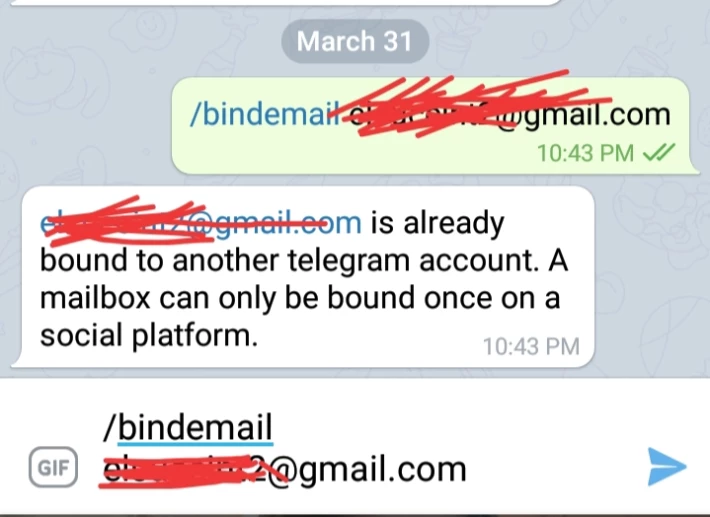
The same command goes for twitter and wechat, you have to execute it DM the bot.
2. Transfer for Free!
Assuming you had done the email binding, you may now initiate the transfer,.make sure you have balance ofc. Yes frens, as EZ as that.
To initiate a transfer across platforms execute the command below from and to your desired social media platform:
transfer <token amount> <token symbol> <Telegram/Twitter/Wechat>
For example, inorder for me to transfer my 1,100 $PON tokens stacked on twitter to telegram, all I need to do is type
transfer 1,100 PON Telegram
After that a confirmation message will appear. You need to copy and paste the message to confirm the transaction. Please refer to the pictures below on how I did that.
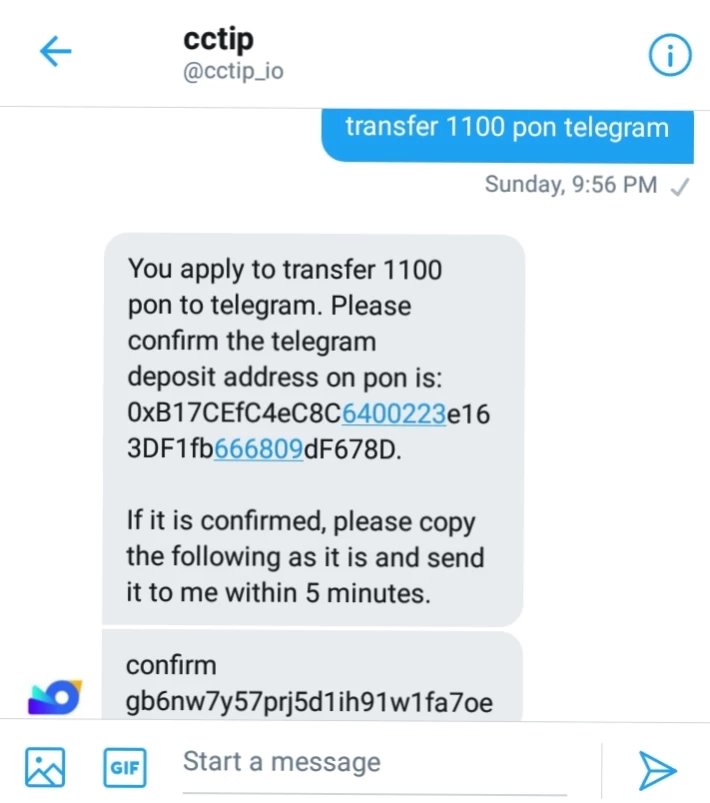

And all done! Congrats! You now have completed a transfer!
I hope this simple tutorial have provided you some help.
You have questions? Drop them below in the comments section and I would love to answer you!
Stay safe and don't forget for some tips! 😘






