ENG
Wax Cloud Wallet, as the name suggests, is a wallet for the WAXP token. But it is not only that, it is also a Blockchain in which you can generate profits in multiple ways, something really interesting and will cause that in the future there will be many more platforms like this. When you access this space, you have so many things to do that you won't know where to start so I'll try to help a little.
Like everything on the internet, the first thing to do is register to get your own space in the Wax Cloud Wallet. You can do it through Google, Twitch, Twitter ... etc. although I recommend that you use your email directly and do not do it through other networks to avoid any type of problem. It will require a password with capital letters and symbols. Once you are inside, you will see several sections in which you can interact which I will explain below.
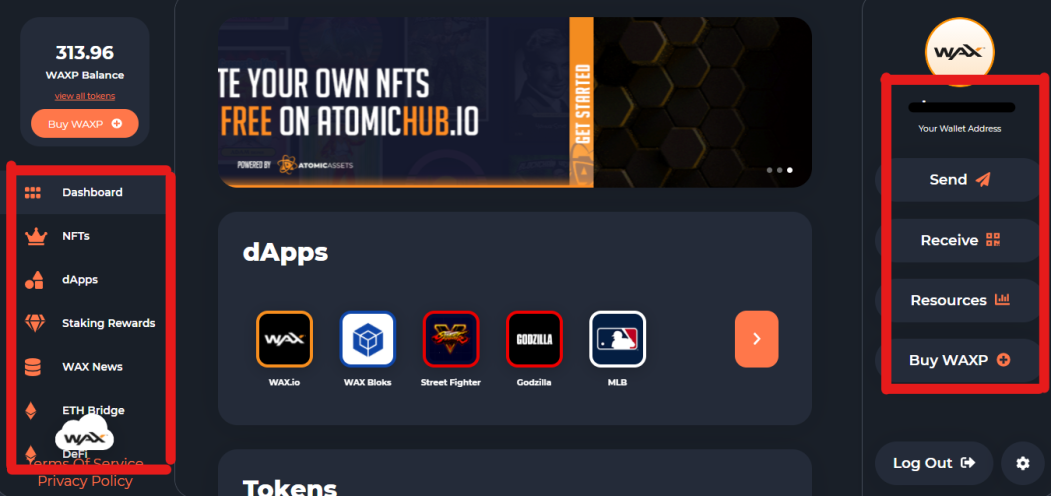
As you can see in the image above, I have highlighted the main sections of the Wax platform. At the top left is your WAXP balance, which will increase or decrease depending on your interactions (purchases, sales, shipments ... etc).
- Dashboard: This is the main section, the same one that appears in the image above. Here you will get the latest announcements, some of the dApps (Decentralized Apps) and the Token that you have.
- NFTs: In this part you will find the famous NFTs (Non Fungible Token) that the different Wax Cloud Wallet dApps can provide. You will have two sections within it: Atomic Assets (most of NFT will appear in this section, also those that are bought according to which market (such as Atomic Market) or dApp) and Simple Assets (A few will appear in this, mainly of the dApp KOLOBOK or Simple Market). You can also transfer or give away your NFTs if you wish, the options appear in the upper right part of each NFT.
- dApps: Here is the whole mogollón or the main activity center within Wax Cloud Wallet. The dApp (Decentraliced App), will give you access to different games, markets or applications and several of them interact with each other and can generate higher profits or extra profits. To explain its general operation, I will write another article focused on the subject.
- Staking Rewards: In this section you will find the data of the WAX that you invest within the platform. This will affect the performance of your wallet within the blockchain and is linked to the Resources section. All the invested WAX will appear, you will be able to make proxy voting to the different WAX guilds once you have WAX in stake and those same votes will give you small benefits in WAX. The more WAX you have in stake, the more you will passively generate and the more you can invest, increasing your amount slowly but constantly. This section interacts directly with the Resources section which I will explain a little more below.
- WAX News: Obviously this is the news section where you will have the information of any news within the blockchain: news, offers, events ... etc.
- ETH Bridge: Although I have not personally checked it, it seems that in this section you can convert your WAXP to WAXE (ERC20 token) and WAXUSDT to USDT. Also listed are the options to withdraw to ETH and deposit to WAX.
- DeFi: I can tell you little about this section since I still have it pending study. DeFi (Decentraliced Finance) has several options where it appears that you can use WAXP and WAXE to generate passive income through ETH and WAXG (Wax Governance Token).
Now we go with the right part of the screen, at the top the name of your wallet will appear, which will usually end in .wam, this is the address of your wallet. Yes, it is very different from the usual market directions, but don't worry, it's correct.
- Send / Receive: As in all wallets or exchanges, the options to send or receive WAXP from wherever.
- Resources: This is the section that contains your current resources within the blockchain, CPU, NET and RAM. With these names you can think that it refers to the potential of the computer but in principle it is not like that. These three factors refer to the capacity of your wallet within the blockchain and for proper operation it is advisable to start by investing a WAXP in each of them. Why? By having WAXP at stake in these three factors you will avoid reaching 100% of any of these, if you reach 100% your operations will require you to increase the stake in one of the specific factors. The most affected is usually the CPU that is the one that is used the most in the game dApps, in addition, everything you invest here will be added to the Staking Rewards.
- Buy WAXP: This is where you can buy WAXP through different means. I can only tell you that I tried it through my bank card but it seems that you can only do it with dollars and not with other cash. In my case, I bought the WAXPs on the KuCoin exchange and sent them to my wallet paying a commission of 10 WAXP (2.5 dollars approx.) Per shipment.
The last parts are the Logout to close your session and the options of your account where you can edit your data, security or create a new account among other things.
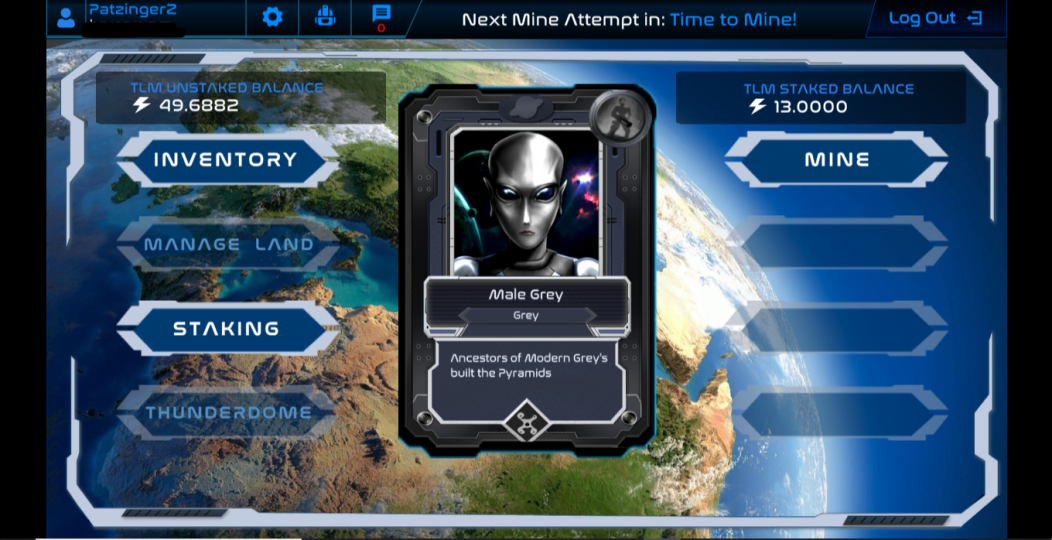
Finally, I will explain how to start your journey in Wax Cloud Wallet without investing a single penny. Once inside the platform, go to the dApps section and look for the one called Alien Worlds. Once opened, it will ask you the usual, register your email and put your username. Then you will have to choose one of the land (depending on which will have more or less commission in addition to varying in the TLM mining and NFT drop) and you can start mining TLM, the Alien Worlds token. Once you have TLM, go to the Alcor exchange, which you can link to your Wax Cloud Wallet account and you can change the TLM to WAX. Use this initial WAX to invest in CPU, RAM and NET and you are off to a good start.
So far, the introduction of the Wax Cloud Wallet. In the next article, I will try to explain the general operation of all the dApps, greetings.
Thank you for reading this post!!
Dare to write you too !!
ESP
Wax Cloud Wallet, como su nombre indica, es una cartera para el token WAXP. Pero no es solo eso, también es un Blockchain en el que puedes generar ganancias de múltiples maneras, algo realmente interesante y provocará que en un futuro hayan muchas más plataformas como esta. Cuando accedes a este espacio, tienes tantas cosas para hacer que no sabrás por donde empezar así que trataré de ayudar un poco.
Como todo en internet, lo primero de todo es registrarte para obtener tu propio espacio en la Wax Cloud Wallet. Podrás hacerlo a través de Google, Twitch, Twitter... etc. aunque recomiendo que utilices tu email directamente y no lo hagas a través de otras redes para evitar cualquier tipo de problema. Te exigirá una contraseña con mayúsculas y símbolos. Una vez que estás dentro, verás varias secciones en las que puedes interactuar las cuales explicare a continuación.
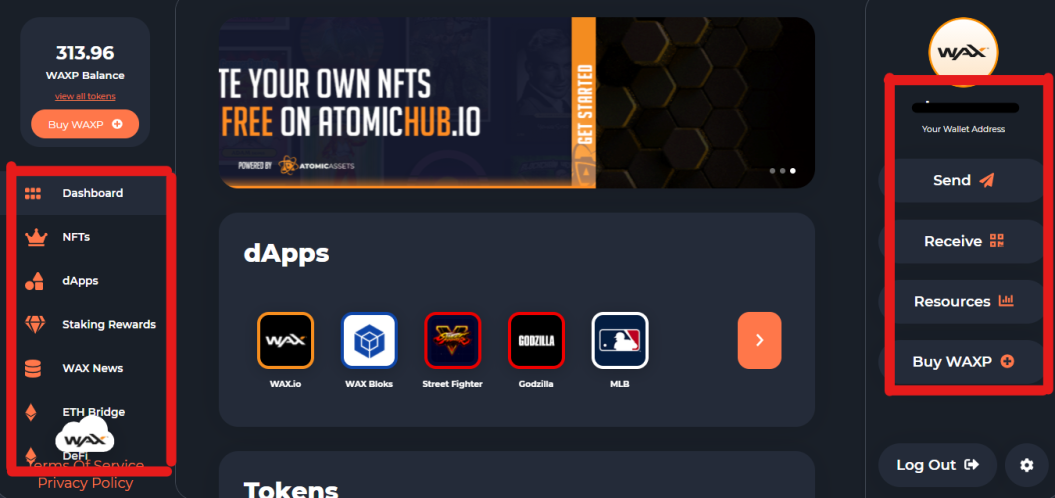
Como puedes ver en la imagen superior, he destacado las secciones principales de la plataforma de Wax. En la parte superior izquierda figura tu balance de WAXP, cosa que aumentará o disminuirá según tus interacciones (compras, ventas, envíos... etc).
- Dashboard: Esta es la sección principal, la misma que aparece en la imagen superior. Aquí te saldrán los últimos anuncios, algunas de las dApps (Apps Descentralizadas) y los Token que posees.
- NFTs: En esta parte encontrarás los famosos NFT (No Fungible Token) que te puedan proporcionar las distintas dApps de Wax Cloud Wallet. Tendrás dos secciones dentro de ésta: Atomic Assets (la mayoría de NFT te aparecerán en esta sección, también los que se compren en según que mercado (como Atomic Market) o dApp) y Simple Assets (Unos pocos aparecerán en esta, principalmente de las dApp KOLOBOK o Simple Market). También podrás transferir o regalar tus NFT si lo deseas, las opciones aparecen en la parte superior derecha de cada NFT.
- dApps: Aquí esta todo el mogollón o el principal centro de actividades dentro de Wax Cloud Wallet. Las dApp (Decentraliced App), te darán acceso a distintos juegos, mercados o aplicaciones y varias de ellas interactúan unas con otras pudiendo generarte mayores ganancias o ganancias extra. Para explicaros su funcionamiento general, escribiré otro artículo enfocado en el tema.
- Staking Rewards: En esta sección encontrarás los datos de los WAX que inviertas dentro de la plataforma. Esto afectará al rendimiento de tu wallet dentro de la blockchain y va vinculada con la sección Resources. Figurará todo el WAX invertido, podrás hacer unas votaciones de proxy a los distintos gremios de WAX una vez tengas WAX en stake y esas mismas votaciones te darán pequeños beneficios en WAX. A más WAX tengas en stake más generarás pasivamente y más podrás invertir aumentando tu cantidad lenta pero constantemente. Esta sección interactúa directamente con la sección Resources la cual explicaré un poco más abajo.
- WAX News: Evidentemente esta es la sección de noticias donde tendrás la información de cualquier novedad dentro de la blockchain: novedades, ofertas, eventos... etc.
- ETH Bridge: Aunque no lo he comprobado personalmente, parece que en esta sección puedes convertir tu WAXP en WAXE (token ERC20) y WAXUSDT en USDT. También figuran las opciones de retirar a ETH y depositar a WAX.
- DeFi: De esta sección poco puedo deciros ya que aún la tengo pendiente de estudio. DeFi (Decentraliced Finance) tiene varias opciones en las que parece que puedes utilizar WAXP y WAXE para generar ingresos pasivos a través de ETH y WAXG (Wax Gobernance Token).
Ahora vamos con la parte derecha de la pantalla, en la parte superior aparecerá el nombre de tu wallet que por lo general acabará en .wam, esta es la dirección de vuestra cartera. Si, es muy distinta de las direcciones habituales de los mercados pero tranquilos que es correcta.
- Send/Receive: Como en todas las wallet o exchanges, las opciones de enviar o recibir WAXP de donde sea.
- Resources: Esta es la sección en la que constan tus recursos actuales dentro de la blockchain, CPU, NET y RAM. Con estos nombres puedes pensar que se refiere al potencial de la computadora pero en principio no es así. Estos tres factores hacen referencia a la capacidad de tu wallet dentro de la blockchain y para un correcto funcionamiento es recomendable empezar invirtiendo un WAXP en cada uno de ellos. Por qué? al tener WAXP en stake en estos tres factores evitarás llegar al 100% de cualquiera de estos, si llegas al 100% tus operaciones te exigirán que aumentes el stake en uno de los factores concretos. La más afectada por lo general es la CPU que es la que más se utiliza en las dApps de juegos, además, todo lo que inviertas aquí se sumará al Staking Rewards.
- Buy WAXP: Aquí es donde podrás comprar WAXP a través de distintos medios. Solo puedo deciros que yo lo intenté a través de mi tarjeta bancaria pero parece ser que solo puedes hacerlo con dólares y no con otros efectivos. En mi caso, compró los WAXP en el exchange KuCoin y los envío a mi wallet pagando una comisión de 10 WAXP (2,5 dolares aprox.) por envío.
Las últimas partes son el Logout para cerrar tu sesión y las opciones de tu cuenta donde podrás editar tus datos, la seguridad o crear una cuenta nueva entre otras cosas.
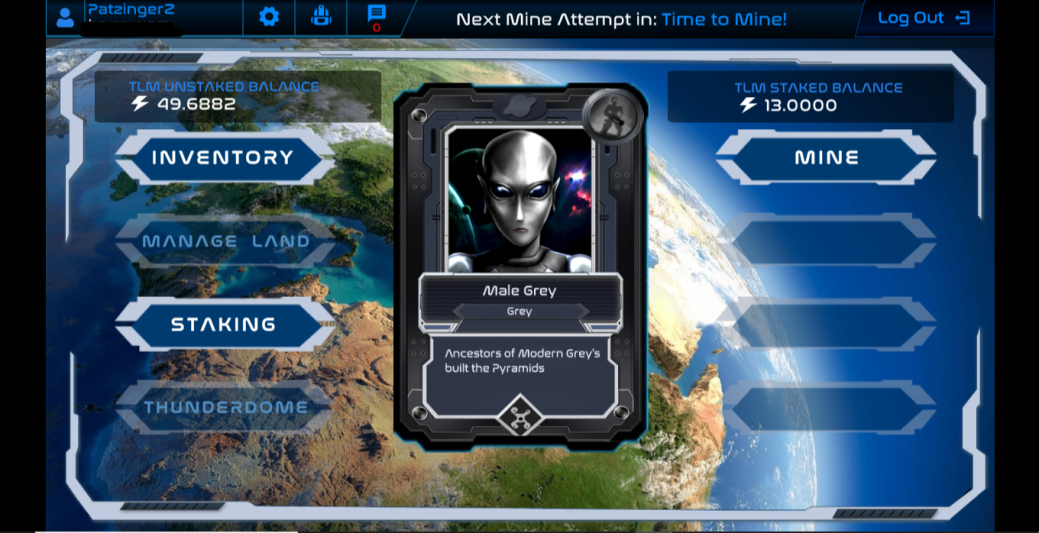
Para terminar, te explicaré como comenzar tu viaje en Wax Cloud Wallet sin invertir ni un solo céntimo. Ya dentro de la plataforma, dirígete a la sección de dApps y busca la llamada Alien Worlds. Una vez abierta te pedirá lo de siempre, registra tu email y pon tu nombre de usuario. Después tendrás que elegir una de las land (según cuales tendrán mayor o menor comisión además de variar en el minado de TLM y drop de NFT) y ya podrás comenzar a minar TLM, el token de Alien Worlds. Una vez tengas TLM, ve al exchange Alcor, el cual podrás vincular con tu cuenta de Wax Cloud Wallet y podrás cambiar el TLM por WAX. Utiliza este WAX inicial para invertirlo en la CPU, RAM y NET y ya habrás empezado con buen pie.
Hasta aquí, la introducción de la Wax Cloud Wallet. En el próximo artículo, tratare de explicar el funcionamiento general de todas la dApps, un saludo.
¡¡Gracias por leer el post!!
¡¡Anímate a escribir tu también!!