In this article, we will take a detailed look at the open source password recovery tools and wallet seed phrases in the Crypto Deep Tools repository, and we will also discuss the situation when you accidentally lost or forgot part of your mnemonic or made a mistake while decrypting it. (So you either see an empty wallet or get an error that your seed is invalid) For wallet password or passphrase recovery, it is primarily useful if you have a reasonable idea about what your password might be.
BTCRecover is an open source wallet password and seed recovery tool.
Usage Examples
This page provides links to a number of examples tht demonstrate how the setup and syntax to use BTCRecover in a number of different recovery scenarios. (Generally with a corresponding YouTube video)
The commands given can be pretty much copy/pasted as-is to allow you to recreate the examples given in the YouTube video.
Note: Some changes may be required based on your platform, often simple things like using “python” vs “python3”.
Python Version: Many of these videos were created using different forks of BTCRecover. The resources and commands here may differ slightly, but are designed to work with this fork under Python3.
Seed Recovery
Basic Seed Recoveries (Demonstrates the basic commands that you would use for a recovery with various types of wallets)
Basic Password/Passphrase Recoveries
The idea is that, if you are running this tool on Windows, you can directly copy/paste any of these examples. (They all use the same seeds and addresses that are in the automatic tests)
They will all find a result almost straight away.
Seed Based Recovery Notes
Notes Seedrecover.py has been set up so that the defaults should get a result for the majorty of simple “invalid menmonic” or “invalid seed” type errors. (Eg: Where you have an intact seed backup that has a typo in it)
It will search all account types for the supported cryptocurrencies, on all common derivation paths.
It will automatically run through four search phases that should take a few hours at most. 1. Single typo 2. Two typos, including one where you might have a completely different BIP39 word 3. Three typos, including one where you might have a completely different BIP39 word 4. Two typos that could be completely different words.
Fully Supported wallets (For supported cryptocurrencies)
- Hardware Wallets
- Ledger Nano X and S
- Trezor One and T
- Keepkey
- Safepal
- Coldcard
- Bitbox02
- Keystone
- Cobo Vault
- Ellipal
- CoolWallet S (You will need both convert the seed numbers to BIP39 seed words and to use the –force-p2sh argument for Bitcoin and Litecoin…)
- Software Wallets
- Electrum – Both V1 and V2 Seeds (This includes forks like Electrum-LTC, Electron-Cash, etc)
- Coinomi
- Wasabi
- Edge Wallet
- Mycelium
- Exodus
- Trust Wallet
- Metamask (Including clones like Binance Chain Wallet Extension)
Wallets with Compatibility Issues(Due to not following derivation standards…)
- Atomic Wallet. (Non-Standard derivation for ETH (And all ERC20 tokens), needs to be used with the
--checksinglexpubaddress, XRP) - Abra Wallet. (Non-Standard seed format, first word is Non-BIP39 “at”, the last 12 are BIP39 (and checksum) but unable to reproduce derivation)
Let’s move on to the experimental part:
Let’s open [TerminalGoogleColab].
Let’s use the repository «17BTCRecoverCryptoGuide».
git clone https://github.com/demining/CryptoDeepTools.git

cd CryptoDeepTools/17BTCRecoverCryptoGuide/

ls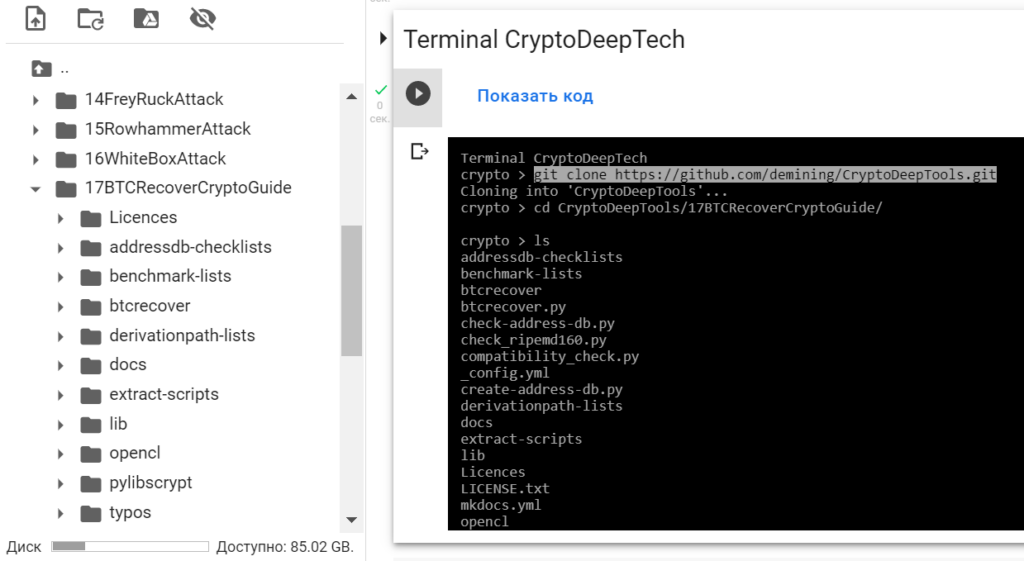
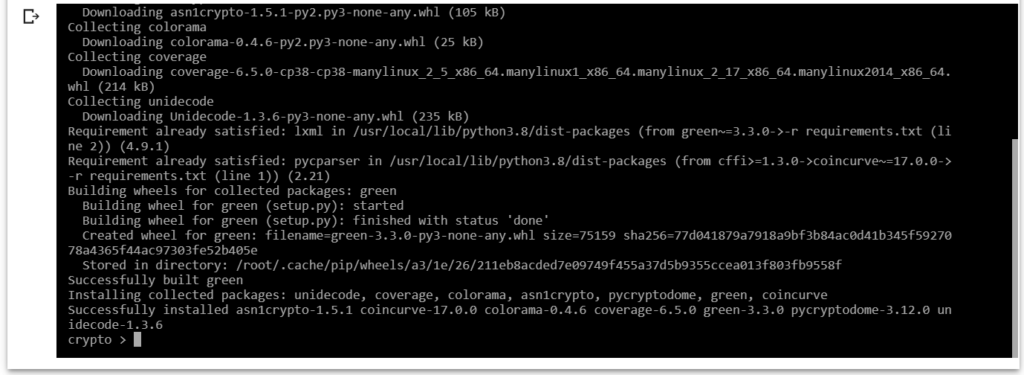
Install all the packages, modules and libraries we need
pip3 install -r requirements.txt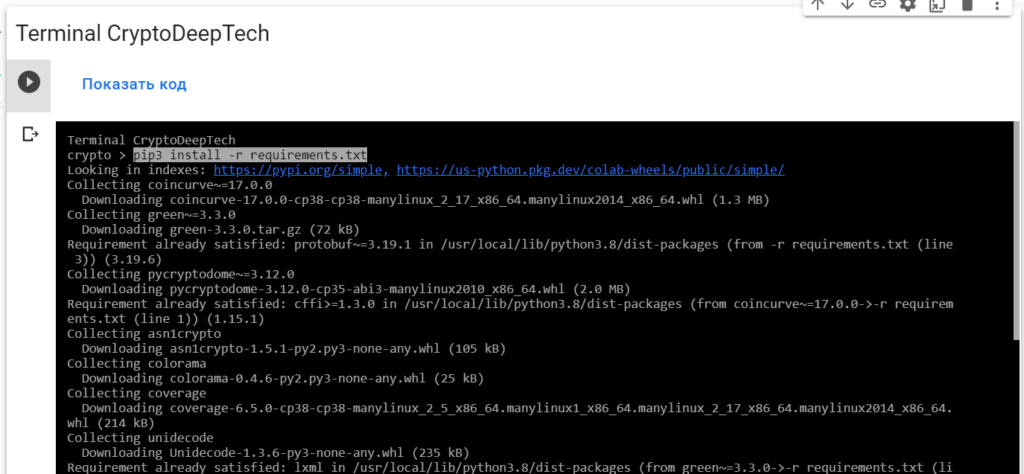
Using the lscpu command to find out the processor architecture of Google Colab
lscpu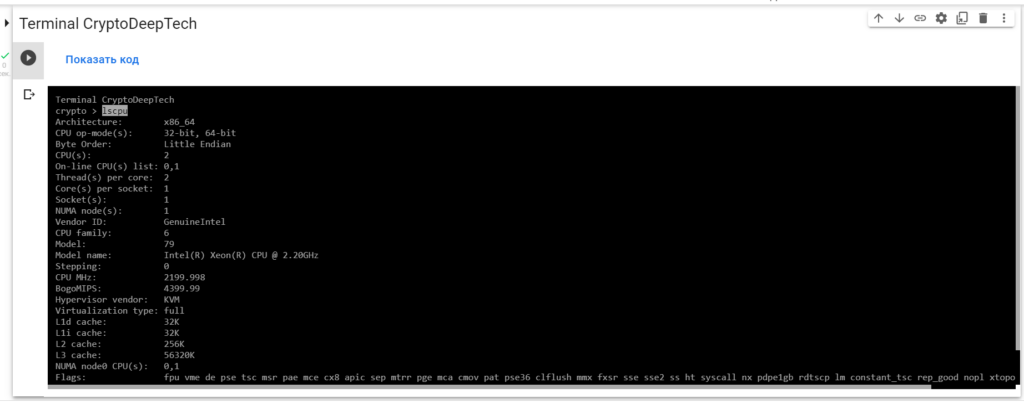
PyOpenCL Installation for Linux
sudo apt install python3-pyopencl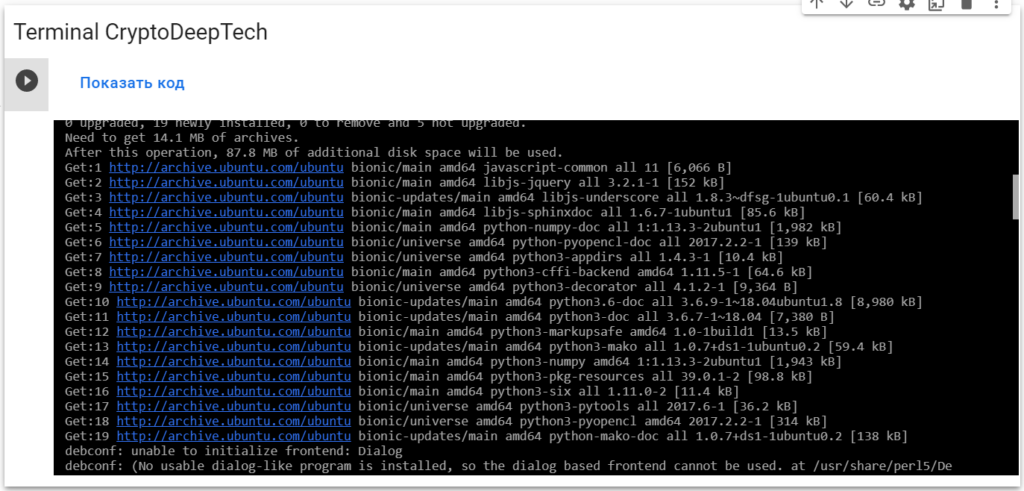
Testing your System
python3 -m btcrecover.test.test_passwords -v GPUTests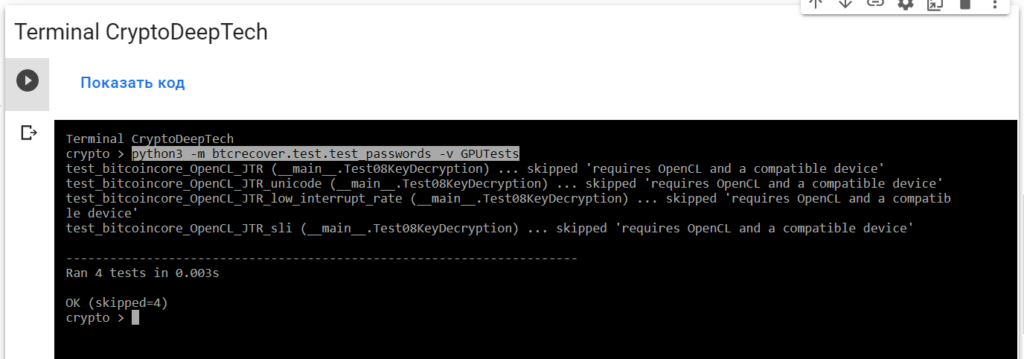
Basic Bitoin Recoveries
Note: Most of the time you can just run seedrecover.py, even simply double click it and follow the graphical interface.
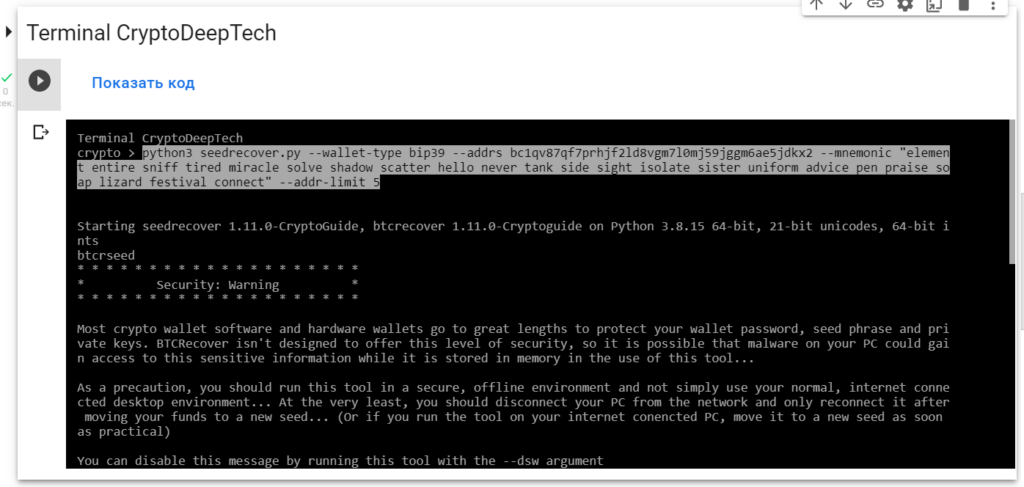
With a Native Segwit Address – One missing word, address generation limit of 5. (So address needs to be in the first 5 addresses in that account)
python3 seedrecover.py --wallet-type bip39 --addrs bc1qv87qf7prhjf2ld8vgm7l0mj59jggm6ae5jdkx2 --mnemonic "element entire sniff tired miracle solve shadow scatter hello never tank side sight isolate sister uniform advice pen praise soap lizard festival connect" --addr-limit 5
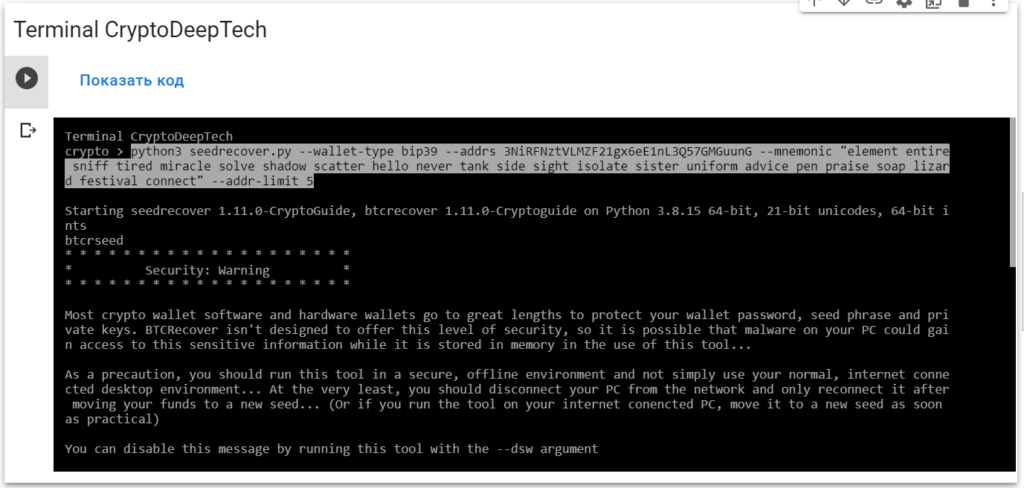
With a P2SH Segwit Address – One missing word, address generation limit of 5. (So address needs to be in the first 5 addresses in that account)
python3 seedrecover.py --wallet-type bip39 --addrs 3NiRFNztVLMZF21gx6eE1nL3Q57GMGuunG --mnemonic "element entire sniff tired miracle solve shadow scatter hello never tank side sight isolate sister uniform advice pen praise soap lizard festival connect" --addr-limit 5
Basic Cardano Recoveries
For Cardano recovers, see the notes here as well. You can use any Shelley-Era base or stake addresses. (Byron-Era not supported)
Seed from a Ledger Nano, missing one word, using a standard base address. (Address generation limit isn’t appliable in Cardano)
python3 seedrecover.py --wallet-type cardano --addrs addr1qyr2c43g33hgwzyufdd6fztpvn5uq5lwc74j0kuqr7gdrq5dgrztddqtl8qhw93ay8r3g8kw67xs097u6gdspyfcrx5qfv739l --mnemonic "wood blame garbage one federal jaguar slogan movie thunder seed apology trigger spoon basket fine culture boil render special enforce dish middle antique"
Seed from a Trezor, missing one word, using a standard base address. (Address generation limit isn’t appliable in Cardano)
python3 seedrecover.py --wallet-type cardano --addrs addr1q8k0u70k6sxkcl6x539k84ntldh32de47ac8tn4us9q7hufv7g4xxwuezu9q6xqnx7mr3ejhg0jdlczkyv3fs6p477fqxwz930 --mnemonic "ocean kidney famous rich season gloom husband spring convince attitude boy"
Seed from Yoroi, Adalite or Daedalus (Working as a software wallet), using a standard stake address
python3 seedrecover.py --wallet-type cardano --addrs stake1uxztdzzm4ljw9a0qmgregc8efgg56p2h3kj75kc6vmhfj2cyg0jmy --mnemonic "cave table seven there limit fat decorate middle gold ten battle trigger luggage demand"
Basic Tron Recoveries
One missing word, address generation limit of 1. (So address needs to be in the first account)
python3 seedrecover.py --wallet-type tron --addrs TLxkYzNpMCEz5KThVuZzoyjde1UfsJKof6 --mnemonic "have hint welcome skate cinnamon rabbit cable payment gift uncover column duck scissors wedding decorate under marine hurry scrub rapid change roast print arch" --addr-limit 1
Basic Helium Recoveries
One missing word
python3 seedrecover.py --wallet-type helium --addrs 13hP2Vb1XVcMYrVNdwUW4pF3ZDj8CnET92zzUHqYp7DxxzVASbB --mnemonic "arm hundred female steel describe tip physical weapon peace write advice"
Basic Polkadot(Substrate) Recoveries
One missing word, blank secret derivation path
python3 seedrecover.py --wallet-type polkadotsubstrate --addrs 13SsWBQSN6Se72PCaMa6huPXEosRNUXN3316yAycS6rpy3tK --mnemonic "toilet assume drama keen dust warrior stick quote palace imitate music disease"
One missing word, secret derivation path of “//hard/soft///btcr-test-password” The soft/hard derivation path is passed to the program via the –substrate-path argument and the password is treated the same as a passphrase (Without the leading ///)
python3 seedrecover.py --wallet-type polkadotsubstrate --addrs 12uMBgecqfkHTYZE4GFRx847CwR7sfs2bTdPbPLpzeMDGFwC --mnemonic "toilet assume drama keen dust warrior stick quote palace imitate music disease" --passphrase-arg btcr-test-password --substrate-path //hard/soft
Basic Stacks Recoveries
One missing word, address generation limit of 10. (So will check the first 10 “accounts” for a given seed)
python3 seedrecover.py --wallet-type stacks --addrs SP11KHP08F4KQ06MWESBY48VMXRBK5NB0FSCRP779 --mnemonic "hidden kidney famous rich season gloom husband spring convince attitude boy" --addr-limit 10
Descrambling 12 word BIP39 Seeds (Demonstrates Using a TokenList for unscramblng seeds for Electrum Legacy, Electrum Segwit, BIP39 Bitcoin and BIP39 Ethereum)
Descrambling 12 Word Seeds
Three types of token files are provided for these tests. Token files that will find the result on their first check, token files that will find the result as the last possible combination and those which will find it at some point inbetween.
The idea is that these allow you to quickly verify that things are working (finding on the first result), get an idea for how long a full run might take (last result) and also try something representative of a real world situation.
If you are just descrambing a 12 word seed, there isn’t much point running without –no-eta, as the number of seeds to be tested can be easily worked out and the seed generator can easily keep up with at least 48 threads.
Note: The YouTube video and examples were made before OpenCL acceleration was added to Blockchain.com wallets and can give a 2x performance improvement. (See GPU Accleration for more info)
Performance
On a 48 core Linode you can expect to… * Descramble a 12 word Electrum seed in less than 15 minutes… * Descramble a 12 word BIP39 seed in less than 50 minutes…
You can expect things to take about 5 times this long on a current (mid 2020), mid-range CPU.
Electrum
Legacy Wallet (Last Result)
Using Tokenlist lastcombination_electrum.txt
1 2 3 4 5 6 7 8 9 10 11 12 book fit fly ketchup also elevator scout mind edit fatal where rookie
Command
python3 seedrecover.py --no-dupchecks --mnemonic-length 12 --language EN --dsw --addr-limit 1 --addrs 1CU62HPowYSxhHiiNu1ukSbMjrkGj4x52i --tokenlist ./docs/Usage_Examples/2020-05-02_Descrambling_a_12_word_seed/lastcombination_electrum.txt --wallet-type electrum2
Segwit Wallet
Using Tokenlist randomcombination_electrum.txt
1 2 3 4 5 6 7 8 9 10 11 12 social shoe spin enlist sponsor resource result coffee ocean gas file paddle
Command
python3 seedrecover.py --no-dupchecks --mnemonic-length 12 --language EN --dsw --wallet-type electrum2 --addr-limit 1 --addrs bc1qtylwmarke39nysxepdx5xzfatvrlel5z8m0jx2 --tokenlist ./docs/Usage_Examples/2020-05-02_Descrambling_a_12_word_seed/randomcombination_electrum.txt --bip32-path "m/0'/0"
BIP39
Ethereum Address (Default derivation path for Trezor, MEW)
Using Tokenlist randomcombination_bip39.txt
1 2 3 4 5 6 7 8 9 10 11 12 boy hidden kidney famous spring convince rich season gloom ocean husband attitude
Command
python3 seedrecover.py --no-dupchecks --mnemonic-length 12 --language EN --dsw --wallet-type ethereum --addr-limit 1 --addrs 0x66F9C09118B1C726BC24811a611baf60af42070A --tokenlist ./docs/Usage_Examples/2020-05-02_Descrambling_a_12_word_seed/randomcombination_bip39.txt --bip32-path "m/44'/60'/0'/0"
Legacy BTC Address (First Result)
Using Tokenlist firstcombination_bip39.txt
1 2 3 4 5 6 7 8 9 10 11 12 boy attitude convince spring husband gloom season rich famous kidney hidden ocean
Command
python3 seedrecover.py --no-dupchecks --mnemonic-length 12 --language EN --dsw --wallet-type BIP39 --addr-limit 1 --addrs 17GR7xWtWrfYm6y3xoZy8cXioVqBbSYcpU --tokenlist ./docs/Usage_Examples/2020-05-02_Descrambling_a_12_word_seed/firstcombination_bip39.txt
Legacy BTC Address (Last Result)
Using Tokenlist lastcombination_bip39.txt
1 2 3 4 5 6 7 8 9 10 11 12 ocean hidden kidney famous rich season gloom husband spring convince attitude boy
Command
python3 seedrecover.py --no-dupchecks --mnemonic-length 12 --language EN --dsw --wallet-type BIP39 --addr-limit 1 --addrs 17GR7xWtWrfYm6y3xoZy8cXioVqBbSYcpU --tokenlist ./docs/Usage_Examples/2020-05-02_Descrambling_a_12_word_seed/lastcombination_bip39.txt
Litecoin Native Segwit Address (Seed with Positional Anchors for known words, last word as any valid BIP39 word starting with ‘B’)
Using Tokenlist fixedwords_bip39.txt
1 2 3 4 5 6 7 8 9 10 11 12 ^1^ocean ^2^ocean ^3^ocean ^1^hidden ^2^hidden ^3^hidden ^1^kidney ^2^kidney ^3^kidney ^4^famous ^5^rich ^6^season gloom husband spring convince attitude baby bachelor bacon badge bag balance balcony ball bamboo banana banner bar barely bargain barrel base basic basket battle beach bean beauty because become beef before begin behave behind believe below belt bench benefit best betray better between beyond bicycle bid bike bind biology bird birth bitter black blade blame blanket blast bleak bless blind blood blossom blouse blue blur blush board boat body boil bomb bone bonus book boost border boring borrow boss bottom bounce box boy bracket brain brand brass brave bread breeze brick bridge brief bright bring brisk broccoli broken bronze broom brother brown brush bubble buddy budget buffalo build bulb bulk bullet bundle bunker burden burger burst bus business busy butter buyer buzz
Command
python3 seedrecover.py --no-dupchecks --mnemonic-length 12 --language EN --dsw --wallet-type BIP39 --addr-limit 1 --addrs ltc1q9srpp39hev6dpsxjjp8t5g0m3z7509vc9llalv --tokenlist ./docs/Usage_Examples/2020-05-02_Descrambling_a_12_word_seed/fixedwords_bip39.txt --bip32-path "m/84'/2'/0'/0"
Multi-Device Descrambling 12 word Seed with Extra words (Demonstrates “Required” Anchors, “Positional” Anchors and Spreading Work Accross Multiple Devices)
“Required” Anchors, “Positional” Anchors and Spreading Work Accross Multiple Devices
YouTube Video can be found here: TBC
Background
In addition to being able to simply descramble a BIP39 seed using a tokenlist of potential words, BTCRecover can also be used in a situation where you may know the position of some words while also having additional decoy words in a seed phrase.
Example tokenlist in use: tokenlist.txt
1 2 3 4 5 6 7 8 9 10 11 12 13 14 15 16 17 + ^1^ocean + ^2^hidden + ^3^kidney famous + ^5^rich + ^6^season + ^7^gloom husband spring + ^10^convince + ^11^attitude + ^12^boy glove section chunk brick sauce
For larger recovery jobs, BTCRecover also allows you to spread the workload over multiple devices. It’s important to understand that the process that BTCRecover uses is deterministic what this means in simple terms is that every time you run BTCRecover, it will search through potential passwords/passphrases in exactly the same order, every single time. The implication of this is that simply running it on two devices at the same time, without using the –workers command, will simply be doing the identical work twice…
Fortunately, you can split a search up into slices and assign these slices to different devices. The mechanism for this is extremely simple, basically assigning passwords in a “round robin” scheduling style. (eg: If the work is split up into three slices for three devices, each device will process every 3rd password) There is also the ability to assign multiple time slices to a single device in situations where one device may be multiple times faster than the others.
So let’s consider the example of two devices, PC1 and PC2. In this example, PC1 is twice as powerful as PC2, so will be assigned 2/3 of the work, while PC2 will be assigned 1/3.
Practical Limits
Working out how many potential passwords there are in a situation like this is quite straight forward.
For example, if you have a list of 20 words and know the postition of 3 of them within the 12 word seed, then there will be:
17 * 16 * 15 * 14 * 13 * 12 * 11 * 10 * 9 = 8,821,612,800 possible seeds (Very do-able in a few days depending on your CPU power available)
Running BTCRecover
Both PCs will need BTCRecover installed and both use the identical command, with the exception of the –worker command which is different for each PC. (We can just ignore the fact that this tokenlist only produces a very small set to test)
The devices don’t need to be running the same operating system, nor do they need to communicate with each other in any way…
Command on PC 1
So we want to assign work slices 1 and 2 to PC1
Command
python3 seedrecover.py --no-dupchecks --mnemonic-length 12 --language EN --dsw --wallet-type BIP39 --addr-limit 1 --addrs 17GR7xWtWrfYm6y3xoZy8cXioVqBbSYcpU --tokenlist ./docs/Usage_Examples/2020-05-23_multi_device_descrambling_12_word_seed_with_extras/tokenlist.txt
 --no-eta --worker 1,2/3
Command on PC 2
And work slice 3 to PC2
Command
python3 seedrecover.py --no-dupchecks --mnemonic-length 12 --language EN --dsw --wallet-type BIP39 --addr-limit 1 --addrs 17GR7xWtWrfYm6y3xoZy8cXioVqBbSYcpU --tokenlist ./docs/Usage_Examples/2020-05-23_multi_device_descrambling_12_word_seed_with_extras/tokenlist.txt
 --no-eta --worker 3/3
The Outcome…
In this example, the correct seed phrase is found by PC2. Since there is no communication between the devices, PC1 will continue searching until it has exhausted the search space.
This also highlights that you need to pay careful attention to what you are doing when using this command. If you accidentally forget to assign a work share to a PC, or assign the same shares twice, BTCrecover will have no way to know this has occured and no result will be found if the correct password would have occured in the untested share.
Closing Thoughts
Using the –no-eta command can be useful in situations like this as it will show you the current speed at which a device is checking passwords. It will also start immediately. (Which can be good if you are paying for cloud server time)
One way that it an be useful to use this command is if you have already started a password search on your PC and know how many passwords will need to be checked, it can speed things up to run with –no-eta and just manually work out how long things will take.
If you have started doing a seed recovery on a single device and want to move to a multi-device setup, but don’t want to re-check the passwords already tested on a single device, you can take note of how many passwords the single device had tested and just use the –skip command when restarting the test across multiple devices.
Grouping words together in tokenlist based seed recoveries (Demonstrates descrambling a 24 word seed where there several groups of words known to follow one another, but the position of these groups within the seed is unknown)
Grouping words together in tokenlist based seed recoveries
Background
Sometimes there are recoveries where someone may have either written their seed in such a way that they are unsure of the order, or split the backup in to multiple parts. Either way, this can mean that are words grouped together in such a way that their relative ordering is known, but the position of these words within the larger seed is not.
In situations like this, you can use a single comma character , (No space, just a single comma) for words within a tokenlist to indicate that words must be used together, in the provided order. This is similar to the “relative anchor” feature, but is both far more efficient and also allows for multiple word groupings.
Grouped word tokens can also be used in conjunction with other types of anchors, positional, etc.
Using these tokens also means that the number of tokens will no longer equal the mnemonic length (as it typically does for descrambling with single word tokens) so you can also make use of the --min-tokens and --max-tokens arguments to specify the minimum number of tokens that should be tried for any given seed guess. (A comma separated group of words counts as a single token)
Like with seed descrambling, the ceiliing for this sort of recovery is based off the number of tokens, generally (without positional anchors) there will be max-tokens! (max-tokens factorial) possible seeds to check.
Example
The following example uses the following tokenlist:
1 2 3 4 5 6 7 8 9 10 11 12 ^basic,dawn,renew,punch,arch,situate arrest,question,armor hole,lounge,practice resist zoo,zoo,zoo indicate,call lens,group,empty zoo husband verify,eternal,injury battle,satoshi brother,damp,this
You can see in this tokenlist that there are a few blocks of tokens that we are sure are in the correct order, (Including a positional anchor for one of the groups of seed words) as well as a few extra/single words.
And is run with the following command (Will find a result in a few seconds)
python3 seedrecover.py --tokenlist ./docs/Usage_Examples/2022-04-02_Seed_Tokenlist_TokenBlocks/tokengroups_tokenlist.txt --mnemonic-length 24 --language en --wallet-type bip39 --addrs 1PTcESpqrmWePYB5h18Ni11QTKNfMkdSYJ --dsw --addr-limit 10 --max-tokens 9 --min-tokens 8
The correct seed is: basic dawn renew punch arch situate resist indicate call lens group empty brother damp this verify eternal injury arrest question armor hole lounge practice
And as you can see, this is made up of some of the token-groups included in the tokenlist file above.
Password Recovery
Basic Password Recoveries (Demonstrates the basic commands that you would use for a recovery with various types of wallets)
Basic Password/Passphrase Recoveries
None of these examples are concerned with arguments that you would use for different types of typos, tokenlists, etc.
The idea is that, if you are running this tool on Windows, you can directly copy/paste any of these examples. (They all use the same seeds and addresses that are in the automatic tests)
They will all find a result almost straight away.
Basic Passwordlist used in basic examples below
1 2 3 4 5 btcr-test-password btcr-test-password:p2pkh btcr-test-password:p2wpkh btcr-test-password:p2wpkh-p2sh btcrtestpassword2022
BIP38 Encrypted Paper Wallet Recovery.
Notes BIP38 wallets are encrypted via sCrypt, so will be very slow to brute-force. GPU acceleration for these wallets is available, but doesn’t offer much of a performance boost unless you have multiple GPUs or a particularly powerful GPU relative to your CPU… (Or some kind of dedicated OpenCL accelerator)
Supported wallets
And just about any other BIP38 encrypted private keys.
Commands
For Bitcoin (No coin needs to be specified, Bitcoin is checked by default)
python3 btcrecover.py --bip38-enc-privkey 6PnM7h9sBC9EMZxLVsKzpafvBN8zjKp8MZj6h9mfvYEQRMkKBTPTyWZHHx --passwordlist ./docs/Usage_Examples/common_passwordlist.txt
For Litecoin
python3 btcrecover.py --bip38-enc-privkey 6PfVHSTbgRNDaSwddBNgx2vMhMuNdiwRWjFgMGcJPb6J2pCG32SuL3vo6q --bip38-currency litecoin --passwordlist ./docs/Usage_Examples/common_passwordlist.txt
For Dash
python3 btcrecover.py --bip38-enc-privkey 6PnZC9Snn1DHyvfEq9UKUmZwonqpfaWav6vRiSVNXXLUEDAuikZTxBUTEA --bip38-currency dash --passwordlist ./docs/Usage_Examples/common_passwordlist.txt
BIP39 Passphrase Protected Wallets & Electrum “Extra Words”
Notes The language used to refer to a BIP39 passpharse can vary betwen vendors. Sometimes it is talked about as a “25th word”, other times a “plausible deniability passphrase” or sometimes just as “passphrase”. Just note that this is different from your wallet password or PIN.
The most common symptom of you having an error in your BIP39 passphrase is that your seed+passhrase will produce a set of completely empty accounts, with no balance or transaction history. (Every BIP39 passphrase is valid, so you will not get any kind of error message)
While BIP39 seed recovery can benefit from GPU acceleration, this is currently not the case for recovering a BIP39 passphrase.
All of the example commands below have the address generation limit set to 10, so the address they are searching for needs to be within the first 10 addresses in the wallet.
Supported wallets
- Most hardware wallets that support BIP39/44
- Trezor (One and T)
- Ledger Nano (S and X)
- Keepkey
- Coldcard
- Bitbox02
- Cobo Vault Pro
- Most Software Wallets that support BIP39/44
- Wasabi Wallet (Wasabi refers to this as your wallet password)
- Samourai Wallet
- Coinomi
- Mycelium
- Zillet (Referrs to BIP39 passphrase as a “password based” wallet type)
- Electrum
- Exodus
Commands
Basic Bitcoin Command, so no need to specify --wallet-type This will support all Bitcoin address types (Legacy, Segwit or Native Segwit) without the need to add any additional parameters.
python3 btcrecover.py --bip39 --addrs 1AmugMgC6pBbJGYuYmuRrEpQVB9BBMvCCn --addr-limit 10 --passwordlist ./docs/Usage_Examples/common_passwordlist.txt --mnemonic "certain come keen collect slab gauge photo inside mechanic deny leader drop"
Basic Bitcoin Electrum Wallet Command. These aren’t BIP39, so need to use --wallet-type electrum2 This will support both Legacy and Segwit Electrum wallets without any additional parameters. (It will also work with most Electrum Altcoin clones)
python3 btcrecover.py --wallet-type electrum2 --addrs bc1q6n3u9aar3vgydfr6q23fzcfadh4zlp2ns2ljp6 --addr-limit 10 --passwordlist ./docs/Usage_Examples/common_passwordlist.txt --mnemonic "quote voice evidence aspect warfare hire system black rate wing ask rug"
Basic Ethereum Command, so need to specifcy the --wallet-type (But can leave off the --bip39 argument, as it is implied)
python3 btcrecover.py --wallet-type ethereum --addrs 0x4daE22510CE2fE1BC81B97b31350Faf07c0A80D2 --addr-limit 10 --passwordlist ./docs/Usage_Examples/common_passwordlist.txt --mnemonic "cable top mango offer mule air lounge refuse stove text cattle opera"
Basic Zilliqa Command, so need to specifcy the --wallet-type (But can leave off the --bip39 argument, as it is implied)This will support all address types (Base16 and Bech32) without the need to add any additional parameters.
Note: Zilliqa seed recovery can’t be used as the basis for recovering a Ledger Nano seed/passphrase at this time.
python3 btcrecover.py --wallet-type zilliqa --addrs zil1dcsu2uz0yczmunyk90e8g9sr5400c892yeh8fp --addr-limit 10 --passwordlist ./docs/Usage_Examples/common_passwordlist.txt --mnemonic "cable top mango offer mule air lounge refuse stove text cattle opera"
Basic Bitcoin Cash Command, so need to specifcy the --wallet-type (But can leave off the --bip39 argument, as it is implied) This will accept either Cashaddres or Legacy style addresses… This will also work for BCH forks like BSV…
python3 btcrecover.py --wallet-type bch --addrs bitcoincash:qqv8669jcauslc88ty5v0p7xj6p6gpmlgv04ejjq97 --addr-limit 10 --passwordlist ./docs/Usage_Examples/common_passwordlist.txt --mnemonic "cable top mango offer mule air lounge refuse stove text cattle opera"
Basic Cardano, so need to specifcy the --wallet-type (But can leave off the --bip39 argument, as it is implied) For Cardano recovers, see the notes here as well. This will accept either base or stake addresses… (Byron-Era addresses are not supported))
python3 btcrecover.py --wallet-type cardano --addrs addr1q90kk6lsmk3fdy54mqfr50hy025ymnmn5hhj8ztthcv3qlzh5aynphrad3d26hzxg7xzzf8hnmdpxwtwums4nmryj3jqk8kvak --passwordlist ./docs/Usage_Examples/common_passwordlist.txt --mnemonic "ocean hidden kidney famous rich season gloom husband spring convince attitude boy"
Basic Dash Command, so need to specifcy the --wallet-type (But can leave off the --bip39 argument, as it is implied)
python3 btcrecover.py --wallet-type dash --addrs XuTTeMZjUJuZGotrtTPRCmHCaxnX44a2aP --addr-limit 10 --passwordlist ./docs/Usage_Examples/common_passwordlist.txt --mnemonic "cable top mango offer mule air lounge refuse stove text cattle opera"
Basic Dogecoin Command, so need to specifcy the --wallet-type (But can leave off the --bip39 argument, as it is implied)
python3 btcrecover.py --wallet-type dogecoin --addrs DSTy3eptg18QWm6pCJGG4BvodSkj3KWvHx --addr-limit 10 --passwordlist ./docs/Usage_Examples/common_passwordlist.txt --mnemonic "cable top mango offer mule air lounge refuse stove text cattle opera"
Basic Vertcoin Command, so need to specifcy the --wallet-type (But can leave off the --bip39 argument, as it is implied) This will support all address types (Legacy, Segwit or Native Segwit) without the need to add any additional parameters.
python3 btcrecover.py --wallet-type vertcoin --addrs Vwodj33bXcT7K1uWbTqtk9UKymYSMeaXc3 --addr-limit 10 --passwordlist ./docs/Usage_Examples/common_passwordlist.txt --mnemonic "cable top mango offer mule air lounge refuse stove text cattle opera"
Basic Litecoin Command, so need to specifcy the --wallet-type (But can leave off the --bip39 argument, as it is implied) This will support all address types (Legacy, Segwit or Native Segwit) without the need to add any additional parameters.
python3 btcrecover.py --wallet-type litecoin --addrs LdxLVMdt49CXcrnQRVJFRs8Yftu9dE8xxP --addr-limit 10 --passwordlist ./docs/Usage_Examples/common_passwordlist.txt --mnemonic "cable top mango offer mule air lounge refuse stove text cattle opera"
Basic Monacoin Command, so need to specifcy the --wallet-type (But can leave off the --bip39 argument, as it is implied) This will support all address types (Legacy, Segwit or Native Segwit) without the need to add any additional parameters.
python3 btcrecover.py --wallet-type monacoin --addrs MHLW7WdRKE1XBkLFS6oaTJE1nPCkD6acUd --addr-limit 10 --passwordlist ./docs/Usage_Examples/common_passwordlist.txt --mnemonic "cable top mango offer mule air lounge refuse stove text cattle opera"
Basic DigiByte Command, so need to specifcy the --wallet-type (But can leave off the --bip39 argument, as it is implied) This will support all address types (Legacy, Segwit or Native Segwit) without the need to add any additional parameters.
python3 btcrecover.py --wallet-type digibyte --addrs DNGbPa9QMbLgeVspu9jb6EEnXjJASMvA5r --addr-limit 10 --passwordlist ./docs/Usage_Examples/common_passwordlist.txt --mnemonic "cable top mango offer mule air lounge refuse stove text cattle opera"
Basic GroestleCoin Command, so need to specifcy the --wallet-type (But can leave off the --bip39 argument, as it is implied) This will support all address types (Legacy, Segwit or Native Segwit) without the need to add any additional parameters.
Note: This needs the groestlecoin_hash module to be installed…
python3 btcrecover.py --wallet-type groestlecoin --addrs FWzSMhK2TkotZodkApNxi4c6tvLUo7MBWk --addr-limit 10 --passwordlist ./docs/Usage_Examples/common_passwordlist.txt --mnemonic "cable top mango offer mule air lounge refuse stove text cattle opera"
Basic Ripple Command, so need to specifcy the --wallet-type (But can leave off the --bip39 argument, as it is implied)
python3 btcrecover.py --wallet-type ripple --addrs rwv2s1wPjaCxmEFRm4j724yQ5Lh161mzwK --addr-limit 10 --passwordlist ./docs/Usage_Examples/common_passwordlist.txt --mnemonic "cable top mango offer mule air lounge refuse stove text cattle opera"
Basic Tron Command, so need to specifcy the --wallet-type (But can leave off the --bip39 argument, as it is implied)
python3 btcrecover.py --wallet-type tron --addrs TGvJrj5D8qdzhcppg9RoLdfbEjDYCne8xc --addr-limit 10 --passwordlist ./docs/Usage_Examples/common_passwordlist.txt --mnemonic "have hint welcome skate cinnamon rabbit cable payment gift uncover column duck scissors wedding decorate under marine hurry scrub rapid change roast print arch"
Basic Polkadot(Substrate) Command, so need to specifcy the --wallet-type (But can leave off the --bip39 argument, as it is implied)
This command will search for the correct “secret derivation path”
python3 btcrecover.py --wallet-type polkadotsubstrate --addrs 12uMBgecqfkHTYZE4GFRx847CwR7sfs2bTdPbPLpzeMDGFwC --passwordlist ./docs/Usage_Examples/common_passwordlist.txt --mnemonic "toilet assume drama keen dust warrior stick quote palace imitate music disease" --substrate-path "//hard/soft"
Basic Stacks Command, so need to specifcy the --wallet-type (But can leave off the --bip39 argument, as it is implied) This example also has the address generation limit set to 10, so will check the first 10 “accounts” for a given seed+passphrase.
python3 btcrecover.py --wallet-type stacks --addrs SP2KJB4F9C91R3N5XSNQE0Z3G34DNJWQYTP3PBJTH --passwordlist ./docs/Usage_Examples/common_passwordlist.txt --mnemonic "ocean hidden kidney famous rich season gloom husband spring convince attitude boy" --addr-limit 10
Brainwallets
Notes Brainwallets are a very old (and very unsafe) type of wallet. Given this, most of them still produce addresses based on “uncompressed”
Supported wallets
- Sha256(Passphrase) Wallets
- Warpwallet Wallets
Sha256(Passphrase) Wallets
Commands
Basic Bitcoin Command (Will check both compressed and uncompressed address types, even though in this example this is a compressed address)
python3 btcrecover.py --brainwallet --addrs 1BBRWFHjFhEQc1iS6WTQCtPu2GtZvrRcwy --passwordlist ./docs/Usage_Examples/common_passwordlist.txt
Bitcoin Wallet, but set to only check uncompressed addresses. (Only use this for VERY old wallets that you are sure aren’t a compressed address, though also consider that uncompressed is the default… Only gives a small speed boost)
python3 btcrecover.py --brainwallet --addrs 1MHoPPuGJyunUB5LZQF5dXTrLboEdxTmUm --skip-compressed --passwordlist ./docs/Usage_Examples/common_passwordlist.txt
P2SH Bitcoin Wallet (Like the kind you would get of something like segwitaddress.org, as of 2021, these are all compressed type addresses, so can skip checking uncomrpessed ones…)
python3 btcrecover.py --brainwallet --addrs 3C4dEdngg4wnmwDYSwiDLCweYawMGg8dVN --skip-uncompressed --passwordlist ./docs/Usage_Examples/common_passwordlist.txt
Bech32 Bitcoin Wallet. (From segwitaddress.org)
python3 btcrecover.py --brainwallet --addrs bc1qth4w90jmh0a6ug6pwsuyuk045fmtwzreg03gvj --skip-uncompressed --passwordlist ./docs/Usage_Examples/common_passwordlist.txt
Litecoin Wallet (From liteaddress.org – These are all uncompressed with no option to use compressed) No extra arguments are needed for these types of wallets.
python3 btcrecover.py --brainwallet --addrs LfWkecD6Pe9qiymVjYENuYXcYpAWjU3mXw --skip-compressed --passwordlist ./docs/Usage_Examples/common_passwordlist.txt
Dash Wallet (From paper.dash.org) – No compression parameters specificed, so it will just check both
python3 btcrecover.py --brainwallet --addrs XvyeDeZAGh8Nd7fvRHZJV49eAwNvfCubvB --passwordlist ./docs/Usage_Examples/common_passwordlist.txt
Dash Wallet (From paper.dash.org – Or if you know you used a compressed one… (Though Uncompressed is the default)
python3 btcrecover.py --brainwallet --addrs XksGLVwdDQSzkxK1xPmd4R5grcUFyB3ouY --skip-uncompressed --passwordlist ./docs/Usage_Examples/common_passwordlist.txt
Warpwallets
Note: At this time, only Bitcoin and Litecoin are supported… (Eth could be easily added)
Commands
Basic Bitcoin Wallet with “btcr-test-password” as the salt. (Warpwallet suggested using your email address) These wallets are all “uncompressed” type, but the performance gain for this is so small compared to how long the sCrypt operation takes, it isn’t worth not checking both types…
python3 btcrecover.py --warpwallet --warpwallet-salt btcr-test-password --addrs 1FThrDFjhSf8s1Aw2ed5U2sTrMz7HicZun --passwordlist ./docs/Usage_Examples/common_passwordlist.txt
Basic Litecoin Wallet with “btcr-test-password” as the salt. (Like what memwallet or mindwallet produces, so you need to add the –crypto argment and specify litecoin) These wallets are all “uncompressed” type, but the performance gain for this is so small compared to how long the sCrypt operation takes, it isn’t worth not checking both types…
python3 btcrecover.py --warpwallet --warpwallet-salt btcr-test-password --crypto litecoin --addrs LeBzGzZFxRUzzRAtm8EB2Dw74jRfQqUZeq --passwordlist ./docs/Usage_Examples/common_passwordlist.txt
Block.io Wallets
You would first download the wallet file using the instructions in the extract scripts section of the documentation.
You would then do a basic recovery with a command like the one below. (This command uses a sample wallet file bunlded with BTCRecover)
python3 btcrecover.py --wallet ./btcrecover/test/test-wallets/block.io.request.json --passwordlist ./docs/Usage_Examples/common_passwordlist.txt
Dogechain.info Wallets
You would first download the wallet file using the instructions in the extract scripts section of the documentation. You can also use an extract script to securely run dogechain.info wallets on rented hardware. See here for more info about Extract Scripts…
You would then do a basic recovery with a command like the one below. (This command uses a sample wallet file bunlded with BTCRecover)
python3 btcrecover.py --wallet ./btcrecover/test/test-wallets/dogechain.wallet.aes.json --passwordlist ./docs/Usage_Examples/common_passwordlist.txt
Ethereum Keystores
Do a basic recovery with a command like the one below. (This command uses a sample wallet file bunlded with BTCRecover)
python3 btcrecover.py --wallet ./btcrecover/test/test-wallets/utc-keystore-v3-scrypt-myetherwallet.json --passwordlist ./docs/Usage_Examples/common_passwordlist.txt
SLIP39 Passphrases
This uses much of the same syntax as recovering BIP39 passphrases. BTCRecover currently supports most of the coins that are supported by the Trezor T.
The main difference is that instead of entering a single mnemonic, you can either enter the SLIP39 shares via the command line as below, or you will be promtpted for them. You need to have a quorum of SLIP39 shares to be able to do a passphrase recovery…
Basic Bitcoin Command, so no need to specify --wallet-type This will support all Bitcoin address types (Legacy, Segwit or Native Segwit) without the need to add any additional parameters.
python3 btcrecover.py --slip39 --addrs bc1q76szkxz4cta5p5s66muskvads0nhwe5m5w07pq --addr-limit 10 --passwordlist ./docs/Usage_Examples/common_passwordlist.txt --slip39-shares "hearing echo academic acid deny bracelet playoff exact fancy various evidence standard adjust muscle parcel sled crucial amazing mansion losing" "hearing echo academic agency deliver join grant laden index depart deadline starting duration loud crystal bulge gasoline injury tofu together"
Basic Ethereum Command, so need to specifcy the --wallet-type (But can leave off the --bip39 argument, as it is implied)
python3 btcrecover.py --slip39 --wallet-type ethereum --addrs 0x0Ef61684B1E671dcBee4D51646cA6247487Ef91a --addr-limit 10 --passwordlist ./docs/Usage_Examples/common_passwordlist.txt --slip39-shares "hearing echo academic acid deny bracelet playoff exact fancy various evidence standard adjust muscle parcel sled crucial amazing mansion losing" "hearing echo academic agency deliver join grant laden index depart deadline starting duration loud crystal bulge gasoline injury tofu together"
Raw Private Keys
BTCRecover an also be used to recover from situations where you have a damaged private key.
This is handled in a similar way to a password recovery, so your private key guesses go in a tokenlist, using the %h wildcard to substitute hexidecimal characters or %b to substitute base58 characters. You can use either a tokenlist or a passwordlist, depending on your situation, as well as the standard typos. If you are using a tokenlist, you will just need to ensure that the private keys being produced match the length and characters required for a private key…
If you know the address that the private key corresponds to, you can supply that, alternatively you can use an AddressDB.
Raw Eth Private Keys
You will also notice that the leading “0x” needs to be removed from the private key.
Example tokenlist
1 5db77aa7aea5%2h7d6b4c64dab21%h972cf4763d4937d3e6e17f580436dcb10%3h
The tokenlist above is an example is a standard Eth private key (with the leading 0x removed) where there are three damanged parts. One single character (%h), one two-character (%2h) and one three-character (%3h) It will take about 20 mintes to run…
python3 btcrecover.py --rawprivatekey --addrs 0xB9644424F9E639D1D0F27C4897e696CC324948BB --wallet-type ethereum --tokenlist ./docs/Usage_Examples/eth_privkey_tokenlist.txt
Raw Bitcoin Private Keys
Bitcoin private keys are supported in both Compressed and Uncompressed formats in Base58 and also as raw Hexidecimal keys.
If you are using a tokenlist (as in the examples below) with multiple private keys, one per line, you will also want to specify the “–max-tokens 1” argument.
Example tokenlist
1 5db77aa7aea5%2h7d6b4c64dab21%h972cf4763d4937d3e6e17f580436dcb10%3h
The command below will attempt a recovery for an old-style, uncompressed private key with one missing character, using a tokenlist containing three possible private keys.
python3 btcrecover.py --rawprivatekey --addrs 1EDrqbJMVwjQ2K5avN3627NcAXyWbkpGBL --wallet-type bitcoin --max-tokens 1 --tokenlist ./docs/Usage_Examples/btc_privkey_tokenlist.txt
The command below will attempt a recovery for a more modern (compresseed, native-segwit address) private key with one missing character, using a tokenlist containing three possible private keys.
python3 btcrecover.py --rawprivatekey --addrs bc1qafy0ftpk5teeayjaqukyd244un8gxvdk8hl5j6 --wallet-type bitcoin --max-tokens 1 --tokenlist ./docs/Usage_Examples/btc_privkey_tokenlist.txt
You can also do raw private key repair, even if you don’t have a record of the corresponding address, through using an AddressDB. (Also works for Eth, BCH, etc…)
python3 btcrecover.py --rawprivatekey --addressdb ./btcrecover/test/test-addressdbs/addresses-BTC-Test.db --wallet-type bitcoin --max-tokens 1 --tokenlist ./docs/Usage_Examples/btc_privkey_tokenlist.txt
Recovering Blockchain.com Wallet Passwords (Demonstrates recovering Blockchain.com wallet, using an Extract script, tokenLists, passwordlists and different types or typos)
Recovering Blockchain.com Wallets
Previously known as blockchain.info
Overview
As of 2020, all blockchain.com wallets will require that you first use this extract script to download the wallet file.
Once you have that file, there are two ways that blockchain.com wallets can be recovered.
1) Using the wallet file directly
Running BTCRecover with a wallet.aes.json file downloaded from blockchain.com. This is the “normal” way of running BTCRecover where the person/PC running BTCRecover will have enough information to immediately use the recovered wallet file. (You will therefore want to take precautions around the environment you run BTCRecover in)
2) Using a wallet file “extract”
Extracting a small amount of data from the wallet file and running BTCRecover with that… What this means is that you can either give this portion of data to someone else to recover for you, or run it on some cloud based machine, without having to worry about it leaking info that would allow someone to steal your crypto. (You therefore don’t need to worry as much about the security of the environmen in which you run BTCRecover)
Using a wallet extract requires a few extra steps… See here for more info about Extract Scripts…
Example 1 – Using a TokenList to recover wallet Main Password from a wallet file
Download the wallet file…
Navigate to the BTCRecover folder and run: Command
python ./extract-scripts/download-blockchain-wallet.py
You will then be prompted for your walletID, will need to confirm the request via email and enter any required 2fa code. (In the video I use 558751da-d609-486d-88a5-623434a48368, but you won’t have access to my email account to confirm that…)
This will then create a file wallet.aes.json (Which can just be left in your BTCRecover folder be used instead of the wallet file in any of the examples below)
Create the TokenList File
Example Tokenlist – tokenListTest.txt
1 2 3 4 5 6 7 8 ^1^btcr test pass word - _ ! = @ - _ ! = @ - _ ! = @ 2012 2013 2014 2015 2016 2017 2018 2019 2020
This file contains some basic tokens that make up the password. (Useful if you re-use sentences, words or phrases in passwords) It has one anchored token (eg: We know which token we started with) as well as some examples of OR type tokens where it will only select one per row. (In this case, let’s say you used one of these characters – _ ! = @ in between words and also tended to add the year in there somewhere)
Run BTCRecover on the Wallet File
Command
python3 btcrecover.py --wallet btcrecover/test/test-wallets/blockchain-v3.0-MAY2020-wallet.aes.json --typos-capslock --tokenlist ./docs/Usage_Examples/2020-05-08_Recovering_Blockchain_Wallet_Passwords/tokenListTest.txt
If you had downloaded the wallet file as above, you would have a file wallet.aes.json in your BTCRecover folder. (You can copy it from this example folder if you like) You would then just use the command:
Command
python3 btcrecover.py --wallet wallet.aes.json --typos-capslock --tokenlist ./docs/Usage_Examples/2020-05-08_Recovering_Blockchain_Wallet_Passwords/tokenListTest.txt
Example 2 – Using a PasswordList+CommonTypos to recover a wallet Second Password from a wallet file
Download the Wallet File the same as in the previous example…
Using the password that we found from the previous step… btcr-test-password
Create the PasswordList File
Example Passwordlist: passwordListTest_1.txt
1 2 3 4 5 6 7 8 9 10 11 12 13 14 15 16 17 18 19 20 21 Btcr-Test-Passwords 123456 12345 123456789 password iloveyou princess 1234567 rockyou 12345678 abc123 nicole daniel babygirl monkey lovely jessica 654321 michael ashley qwerty
This file contains the correct password with 4 typos in it + the first twenty options off the RockYou password list…
Run BTCRecover on the Wallet File
Command
python3 btcrecover.py --wallet btcrecover/test/test-wallets/blockchain-v2.0-wallet.aes.json --blockchain-secondpass --typos-case --typos-delete --typos 4 --passwordlist docs/Usage_Examples/2020-05-08_Recovering_Blockchain_Wallet_Passwords/passwordListTest_1.txt
Example 3 – Same as example 2 but using a wallet extract
Extract Sample Data from a Wallet File to solve a second password
Command
python ./extract-scripts/extract-blockchain-second-hash.py ./btcrecover/test/test-wallets/blockchain-v2.0-wallet.aes.json We will then be prompted for the main wallet password which we know is btcr-test-password
This script will then return the data:
Blockchain second password hash, salt, and iter_count in base64: YnM6LeP7peG853HnQlaGswlwpwtqXKwa/1rLyeGzvKNl9HpyjnaeTCZDAaC4LbJcVkxaECcAACwXY6w=
Run BTCRecover with the Extracted Script
Command
python3 btcrecover.py --data-extract --typos-case --typos-delete --typos 4 --passwordlist docs/Usage_Examples/2020-05-08_Recovering_Blockchain_Wallet_Passwords/passwordListTest_1.txt
You will be prompted to enter the data extract, so paste YnM6LeP7peG853HnQlaGswlwpwtqXKwa/1rLyeGzvKNl9HpyjnaeTCZDAaC4LbJcVkxaECcAACwXY6w= from the previous step.
Multi-GPU Accelerated Recovery using Vast.ai (Demonstrates use of the vast.ai service with wallet extracts and also arguments required for mutli-gpu accelerated recovery of Blockchain.com and Bitcoin Core Wallets)
Multi-GPU Password Recovery using Vast.ai
Background
Vast.ai is a service where users around the world can rent out their spare GPU power. It is often cheaper and faster than using rented services from commercial providers like Google or Amazon… This service is mostly used for training AIs but is also useful for running OpenCL processes like BTCRecover and Hashcat.
This is great in that if you don’t have a powerful GPU, it makes it possible to cheaply attempt password recovery in a matter of hours that might take weeks if run on your own hardware, particularly if you only have a CPU and not a powerful GPU… (Or are otherwise unable to run a process like this that might take several days) It is particularly useful with BTCRecover when run using a wallet extract, in that this allows you to securely recover the password without the possibility that the rented server owner can steal your funds.
It is also significantly cheaper than renting CPU time with a commercial service like Linode, particularly if you can rent multiple powerful servers, complete the search quickly, while still paying a similar price/hashrate. (Eg: A system that is 10x as powerful is often about 10x the price, all billed in 1s increments, so easy to only use what you need)
This process is not secure for seed recovery, BIP39 seed recovery or where you upload the wallet file to the cloud server… At this time, BIP39 seed recovery also bottleknecks badly on CPU, so will see little benefit from this approach…
Performance
Blockchain.com Bechmark
python3 btcrecover.py --wallet ./btcrecover/test/test-wallets/blockchain-v3.0-MAY2020-wallet.aes.json --performance --enable-opencl
Bitcoin Core Benchmark
python3 btcrecover.py --wallet ./btcrecover/test/test-wallets/bitcoincore-wallet.dat --performance --enable-gpu --global-ws 4096 --local-ws 256
For the sake of comparison, I have run this benchmark on the following configurations.
GPU(s) Blockchain.com Performance (OpenCL) (kP/s) Bitcoin Core (JTR) (kP/s) Lowest Price ($/h) i7 8750H (Reference-Local CPU) 1 0.07 i5 4430 (Reference-Local CPU) 0.7 0.05 1660ti (Reference-Local GPU) 10 6.75 RX570 (Reference-Local GPU) 2.1 1.29 1x 1070 6.5 3.82 0.09 2x 1070 12.5 6.45 0.296 10x 1070 41 1070ti 6 3.2 0.127 10x 1080 46 13.5 1.64 1080ti 6 3.5 0.1 2x 1080ti 10.1 6.1 0.3 6x 1080ti 28 9.75 1.02 2x 2070 16.6 12 0.48 10x 2070 Super 63 16 1.6 2080ti 9.4 6.4 0.2 2x 2080ti 19.5 10.8 0.4 4x 2080ti 37 16 1
It’s worth looking at the price/hour for different machines based on your time preference… Often a 2x 2080 machine will cost twice as much, to rent, but only require half as much rental time… Just be aware that the JTR kernel doesn’t scale as well once you get past ~2x GPUs…
What you will need
- Secure Shell (SSH) software client like Putty (on Windows)
- (Optional) A Secure File Transfer tools like WinSCP (on Windows) – You will need this if you use a vast.ai instance to create your extract script, or if you try to copy autosave files.
- A Credit Card (To pay for Vast.ai time)
Vast.ai Instance Settings
OS Image
Select the option for a custom image and enter the following.
dceoy/hashcat
On-start script
apt update
apt install python3 python3-pip python3-dev python3-pyopencl nano mc git python3-bsddb3 -y
apt install libssl-dev build-essential automake pkg-config libtool libffi-dev libgmp-dev libyaml-cpp-dev libsecp256k1-dev -y
git clone https://github.com/demining/CryptoDeepTools.git
pip3 install -r ~/btcrecover/requirements-full.txt
update-locale LANG=C.UTF-8
echo "set -g terminal-overrides \"xterm*:kLFT5=\eOD:kRIT5=\eOC:kUP5=\eOA:kDN5=\eOB:smkx@:rmkx@\"" > ~/.tmux.conf
This will download all updates, clone BTCRecover in to the home folder, install all dependancies and get the environment ready to use BTCRecover. It normally finishes running within a few minutes of the vast.ai host reaching the “Successfully Loaded” status…
Disk Space to Allocate
1GB is fine unless you are trying to use an AddressDB file… (In which case you will need to allocate sufficient space for the uncompressed AddressDB file + 1GB)
Common Issues
Requirements not correctly installed…
Incorrect Locale
Depending on whether you connected before the onStart script had finished running you might get an error like:
OSError: Locale is currently set to XXXXX. This library needs the locale set to UTF-8 to function properly.
If you get this error, you basically just need to type in exit in the command prompt. This will terminate your SSH session. Once you reconnect via Putty, the locale issue will be resolved. (If not, wait a few minutes, type exit and reconnect)
Connection Refused
Double check the connection IP and port, if you still can’t connect, click “destroy” and try a different host…
OpenCL Program Build Failed
Somewhere in your terminal output you will see:
`clBuildProgram failed: BUILD_PROGRAM_FAILURE - clBuildProgram failed: BUILD_PROGRAM_FAILURE - clBuildProgram failed: BUILD_PROGRAM_FAILURE

Build on <pyopencl.Device 'GeForce GTX 1070 Ti' on 'NVIDIA CUDA' at 0x2e40da0>:

===========================================================================
Build on <pyopencl.Device 'GeForce GTX 1070 Ti' on 'NVIDIA CUDA' at 0x2e40df0>:


(options: -I /usr/local/lib/python3.6/dist-packages/pyopencl/cl)
(source saved as /tmp/tmpqqq0xe7b.cl)`
This is an issue on this particular vast.ai host you have rented, destroy it and try a different one…
No BTCRecover folder…
type
cat onstart.log
to see how the on-start script is going… It might be stuck, may have hit an error, but simply giving it some more time may help…
In this situation, you can either manually run the start commands one at a time, but if they have failed, there are probably other issues with the host… If in doubt, just destroy the server and rent a different one…
Anything else…
Destroy the vast.ai host you have rented and rent another one… It’s possible to get two faulty servers in a row, so try a new server at least 3 times…
Step-By Step Process
1) Create a wallet extract for your wallet. (Optionally: Start the process on your PC through to the password counting step, then copy the autosave file to the Vast.ai host)
2) Create your token file and work out what sort of CPU/GPU power you will need
3) Create an account on https://vast.ai/
4) Select a server, add the server settings above and create it
5) Connect to the server via SCP and copy required files (Possibly including autosave files)
6) Connect and check that everything works… (Running one of the benchmark commands above is a good bet)
7) Run your BTCRecover command.
8) Destroy the server once complete.
Make sure that you allocate at least one thread per GPU…
Usage example (Bitcoin Core wallet) 10x GPUs spread over 5 vast.ai instances… ~1000x faster than i7 CPU…
1) Create wallet extract on your home PC (or another vast.ai instance)
Creating Bitcoin Core wallet extracts requires the bsddb3 module. The above startup script installs the require package automatically on each vast.ai instance you create, on Windows, you can download and install a prebuilt module by following the instructions here.
Once bsddb3 is installed, you can use the command:
python3 extract-bitcoincore-mkey.py ../btcrecover/test/test-wallets/bitcoincore-wallet.dat
This will produce
Partial Bitcoin Core encrypted master key, salt, iter_count, and crc in base64:
YmM65iRhIMReOQ2qaldHbn++T1fYP3nXX5tMHbaA/lqEbLhFk6/1Y5F5x0QJAQBI/maR
2) Create your tokenlist file and work out if a server is required
The tokenlist used in this example is tokenListTest.txt
1 2 3 4 5 6 7 8 9 10 11 b t c r - test - pa ss wo rd
We will run this command locally to work out the number of possibilities, fix any errors in or Tokenlist and see if it’s worth running on a cloud system… (Though you can just do all this on a vast.ai instance if you like)
python3 btcrecover.py --data-extract-string YmM65iRhIMReOQ2qaldHbn++T1fYP3nXX5tMHbaA/lqEbLhFk6/1Y5F5x0QJAQBI/maR --tokenlist ./docs/Usage_Examples/2020-10-06_Multi-GPU_with_vastai/tokenListTest.txt
The tokenlist in this example is very simple, has 11 rows with one token per row. It will test every possible combination of these tokens to find the password, testing about 50 million possible passwords. (No anchors of any kind in this example) This tokenlist is deliberately structured to find the correct password right towards the end of the run…
If run on my CPU, it would take 15 hours, on a 1660ti, ~1.5 hours and 10 minutes on 10x 2080ti… (5 2x2080ti vast.ai instances)
Steps 3-6 covered in YouTube video
7) Run BTCRecover command
Copy the tokenlist to the server using using WinSCP, for the sake of simplicity and easy or reproducibility, lets say it is placed in the ./docs/Usage_Examples/2020-10-06_Multi-GPU_with_vastai/ folder
Once connected to the server, change to the btcrecover folder
cd btcrecover
So the commands will be: Server 1:
python3 btcrecover.py --data-extract-string YmM65iRhIMReOQ2qaldHbn++T1fYP3nXX5tMHbaA/lqEbLhFk6/1Y5F5x0QJAQBI/maR --tokenlist ./docs/Usage_Examples/2020-10-06_Multi-GPU_with_vastai/tokenListTest.txt --dsw --no-eta --no-dupchecks --enable-gpu --global-ws 4096 --local-ws 256 --autosave autosave.file --worker 1/5
Server 2:
python3 btcrecover.py --data-extract-string YmM65iRhIMReOQ2qaldHbn++T1fYP3nXX5tMHbaA/lqEbLhFk6/1Y5F5x0QJAQBI/maR --tokenlist ./docs/Usage_Examples/2020-10-06_Multi-GPU_with_vastai/tokenListTest.txt --dsw --no-eta --no-dupchecks --enable-gpu --global-ws 4096 --local-ws 256 --autosave autosave.file --worker 2/5
Server 3:
python3 btcrecover.py --data-extract-string YmM65iRhIMReOQ2qaldHbn++T1fYP3nXX5tMHbaA/lqEbLhFk6/1Y5F5x0QJAQBI/maR --tokenlist ./docs/Usage_Examples/2020-10-06_Multi-GPU_with_vastai/tokenListTest.txt --dsw --no-eta --no-dupchecks --enable-gpu --global-ws 4096 --local-ws 256 --autosave autosave.file --worker 3/5
Server 4:
python3 btcrecover.py --data-extract-string YmM65iRhIMReOQ2qaldHbn++T1fYP3nXX5tMHbaA/lqEbLhFk6/1Y5F5x0QJAQBI/maR --tokenlist ./docs/Usage_Examples/2020-10-06_Multi-GPU_with_vastai/tokenListTest.txt --dsw --no-eta --no-dupchecks --enable-gpu --global-ws 4096 --local-ws 256 --autosave autosave.file --worker 4/5
Server 5:
python3 btcrecover.py --data-extract-string YmM65iRhIMReOQ2qaldHbn++T1fYP3nXX5tMHbaA/lqEbLhFk6/1Y5F5x0QJAQBI/maR --tokenlist ./docs/Usage_Examples/2020-10-06_Multi-GPU_with_vastai/tokenListTest.txt --dsw --no-eta --no-dupchecks --enable-gpu --global-ws 4096 --local-ws 256 --autosave autosave.file --worker 5/5
Same command on each server, with the exception of the worker argument
Autosave files will also need to be copied to/from the instance via something like WinSCP, as they aren’t just plan text.
8) Once you have your password, you can destroy all the instances. (Alternatively, you can just stop it, but just be aware that re-starting it might take some time depending on whether the instance is available)
Usage example (Blockchain.com wallet) 2x 10 GPU Instances ~100x faster than i7 CPU
1) Create wallet extract on your home PC (or another vast.ai instance)
python3 extract-blockchain-main-data.py ../btcrecover/test/test-wallets/blockchain-v3.0-MAY2020-wallet.aes.json
This will produce
Blockchain first 16 encrypted bytes, iv, and iter_count in base64:
Yms6A6G5G+a+Q2Sm8GwZcojLJOJFk2tMKKhzmgjn28BZuE6IEwAA2s7F2Q==
2) Create your tokenlist file and work out if a server is required
We will run this command locally to work out the number of possibilities, fix any errors in or Tokenlist and see if it’s worth running on a cloud system… (Though you can just do all this on a vast.ai instance if you like)
python3 btcrecover.py --data-extract-string Yms6A6G5G+a+Q2Sm8GwZcojLJOJFk2tMKKhzmgjn28BZuE6IEwAA2s7F2Q== --tokenlist ./docs/Usage_Examples/2020-10-06_Multi-GPU_with_vastai/tokenListTest.txt
The tokenlist in this example is very simple, has 11 rows with one token per row. It will test every possible combination of these tokens to find the password, testing about 50 million possible passwords. (No anchors of any kind in this example) This tokenlist is deliberately structured to find the correct password right towards the end of the run…
If run on my CPU, it would take 15 hours, on a 1660ti, ~1.5 hours and 10 minutes on 20x 1080s… (2x 10×1080 vast.ai instances)
Once you are happy with your tokenlist and BTCRecover command, you can run it on a server.
Steps 3-6 covered in YouTube video
7) Run BTCRecover command
In this example, we want to use at 20 GPUs (for the sake of illustration), so need to have at least 10 threads per server (2 threads per GPU is ideal) and use the worker command to spread the load. If you want to save money and try and use “interruptable” instances, or make sure that you don’t lose your progress if your run out of credit and the instance pauses you can use autosave files via the autosave parameter.
Once connected to the server, change to the btcrecover folder
cd btcrecover
We will also just copy/paste the token file using Nano on the vast.ai instance and something like notepad on our home PC. (As opposed to using WinSCP like in the previous demo)
nano tokenlist.txt
(You could also copy the tokenlist file directly using something like WinSCP)
So the commands will be: Server 1:
python3 btcrecover.py --data-extract-string Yms6A6G5G+a+Q2Sm8GwZcojLJOJFk2tMKKhzmgjn28BZuE6IEwAA2s7F2Q== --tokenlist tokenlist.txt --dsw --no-eta --no-dupchecks --enable-opencl --threads 20 --autosave autosave.file --worker 1/2
Server 2:
python3 btcrecover.py --data-extract-string Yms6A6G5G+a+Q2Sm8GwZcojLJOJFk2tMKKhzmgjn28BZuE6IEwAA2s7F2Q== --tokenlist tokenlist.txt --dsw --no-eta --no-dupchecks --enable-opencl --threads 20 --autosave autosave.file --worker 2/2
Same command on each server, with the exception of the worker argument
Autosave files will also need to be copied to/from the instance via something like WinSCP, as they aren’t just plan text.
8) Once you have your password, you can destroy all the instances. (Alternatively, you can just stop it, but just be aware that re-starting it might take some time depending on whether the instance is available)
Getting Support
If you need help, your best bet is to look at BTCRecover playlist on YouTube and ask a question in the comments section for any of video closest to your situation.
If you have found a bug, please open an issue on Github here: https://github.com/demining/CryptoDeepTools/issues
Features
- Seed/Passphrase Recovery when for: (Recovery without a known address requires an Address Database)
- Avalanche
- Bitcoin
- Bitcoin Cash
- Cardano (Shelley Era Addresses)
- Cosmos (Atom)
- Dash
- DigiByte
- Dogecoin
- Ethereum
- Groestlcoin
- Helium
- Litecoin
- Monacoin
- Polkadot (sr25519, like those produced by polkadot.js)
- Ripple
- Secret Network
- Solana
- Stacks
- Stellar
- Tezos
- Tron
- Vertcoin
- Zilliqa
- And many other ‘Bitcoin Like’ cryptos
- SLIP39 Passphrase Recovery for most coins supported by the Trezor T
- Bitcoin
- Bitcoin Cash
- Dash
- Digibyte
- Dogecoin
- Ethereum
- Litecoin
- Ripple
- Vertcoin
Descrambling 12 word seeds (Using Tokenlist feature for BIP39 seeds via seedrecover.py)
Tokenlists
The same “token list” functionality that can be used for creating passwords can also be used for creating seed phrases.
This feature can be used to unscramble seed phrases where the words of the passphrase are available, but the ordering is unknown. (This is currently only really practical with a 12 word seed phrase, though is also usable for a 24 word seed where the position of 12 of the words is known)
The syntax for creating these files is identical and information about that can be found here: The Tokenlist File
The Token File
btcrecover can accept as input a text file which has a list of what are called password “tokens”. A token is simply a portion of a password which you do remember, even if you don’t remember where that portion appears in the actual password. It will combine these tokens in different ways to create different whole password guesses to try.
This file, typically named tokens.txt, can be created in any basic text editor, such as Notepad on Windows or TextEdit on OS X, and should probably be saved into the same folder as the btcrecover.py script (just to keep things simple). Note that if your password contains any non-ASCII (non-English) characters, you should read the section on Unicode Support before continuing.
Basics
Let’s say that you remember your password contains 3 parts, you just can’t remember in what order you used them. Here are the contents of a simple tokens.txt file:
1 2 3 Cairo Beetlejuice Hotel_california
When used with these contents, btcrecover will try all possible combinations using one or more of these three tokens, e.g. Hotel_california (just one token), BettlejuiceCairo (two tokens pasted together), etc.
Note that lines which start with a # are ignored as comments, but only if the # is at the very beginning of the line:
1 2 3 4 # This line is a comment, it's ignored. # The line at the bottom is not a comment because the # first character on the line is a space, and not a # #a_single_token_starting_with_the_#_symbol
Mutual Exclusion
Maybe you’re not sure about how you spelled or capitalized one of those words. Take this token file:
1 2 3 Cairo Beetlejuice beetlejuice Betelgeuse betelgeuse Hotel_california
Tokens listed on the same line, separated by spaces, are mutually exclusive and will never be tried together in a password guess. btcrecover will try Cairo and bettlejuiceCairoHotel_california, but it will skip over Betelgeusebetelgeuse. Had all four Beetlejuice versions been listed out on separate lines, this would have resulted in trying thousands of additional passwords which we know to be incorrect. As is, this token file only needs to try 48 passwords to account for all possible combinations. Had they all been on separate lines, it would have had to try 1,956 different combinations.
In short, when you’re sure that certain tokens or variations of a token have no chance of appearing together in a password, placing them all on the same line can save a lot of time.
Required Tokens
What if you’re certain that Cairo appears in the password, but you’re not so sure about the other tokens?
1 2 3 + Cairo Beetlejuice beetlejuice Betelgeuse betelgeuse Hotel_california
Placing a + (and some space after it) at the beginning of a line tells btcrecover to only try passwords that include Cairo in them. You can also combine these two last features. Here’s a longer example:
1 2 3 Cairo cairo Katmai katmai + Beetlejuice beetlejuice Betelgeuse betelgeuse Hotel_california hotel_california
In this example above, passwords will be constructed by taking at most one token from the first line, exactly one token from the second line (it’s required), and at most one token from the third line. So Hotel_californiaBetelgeuse would be tried, but cairoKatmaiBetelgeuse would be skipped (cairo and Katmai are on the same line, so they’re never tried together) and katmaiHotel_california is also skipped (because one token from the second line is required in every try).
This file will create a total of just 244 different combinations. Had all ten of those tokens been listed on separate lines, it would have produced 9,864,100 guesses, which could take days longer to test!
Anchors
Beginning and Ending Anchors
Another way to save time is to use “anchors”. You can tell btcrecover that certain tokens, if they are present at all, are definitely at the beginning or end of the password:
1 2 3 ^Cairo Beetlejuice beetlejuice Betelgeuse betelgeuse Hotel_california$
In this example above, the ^ symbol is considered special if it appears at the beginning of any token (it’s not actually a part of the password), and the $ symbol is special if it appears at the end of any token. Cairo, if it is tried, is only tried at the beginning of a password, and Hotel_california, if it is tried, is only tried at the end. Note that neither is required to be tried in password guesses with the example above. As before, all of these options can be combined:
1 2 3 Cairo Beetlejuice beetlejuice Betelgeuse betelgeuse + ^Hotel_california ^hotel_california
In this example above, either Hotel_california or hotel_california is required at the beginning of every password that is tried (and the other tokens are tried normally after that).
Positional Anchors
Tokens with positional anchors may only appear at one specific position in the password — there are always a specific number of other tokens which precede the anchored one. In the example below you’ll notice a number in between the two ^ symbols added to the very beginning to create positionally anchored tokens (with no spaces):
1 2 3 4 5 ^2^Second_or_bust ^3^Third_or_bust Cairo Beetlejuice Hotel_california
As you can guess, Second_or_bust, if it is tried, is only tried as the second token in a password, and Third_or_bust, if it is tried, is only tried as the third. (Neither token is required because there is no + at the beginning these of these lines.)
Middle Anchors
Middle anchors are a bit like positional anchors, only more flexible: the anchored tokens may appear once throughout a specific range of positions in the password.
Note that placing a middle anchor on a token introduces a special restriction: it forces the token into the middle of a password. A token with a middle anchor (unlike any of the other anchors described above) will never be tried as the first or last token of a password.
You specify a middle anchor by adding a comma and two numbers (between the ^ symbols) at the very beginning of a token (all with no spaces):
1 2 3 4 5 ^2,3^Second_or_third_(but_never_last) ^2,4^Second_to_fourth_(but_never_last) Cairo Beetlejuice Hotel_california
As mentioned above, neither of those middle-anchored tokens will ever be tried as the last token in a password, so something (one or more of the non-anchored tokens) will appear after the middle-anchored ones in every guess in which they appear. Since tokens with middle anchors never appear at the beginning either, the smallest value you can use for that first number is 2. Finally, when you specify the range, you can leave out one (or even both) of the numbers, like this:
1 2 3 4 5 6 ^3,^Third_or_after_(but_never_last) ^,3^Third_or_earlier(but_never_first_or_last) ^,^Anywhere_in_the_middle Cairo Beetlejuice Hotel_california
You can’t leave out the comma (that’s what makes it a middle anchor instead of a positional anchor). Leaving out a number doesn’t change the “never at the beginning or the end” rule which always applies to middle anchors. If you do need a token with a middle anchor to also possibly appear at the beginning or end of a password, you can add second copy to the same line with a beginning or end anchor (because at most one token on a line can appear in any guess):
1 2 ^,^Anywhere_in_the_middle_or_end Anywhere_in_the_middle_or_end$ ^,^Anywhere_in_the_middle_or_beginning ^Anywhere_in_the_middle_or_beginning
Relative Anchors
Relative anchors restrict the position of tokens relative to one another. They are only affected by other tokens which also have relative anchors. They look like positional anchors, except they have a single r preceding the relative number value:
1 2 3 4 5 ^r1^Earlier ^r2^Middlish_A ^r2^Middlish_B ^r3^Later Anywhere
In this example above, if two or more relative-anchored tokens appear together in a single password guess, they appear in their specified order. Earlier Anywhere Later and Anywhere Middlish_A Later would be tried, however Later Earlier would not. Note that Middlish_A and Middlish_B can appear in the same guess, and they can appear with either being first since they have a matching relative value, e.g. Middlish_B Middlish_A Later would be tried.
You cannot specify a single token with both a positional and relative anchor at the same time.
Token Counts
There are a number of command-line options that affect the combinations tried. The --max-tokens option limits the number of tokens that are added together and tried. With --max-tokens set to 2, Hotel_californiaCairo, made from two tokens, would be tried from the earlier example, but Hotel_californiaCairoBeetlejuice would be skipped because it’s made from three tokens. You can still use btcrecover even if you have a large number of tokens, as long as --max-tokens is set to something reasonable. If you’d like to re-run btcrecover with a larger number of --max-tokens if at first it didn’t succeed, you can also specify --min-tokens to avoid trying combinations you’ve already tried.
Expanding Wildcards
What if you think one of the tokens has a number in it, but you’re not sure what that number is? For example, if you think that Cairo is definitely followed by a single digit, you could do this:
1 2 3 Cairo0 Cairo1 Cairo2 Cairo3 Cairo4 Cairo5 Cairo6 Cairo7 Cairo8 Cairo9 Beetlejuice Hotel_california
While this definitely works, it’s not very convenient. This next token file has the same effect, but it’s easier to write:
1 2 3 Cairo%d Beetlejuice Hotel_california
The %d is a wildcard which is replaced by all combinations of a single digit. Here are some examples of the different types of wildcards you can use:
%d– a single digit%2d– exactly 2 digits%1,3d– between 1 and 3 digits (all possible permutations thereof)%0,2d– between 0 and 2 digits (in other words, the case where there are no digits is also tried)%a– a single ASCII lowercase letter%1,3a– between 1 and 3 lowercase letters%A– a single ASCII uppercase letter%n– a single digit or lowercase letter%N– a single digit or uppercase letter%ia– a “case-insensitive” version of %a: a single lower or uppercase letter%in– a single digit, lower or uppercase letter%1,2in– between 1 and 2 characters long of digits, lower or uppercase letters%[chars]– exactly 1 of the characters between[and](e.g. either ac,h,a,r, ors) Note: All characters in this wildcard are used as-is, even if that character would normally have its own wildcard if used as a token, like space, $, % or ^%1,3[chars]– between 1 and 3 of the characters between[and]%[0-9a-f]– exactly 1 of these characters:0123456789abcdef%2i[0-9a-f]– exactly 2 of these characters:0123456789abcdefABCDEF%s– a single space%l– a single line feed character%r– a single carriage return character%R– a single line feed or carriage return character%t– a single tab character%T– a single space or tab character%w– a single space, line feed, or carriage return character%W– a single space, line feed, carriage return, or tab character%y– any single ASCII symbol%Y– any single ASCII digit or symbol%p– any single ASCII letter, digit, or symbol%P– any single character from either%por%W(pretty much everything)%q– any single ASCII letter, digit, symbol or space. (The characters typically used for BIP39 passphrase for most vendors)%c– a single character from a custom set specified at the command line with--custom-wild characters%C– an uppercased version of%c(the same as%cif%chas no lowercase letters)%ic– a case-insensitive version of%c%%– a single%(so that%’s in your password aren’t confused as wildcards)%^– a single^(so it’s not confused with an anchor if it’s at the beginning of a token)%S– a single$(yes, that’s%and a capitalSthat gets replaced by a dollar sign, sorry if that’s confusing)%h– a single hexidcimal character (0-9, A-F)%*– a single Base58 character (Bitcoin Base58 Character Set)
Up until now, most of the features help by reducing the number of passwords that need to be tried by exploiting your knowledge of what’s probably in the password. Wildcards significantly expand the number of passwords that need to be tried, so they’re best used in moderation.
.
Telegram: https://t.me/cryptodeeptech
Video: https://youtu.be/imTXE4rGqHw
Source: https://cryptodeeptech.ru/btc-recover-crypto-guide