A Chrome extension is a small program added to Chrome that allows you to customize your browsing experience. With them you can access extra functions or information without leaving the page you are visiting. For those interested in the Crypto Ecosystem having an extension that shows them the real-time bitcoin price in the toolbar would be exceptionally useful and would offer them many advantages.
It is true that they could search the internet and find the ones that best suit their needs or interests, but are they secure, how can you be sure that they are not stealing your information? The solution is to have the satisfaction of building your own. It's one of those days when you have the idea and then you ask yourself, how do I do it now? Half jokingly half seriously in my country there is a saying: "...the important thing is not to know but to know the phone number of the one who knows..." and phone in hand (with some protests from the other side of the line) I created this simple Chrome extension that displays the Bitcoin price in real time in the toolbar.
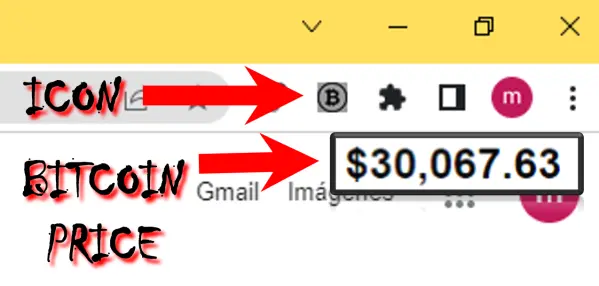
You don't need to have any prior knowledge of programming or cryptocurrencies; just by following a few simple steps you will have the satisfaction of building your own Chrome extension. Take the freedom to modify it and experiment with it as you wish, it's a gift for all those in the Publish0x Community who are interested in this kind of programs. Are you ready? Let's get started!
To create your own Chrome extension, you only need three things: a manifest file, a logo, and a folder to save them in. Here's how to do it step by step.
Step # 1 - First create a folder with the name you want, for this example, I will name it "BTC", inside it will go the files of the extension.
Inside the folder you created (In my case "BTC"), create a new file and name it "manifest.json" (without the quotes of course). A JSON file is a text format used to store and transmit structured data. It is necessary for creating a Chrome extension because it tells the browser how your extension should work and what features it has. Here you define the name, version, icon and popup of the extension, as well as the permission to access the CoinDesk API that will give you the bitcoin price. Open it with a text editor (Notepad++, notepad blog, etc), paste the following content and save it.
{"manifest_version": 2,"name": "Bitcoin Price","version": "1.0","browser_action": {"default_icon": "icon.png","default_popup": "popup.html"},"permissions": ["https://api.coindesk.com/v1/bpi/currentprice.json"]}
Step # 2 - Now find or create an image of 128 x 128 pixels that you want to use as the logo of your extension, paste it inside the folder and name it as "icon.png".
Step # 3 - Next step, create a file and name it "popup.html", open it with a text editor, paste the following content and save it. A popup is a small window that opens when you click on the icon of your extension and displays some content or functionality. This file defines the appearance and behavior of the popup that will be displayed when clicking on your extension icon and uses a div element with id "price" to display the bitcoin price and a popup.js file to get and update the price.
<html><head><style>body {font-family: Arial, sans-serif;font-size: 14px;width: 200px;height: 100px;}#price {font-weight: bold;font-size: 24px;}</style></head><body><div id="price"></div><script src="popup.js"></script></body></html>
Step # 4 - Create a last file and name it "popup.js", this file defines the getPrice function that uses XMLHttpRequest to make a GET request to the CoinDesk API and get the bitcoin price in dollars. It then formats and displays the price in the div element with id "price". The function is called on page load and every minute to update the price. Open it with a text editor (Notepad++, notepad blog, etc), paste the following content and save it (I'll put some notes for reference, they are the ones after "//")
// Function to get the bitcoin price from the CoinDesk APIfunction getPrice() {
// Create an XMLHttpRequest objectvar xhr = new XMLHttpRequest();
// Open a GET request to the API URLxhr.open("GET", "https://api.coindesk.com/v1/bpi/currentprice.json", true);
// Define a function that will be executed when the request is completedxhr.onload = function() {
// If the status of the request is successful (200)if (xhr.status == 200) {
// Parse the response as a JSON objectvar data = JSON.parse(xhr.responseText);
// Get the bitcoin price in dollars from the object.var price = data.bpi.USD.rate;
// Format the price with two decimal places and thousands separator.price = parseFloat(price.replace(/,/g, "")).toFixed(2).toString().replace(/\B(?=(\d{3})+(?!\d))/g, ",");
// Display the price in the div element with id "price".
document.getElementById("price").textContent = "$" + price;
}
};
// Send the request
xhr.send();
}
// Call the getPrice function on page load.getPrice();
// Call the getPrice function every minute to update the pricesetInterval(getPrice, 60000);
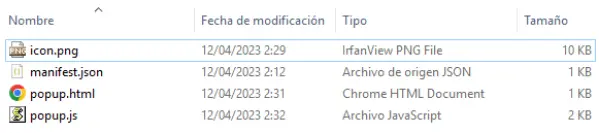
Let's review, you must have created four (4) files inside a folder:
- manifest.json
- icon.png
- popup.html
- popup.js
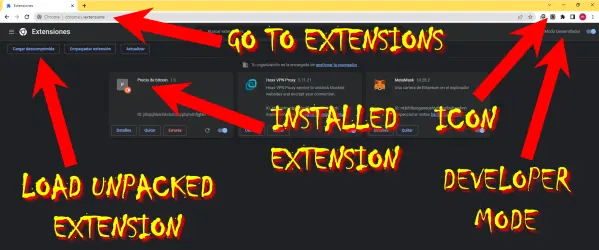
Step #5 - Open Chrome and go to extensions, you can do this in three (3) ways:
- Copy or type "chrome://extensions/" in the search bar and run "Enter" (the short way).
- Or click on the three (3) dots in the upper right corner of the Chrome browser, position the cursor in the "More Tools" window, and in the next window that opens look for extensions and execute click.
- Or click on the three (3) dots in the upper right corner of the Chrome browser, look at the bottom of the window "Settings", execute click, look at the bottom left "Extensions" and execute click (poof, how long, better use the first variant).
Step # 6 - We continue, now you have to activate the "Developer Mode" in the upper right corner.
Step # 7 - Finally, click on "Load Unpacked Extension" or "Load Unpacked Folder" (depending on the language you use) and select the folder where you saved the extension files we created. You will see your extension appear in the list and in the Chrome toolbar the icon with the image you chose (icon.png).
Step # 8 - Now just click on the icon and you will see the popup with the price of bitcoin in real time. That's it! We are done!
🛠💯💰 Tools, Platforms and Applications: What is marked in brackets are the invitation or referral codes and in some cases they are necessary to receive the rewards or bonuses. All promotions have referral programs with which you can earn passive earnings without investment, however I recommend that you do your own research.
- CoinInn (
2x9ygk) - Bonus between $500 and $750, non-withdrawable, trading only, valid for 6 days, profits withdrawable to the portfolio of your choice. - StormGain (
BNS16466839) - Trading - They can start without investment, capital is acquired with the Bitcoin Cloud Miner. The capital obtained in mining is not withdrawable, only to operate on the platform, profits withdrawable to the portfolio of your choice. - QuantFury (
JRRU2593) - Trading - Bonus in cryptocurrencies or company stock worth up to $250. - KuCoin (
rBPYVZS), BingX (GHXOZE), CoinEX (85eqt), MoonXBT (z3v6ho), BiBox (0FkIPQ), PrimeXBT (526609), BitYard (kZnnxp) - Trading - They offer different bonuses. - Furucombo (
cft91oe77sps70fltak0) - Tool to integrate multiple applications of DeFi protocols into a single transaction. - Haasonline (
20206) - Trading bot software platform. - CoinMarketCap (
NELT6UUC) - Website for monitoring crypto asset prices with several very interesting sections (Indispensable tool for traders). - TradingView - Charting platform and social network (Indispensable tool for traders).
- ChangeNow, Changelly - Wryptocurrency exchange platform.
- TipMeACoffee - Social network that rewards user contributions with TMAC.
- NFTify - To create your own NFTs store, no investment, no codes.
- Neosify - Is a crypto wallet that makes DeFi easy and accessible not to just technical enthusiasts, but to regular people.
- Ledger (
553b0c2d2056GHXOZE), BixBox02 (9qhM1vbhe20FkIPQ), Ellipal Titan (7114862.6897e230FkIPQ), Keystone (7115442.43b3fc0FkIPQ) - Hardware Wallet. - Books - "Trading in the Zone" & "The Subtle Art Of Not Giving A F*ck" - Books that will inspire you to acquire a truly winning mindset.
Other: StormGain affiliate program
"You will ask yourself: And if I take a risk and lose...? I will ask you: AND IF YOU RISK AND WIN? Success begins with thought, because sooner or later the man who wins is the one who believes he can do it. Do not be afraid of mistakes or failure, winners are not afraid of losing, losers are, in most cases the risk comes from not knowing what you are doing, so trust yourself, learn, be patient, manage your emotions and above all, enjoy the journey, what the wise man does at the beginning, the fool does at the end" - Anonymous.
REMEMBER THAT YOU ARE ALSO REWARDED FOR READING THE PUBLICATION, CLICK ON THE "☆ TIP" BUTTON AND RECEIVE YOUR REWARD.

Author's Note: The opinion expressed here is not investment advice, is provided for informational purposes only, and reflects the opinion of the author only. I do not promote, endorse or recommend any particular investment. Investments may not be right for everyone. Every investment in the market and every trade you make involves risk, so you should always do your own research before making any decision. I do not recommend investing money that you cannot afford to chair, as you could lose the entire amount invested.

“Everyone has their own forms of expression. I think we all have a lot to say, but finding ways to say it is more than half the battle" - Criss Jami.

"Everything we hear is an opinion, not a fact. Everything we see is a perspective, not the truth" - Marcus Aurelius.






