![How Can You Use Brave Rewards With Your Android Device [Valid for iOs also]](https://www.publish0x.com/img/7774.webp?action=resize&ar=1&enc=webp&inv=0&ori=1&st=1&up=1&w=1140&signature=2f836afa2517c75d6dd298d2e475b6a87d58eae33543447c0acd3361f3f69a50)
You may hear about Brave Web Browser and its Rewards. We can use Brave Rewards in our computer. It is easy and useful browser app ever. There are many advantages. Especially it is completely ad-free! And fastest browser I've ever seen.
We already can use Brave with our PC! But there is a complication with mobile devices. I found a way of using Brave with Rewards in mobile devices.
Hope you like & enjoy it...

You should first downlad Brave Browser from Android Play Store but you can use my referral link first [I will be glad if you use]
My Ref Link: https://brave.com/tur376 (It will direct you mobile store Android or iOS)
It is easy to download and install your mobile devices.
Next, open Brave Browser with you mobile;
 It is a great and easy-to-use browser app. You can easily adapt it. You can start to use it now.
But if you want to use Brave Reward with mobile also, you should complete some things in this Beta version.
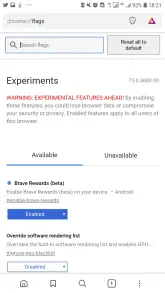
1) Type chrome://flags and search it. It will be the open experimental area on your browser.
2) We will use now search button in flags. And type "brave" in the search bar.

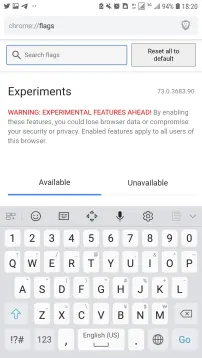
3) Type "Brave" in the flags search bar and then you can see Brave Rewards (Beta)
4) Change "Default" to with "Enabled".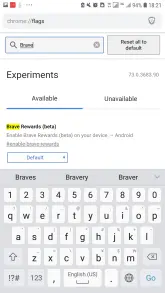
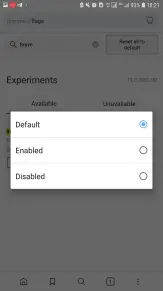
5) The browser will want to Relaunch for activation Rewards bottom of the right after you enabled it.
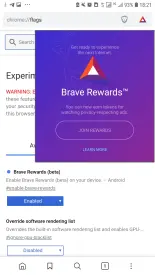
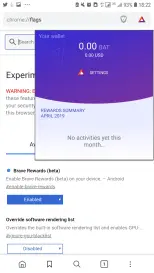
6) And after the relaunch, you can see the Rewards button top of the right.
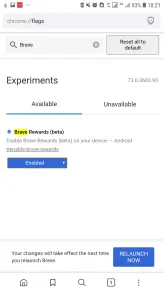
7) You are ready to use now.
8) Enjoy it ;)
Hope you like it.
If you want to support me you may visit and tip my blog.






